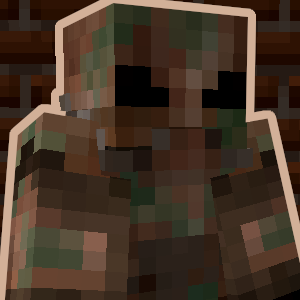
Power Armor
Adds a fully functional power armor system inspired by the Fallout series!
Screenshots
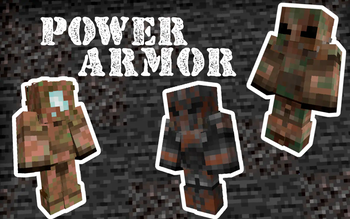
Über diese Mod
This datapack introduces a fully functional Power Armor system!
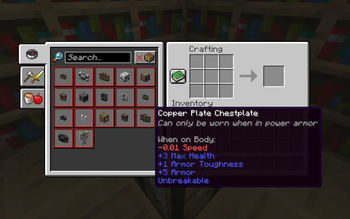
The recipes for all items added by this datapack can be viewed in the recipe book inside the crafting table. Alternativly, all items can also be obtained via the give commands: /function give:[item_name].
Power Armor is a special type of armor that cannot be worn like traditional armor. Instead, you must first craft a Power Armor Frame and then place it on the ground. Once placed, you will need to power it. Add power to the suit by right-clicking with redstone blocks on the back. Once you do this, you can enter the suit by right-clicking on the back.
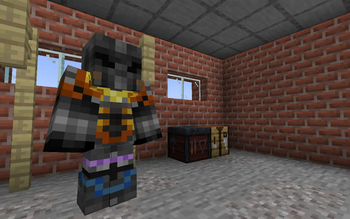
To get the most out of Power Armor, you will need to craft individual pieces of power armor. There are multiple different pieces of Power Armor you can craft, some are more powerful than others. Whichever piece you choose to craft, each armor piece you add will further boost your stats. To customize your armor even further, you can add any vanilla or modded armor trims to give your Power Armor extra flair.
When you want to exit the power armor, simply look straight down and sneak. Alternatively, when you die, your power armor will be placed on the spot where you died. Any unused redstone power left in the suit will remain until your next use.
Obviously, this Power Armor system is inspired by the Fallout series of games, with inspiration taken mostly from Fallout 4 and Fallout 76.
https://discord.gg/dKMxTjchsg
Need help with my datapacks? Found a bug? Want to share some feedback? Join my Discord server! There, I can offer personal help towards any problem you may be having!

Verfügbare Versionen
Power Armor auf dem Server installieren
Server bestellen
Bestelle einen Minecraft Java Server mit mindestens 3 GB RAM (4 GB empfohlen).
datapack Loader setzen
Wähle im Panel unter "Egg" den datapack-Loader und die passende Minecraft-Version (26.1.2).
Mod installieren
Öffne den Mod-Browser im Dashboard und suche nach "Power Armor". Klicke "Installieren" – fertig! Alternativ: Lade die .jar via SFTP in den /mods Ordner.
Kompatibilität
Mod-Loader
Minecraft-Versionen
26.1.2, 26.1.1, 26.1 (+10 weitere)
Server-seitig
✓ ErforderlichEmpfohlener RAM
4 GB(min. 3 GB)Häufige Fragen
Power Armor Server crasht beim Start – was tun?
Häufigste Ursache: falsche datapack-Version oder zu wenig RAM. Prüfe im Server-Log (latest.log), ob ein "OutOfMemoryError" oder "Mixin"-Fehler auftritt. Bei Mado Hosting: Stelle sicher, dass mindestens 3 GB RAM zugewiesen sind und der Loader zur Mod-Version passt (26.1.2). Über das Panel kannst du den Loader mit einem Klick wechseln.
Ist Power Armor mit datapack und fabric und forge und minecraft und neoforge und quilt kompatibel?
Power Armor unterstützt offiziell datapack, fabric, forge, minecraft, neoforge, quilt für Minecraft 26.1.2, 26.1.1, 26.1. Achtung: Forge- und Fabric-Mods sind NICHT untereinander kompatibel – wähle einen Loader und bleibe dabei. Im Mado Dashboard werden inkompatible Loader-Kombinationen automatisch erkannt.
Server laggt mit Power Armor – wie optimiere ich die Performance?
Empfohlener RAM: 4 GB (+1 GB pro 8 Spieler). Prüfe mit /spark profiler, ob Power Armor den meisten Tick-Time verbraucht. Häufige Fixes: Server-View-Distance auf 8-10 reduzieren, bei Forge "performant" oder "starlight" als Zusatz-Mod installieren. Bei Mado Hosting läuft dein Server auf NVMe-SSDs mit dedizierten CPU-Kernen für minimale Latenz.
Ähnliche Mods



![[TaCZ] Timeless and Classics Zero](https://cdn.modrinth.com/data/SzzJttH8/fd27766d2bb8390d284696b1dbd358f87e081439_96.webp)


Modded Server mieten
Installiere Power Armor mit nur einem Klick auf deinem Server.
Details
- Lizenz
- Creative Commons Attribution Non Commercial No Derivatives 4.0 International
- Server-seitig
- Erforderlich