
Recall Potion
Teleport to saved locations in a simple and balanced way. Inspired by Terraria and Dofus.
Screenshots
Über diese Mod

About
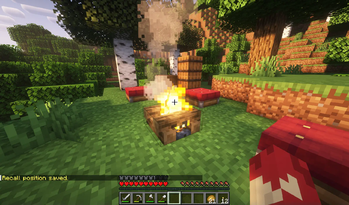
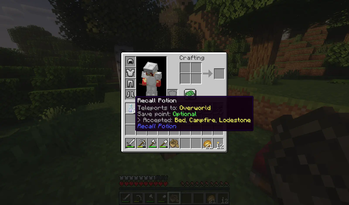
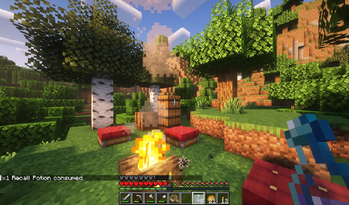
This mod is inspired by Terraria's and Dofus' Recall Potions. Specific blocks like Campfires, Beds and others now act as saving points, which you can travel back to using 3 potions added by the mod:
 Recall Potion: Travel back to your latest saving point in the Overworld (World Spawn by default).
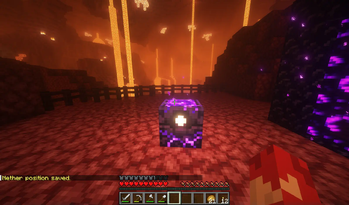
 Nether Potion: Travel to the Nether. You must have already visited the Nether and saved your location there.
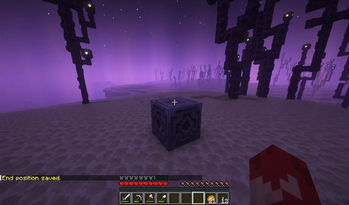
 End Potion: Travel to the End. You must have already visited the End and saved your location there.

Features
- You can save your location in each dimension by Sneak+Right-Click on any valid block (full list below).
- Use one of the 3 potions to travel back to your latest saving point in the corresponding dimension.
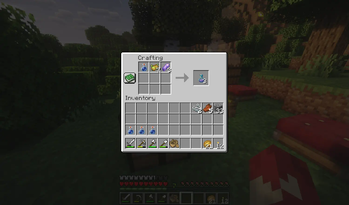
- Recall Potions can be found in any vanilla loot chest, or crafted using resources from their respective dimensions.
- Unlike vanilla potions, these stack up to 16 and don't take much inventory space. Ideal for exploring sessions!
Saving points
Saving points are dimension-specific. You can save your location for the current dimension using one of the valid blocks from the list below:
- Overworld: Bed, Campfire, Lodestone
- Nether: Soul Campfire, Respawn Anchor, Lodestone
- End: Lodestone

Want to get back to your base after some exploring? Just drink a Recall Potion and travel back home instantly!
Recipes


Tools for modpacks
More blocks can be added as valid saving points to each dimension, using block tags:
• Overworld: recall_save_point
• Nether: nether_save_point
• End: end_save_point
Structure is as follows: recall_potion:{tag}
Videos
Dependencies
This mod has no dependencies.
JEI is recommended for recipes but not required.
Installation
Add the .jar mod file into your mods folder.
Alternatively, you can browse the Modrinth launcher for the mod (if it doesn't show up, try typing the autor's name). Once found, click "Install" to add it to your modpack.
Permissions
You are free to include this mod in any modpack, public or private.
Support my work
 Download my projects on CurseForge
 Download my projects on Modrinth
Donate on Paypal
Verfügbare Versionen
Recall Potion auf dem Server installieren
Server bestellen
Bestelle einen Minecraft Java Server mit mindestens 3 GB RAM (4 GB empfohlen).
forge Loader setzen
Wähle im Panel unter "Egg" den forge-Loader und die passende Minecraft-Version (1.21.4).
Mod installieren
Öffne den Mod-Browser im Dashboard und suche nach "Recall Potion". Klicke "Installieren" – fertig! Alternativ: Lade die .jar via SFTP in den /mods Ordner.
Kompatibilität
Mod-Loader
Minecraft-Versionen
1.21.4, 1.21.1, 1.21 (+4 weitere)
Server-seitig
✓ ErforderlichEmpfohlener RAM
4 GB(min. 3 GB)Häufige Fragen
Recall Potion Server crasht beim Start – was tun?
Häufigste Ursache: falsche forge-Version oder zu wenig RAM. Prüfe im Server-Log (latest.log), ob ein "OutOfMemoryError" oder "Mixin"-Fehler auftritt. Bei Mado Hosting: Stelle sicher, dass mindestens 3 GB RAM zugewiesen sind und der Loader zur Mod-Version passt (1.21.4). Über das Panel kannst du den Loader mit einem Klick wechseln.
Ist Recall Potion mit forge und neoforge kompatibel?
Recall Potion unterstützt offiziell forge, neoforge für Minecraft 1.21.4, 1.21.1, 1.21. Im Mado Dashboard werden inkompatible Loader-Kombinationen automatisch erkannt.
Server laggt mit Recall Potion – wie optimiere ich die Performance?
Empfohlener RAM: 4 GB (+1 GB pro 8 Spieler). Prüfe mit /spark profiler, ob Recall Potion den meisten Tick-Time verbraucht. Häufige Fixes: Server-View-Distance auf 8-10 reduzieren, bei Forge "performant" oder "starlight" als Zusatz-Mod installieren. Bei Mado Hosting läuft dein Server auf NVMe-SSDs mit dedizierten CPU-Kernen für minimale Latenz.
Ähnliche Mods




Modded Server mieten
Installiere Recall Potion mit nur einem Klick auf deinem Server.