
Seven Elements
A Minecraft mod that brings a faithful implementation of Genshin Impact's Elemental Combat system in Minecraft
Screenshots
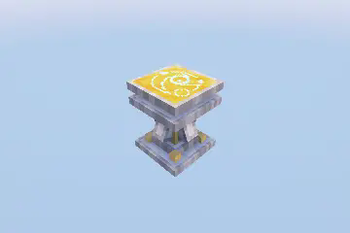

Über diese Mod

Seven Elements is a Minecraft mod that brings Genshin Impact's Elemental Combat System to Minecraft with the goal of staying faithful to the systems that hold it such as the Elemental Gauge Theory and Internal Cooldown while ensuring a smooth integration within Minecraft.
Tired of standard vanilla combat? Ever wanted to spice things up a little bit?
Seven Elements is a Minecraft mod that brings Genshin Impact's intricate Elemental Combat System to Minecraft, introducing Elements into the game. With two elements, trigger various reactions and harness the elements to your advantage!
IMPORTANT
When using this mod for Forge via Sinytra Connector, refer to this page for the proper installation instructions.
Getting Started
It all starts with the Infusion Table.

The Infusion Table, like the Enchanting Table, is a block used to infuse your items with the power of the elements!
To begin, pick a item you want to be infused with and click Infuse. This will cost 10 experience levels, so make sure you have enough!
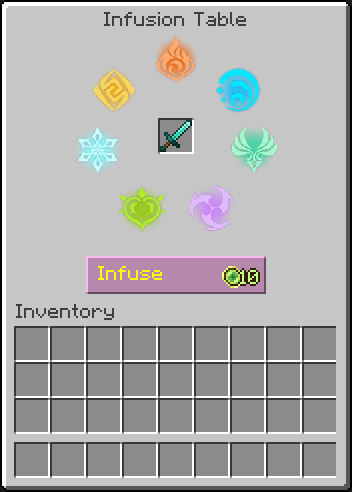
Once done, the selected item will be permanently infused with a random Element, and will now deal damage of that element!
Experiment with various elemental combos and master the elements to your advantage!
Alternatively, if you prefer a more direct approach, visit the wiki!
© All rights reserved by HoYoverse. Other properties belong to their respective owners.
THIS PROJECT IS NOT AFFILIATED WITH NEITHER HOYOVERSE NOR GENSHIN IMPACT.
Copyright © 2025 xrickastley (_xRickAstley). All Rights Reserved.
Special thanks to:
- YaBoiYin (yin_n_yang @ Discord) - Entity Models
- LW-Arqiu1shz - ZH-CN localization
Verfügbare Versionen
Seven Elements auf dem Server installieren
Server bestellen
Bestelle einen Minecraft Java Server mit mindestens 3 GB RAM (4 GB empfohlen).
fabric Loader setzen
Wähle im Panel unter "Egg" den fabric-Loader und die passende Minecraft-Version (26.2).
Mod installieren
Öffne den Mod-Browser im Dashboard und suche nach "Seven Elements". Klicke "Installieren" – fertig! Alternativ: Lade die .jar via SFTP in den /mods Ordner.
Kompatibilität
Mod-Loader
Minecraft-Versionen
26.2, 26.1.2, 26.1.1 (+15 weitere)
Server-seitig
✓ ErforderlichEmpfohlener RAM
4 GB(min. 3 GB)Häufige Fragen
Seven Elements Server crasht beim Start – was tun?
Häufigste Ursache: falsche fabric-Version oder zu wenig RAM. Prüfe im Server-Log (latest.log), ob ein "OutOfMemoryError" oder "Mixin"-Fehler auftritt. Bei Mado Hosting: Stelle sicher, dass mindestens 3 GB RAM zugewiesen sind und der Loader zur Mod-Version passt (26.2). Über das Panel kannst du den Loader mit einem Klick wechseln.
Ist Seven Elements mit fabric und forge kompatibel?
Seven Elements unterstützt offiziell fabric, forge für Minecraft 26.2, 26.1.2, 26.1.1. Achtung: Forge- und Fabric-Mods sind NICHT untereinander kompatibel – wähle einen Loader und bleibe dabei. Im Mado Dashboard werden inkompatible Loader-Kombinationen automatisch erkannt.
Server laggt mit Seven Elements – wie optimiere ich die Performance?
Empfohlener RAM: 4 GB (+1 GB pro 8 Spieler). Prüfe mit /spark profiler, ob Seven Elements den meisten Tick-Time verbraucht. Häufige Fixes: Server-View-Distance auf 8-10 reduzieren, bei Forge "performant" oder "starlight" als Zusatz-Mod installieren. Bei Mado Hosting läuft dein Server auf NVMe-SSDs mit dedizierten CPU-Kernen für minimale Latenz.
Ähnliche Mods




Modded Server mieten
Installiere Seven Elements mit nur einem Klick auf deinem Server.