
ShowMySkin
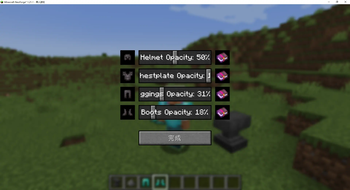
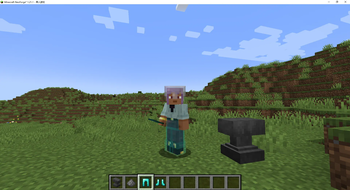
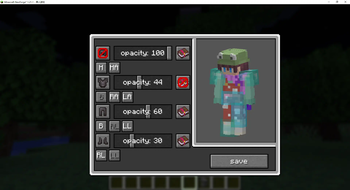
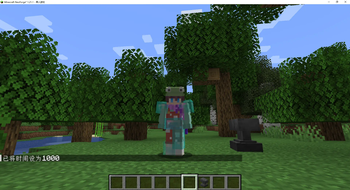
Empower players with the ability to have personalized and precise control over armor display, transparency, and enchantment glow effects.
Screenshots
Über diese Mod
ZH_CN
简介
本模组专为《我的世界》1.21.1 版本基于 Neoforge 开发,旨在为玩家提供对盔甲显示的全方位个性化控制。借助此模组,玩家能够随心所欲地调整盔甲的各个方面,极大地丰富游戏的视觉体验。
主要功能
- 盔甲可见性控制:玩家可以独立开启或关闭头盔、胸甲、护腿和靴子的显示。无论是为了追求特定的外观造型,还是根据游戏情境的需要,都能轻松实现。
- 透明度调节:通过直观的滑动条,玩家能够精确控制盔甲的透明度,范围从完全不透明(0%)到完全透明(100%),为游戏增添独特的视觉效果。
- 附魔光效开关:模组允许玩家分别控制头盔、胸甲、护腿和靴子的附魔光效显示,可根据个人喜好开启或关闭,打造专属的盔甲外观。
适用范围
本模组适用于《我的世界》1.21.1 版本,并基于 Neoforge 平台运行。请确保你的游戏环境已正确安装 Neoforge,以保证模组的正常使用。
EN_US
Introduction
This mod is specifically developed for Minecraft version 1.21.1 based on Neoforge. Its purpose is to provide players with comprehensive and personalized control over armor display. With this mod, players can freely adjust various aspects of armor, greatly enhancing the visual experience of the game.
Key Features
- Armor Visibility Control: Players can independently turn on or off the display of helmets, chestplates, leggings, and boots. Whether it's for achieving a specific appearance or meeting the needs of different game scenarios, it can be easily accomplished.
- Transparency Adjustment: Through an intuitive slider, players can precisely control the transparency of the armor, ranging from completely opaque (0%) to completely transparent (100%), adding unique visual effects to the game.
- Enchantment Glow Effect Switch: The mod allows players to separately control the display of enchantment glow effects on helmets, chestplates, leggings, and boots. You can turn them on or off according to your personal preferences to create your own exclusive armor appearance.
Compatibility
This mod is designed for Minecraft version 1.21.1 and runs on the Neoforge platform. Please ensure that Neoforge is correctly installed in your game environment to ensure the normal operation of the mod.
Verfügbare Versionen
ShowMySkin auf deinem Client installieren
Mod-Loader lokal installieren
Installiere neoforge für deine lokale Minecraft-Version.
Passende Datei herunterladen
Wähle die ShowMySkin-Datei für neoforge und Minecraft 1.21.1.
Mod installieren
Lege die .jar-Datei in deinem lokalen .minecraft/mods-Ordner ab und starte Minecraft neu. Eine Installation auf dem Server ist nicht nötig.
Kompatibilität
Mod-Loader
Minecraft-Versionen
1.21.1, 1.21
Server-seitig
✗ Nicht unterstütztEmpfohlener RAM
4 GB(min. 3 GB)Häufige Fragen
Muss ShowMySkin auf dem Minecraft Server installiert werden?
Nein. Modrinth kennzeichnet ShowMySkin serverseitig als nicht unterstützt. Installiere die Mod nur im lokalen Minecraft-Mods-Ordner. Dein Server kann unverändert bleiben, sofern die Mod-Seite keine zusätzliche Abhängigkeit nennt.
Welche Version und welchen Loader braucht ShowMySkin?
Nutze eine Datei für neoforge und exakt deine Minecraft-Version. Unterstützte Versionen sind unter anderem 1.21.1, 1.21. Loader-Dateien sind nicht untereinander austauschbar.
ShowMySkin funktioniert nicht – was kann ich prüfen?
Prüfe zuerst Minecraft-Version, Loader-Version und erforderliche Abhängigkeiten. Lege die .jar-Datei im lokalen .minecraft/mods-Ordner ab und entferne ältere Duplikate. Da die Mod clientseitig ist, löst mehr Server-RAM dieses Problem nicht.
Ähnliche Mods



![[TaCZ] Timeless and Classics Zero](https://cdn.modrinth.com/data/SzzJttH8/fd27766d2bb8390d284696b1dbd358f87e081439_96.webp)


Minecraft Server für deine Gruppe
ShowMySkin bleibt auf deinem Client. Hoste dazu eine kompatible Welt für deine Mitspieler.