
ShulkerSorter
Sort, merge and label your shulker boxes with a single keypress.
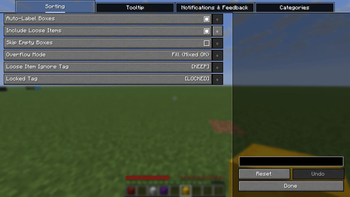
Screenshots
Über diese Mod
ShulkerSorter
Sort, merge and label your shulker boxes with a single keypress.
ShulkerSorter is a lightweight Fabric mod that automatically organizes all items across your shulker boxes by category. Press one key — your ores go into one box, your redstone into another, your tools into a third. Every box gets a clean label. No more shulker box chaos.
Works in singleplayer, multiplayer survival (with mod on server), and multiplayer creative (no server mod needed).
Features
One-Key Sorting
- Press J to sort all shulker boxes in your inventory instantly
- 11 categories — Redstone, Transport, Nature, Mob Loot, Decoration, Blocks, Tools, Food, Ores, Brewing, Misc
- Stack merging — Partial stacks of the same item are merged before distributing
- Affinity sorting — Boxes keep their dominant category when re-sorting
Overflow Modes
- Fill — Pack items across available boxes when a category has no dedicated box
- Dominant — Each box is dedicated to one category only
Undo
- Press Shift+J to instantly undo the last sort and restore your inventory
Loose Items
- Optionally sort loose items from your inventory into shulker boxes
- Mark items with
[KEEP]in their name to exclude them from sorting
Auto-Labeling
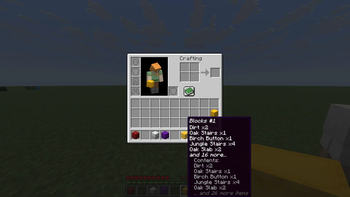
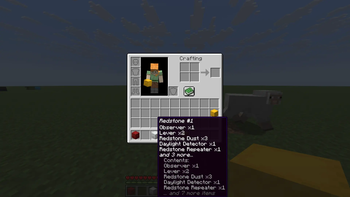
- Sorted boxes get named by their category (e.g. "Ores #1", "Blocks #2")
- Labels follow your game language (English, German)
- Add
[LOCKED]to a box name to exclude it from sorting
Tooltip Preview
- See shulker box contents without opening them
- Configurable max lines shown in the tooltip
Feedback
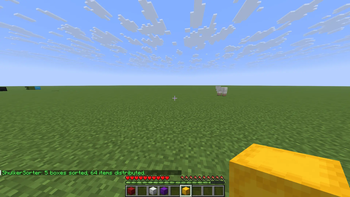
- Chat notifications with box and item count
- Sound effects on successful sorting
- Animated "Sorting..." HUD overlay
Controls
| Key | Action |
|---|---|
| J | Sort all shulker boxes in inventory |
| Shift+J | Undo last sort |
Customization
Configure the mod via Mod Menu + YACL, or by editing .minecraft/config/shulkersorter.toml:
- Auto-labeling on/off
- Overflow mode (Fill / Dominant)
- Include loose items on/off
- Skip empty boxes on/off
- Locked tag and loose item ignore tag
- Chat notifications, sound effects, HUD overlay
- Tooltip on/off and max lines
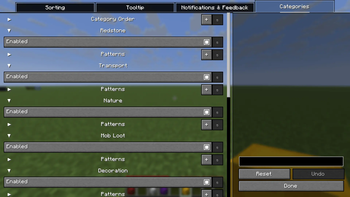
- Category order, enable/disable, and custom patterns
- Add your own categories with custom item patterns
Requirements
- Fabric Loader and Fabric API
- YACL — Optional (for in-game config screen)
- Mod Menu — Optional (for accessing config via mod list)
Supported Minecraft Versions
| Branch | Minecraft | Java |
|---|---|---|
| mc1.21-1.21.8 | 1.21 – 1.21.8 | 21+ |
| mc1.21.9-1.21.11 | 1.21.9 – 1.21.11 | 21+ |
| mc26.1 | 26.1+ | 25+ |
| mc26.2 | 26.2+ | 25+ |
How It Works
- Fill some shulker boxes with mixed items
- Keep the shulker boxes in your inventory
- Press J — all items are categorized, merged, and distributed
- Each box gets labeled by its category (e.g. "Tools #1", "Ores #2")
- Not happy? Press Shift+J to undo
Boxes with [LOCKED] in their name are skipped. Loose items with [KEEP] in their name stay in your inventory.
Perfect For
- Hoarders — Finally organize that inventory full of random shulker boxes
- Builders — Keep building blocks neatly separated from tools and ores
- Miners — Auto-sort your mining haul into clean categories
- Base Organizers — Label and sort boxes before storing them in your base
FAQ
Does this mod work on servers?
Yes! In singleplayer and multiplayer creative it works client-only. For multiplayer survival, install the mod on both client and server — sorting runs server-side via custom packets.
Does it affect performance?
No. ShulkerSorter only runs when you press the sort key.
Can I customize categories?
Yes! Use the in-game config screen or edit shulkersorter.toml to add, remove, reorder, or disable categories with custom item patterns.
What if I don't have enough shulker boxes?
Sorting is cancelled safely — no items are lost.
Can I undo a sort?
Yes! Press Shift+J immediately after sorting to restore your inventory.
Languages
Available in English and German.
Links
- Issues & Bugs: GitHub Issues
- Source Code: GitHub Repository
License
This mod is open-source and licensed under the MIT License.
Verfügbare Versionen
ShulkerSorter auf dem Server installieren
Server bestellen
Bestelle einen Minecraft Java Server mit mindestens 3 GB RAM (4 GB empfohlen).
fabric Loader setzen
Wähle im Panel unter "Egg" den fabric-Loader und die passende Minecraft-Version (26.2).
Mod installieren
Öffne den Mod-Browser im Dashboard und suche nach "ShulkerSorter". Klicke "Installieren" – fertig! Alternativ: Lade die .jar via SFTP in den /mods Ordner.
Kompatibilität
Mod-Loader
Minecraft-Versionen
26.2, 26.1.2, 26.1.1 (+13 weitere)
Server-seitig
✓ ErforderlichEmpfohlener RAM
4 GB(min. 3 GB)Häufige Fragen
ShulkerSorter Server crasht beim Start – was tun?
Häufigste Ursache: falsche fabric-Version oder zu wenig RAM. Prüfe im Server-Log (latest.log), ob ein "OutOfMemoryError" oder "Mixin"-Fehler auftritt. Bei Mado Hosting: Stelle sicher, dass mindestens 3 GB RAM zugewiesen sind und der Loader zur Mod-Version passt (26.2). Über das Panel kannst du den Loader mit einem Klick wechseln.
Ist ShulkerSorter mit fabric kompatibel?
ShulkerSorter unterstützt offiziell fabric für Minecraft 26.2, 26.1.2, 26.1.1. Im Mado Dashboard werden inkompatible Loader-Kombinationen automatisch erkannt.
Server laggt mit ShulkerSorter – wie optimiere ich die Performance?
Empfohlener RAM: 4 GB (+1 GB pro 8 Spieler). Prüfe mit /spark profiler, ob ShulkerSorter den meisten Tick-Time verbraucht. Häufige Fixes: Server-View-Distance auf 8-10 reduzieren, bei Forge "performant" oder "starlight" als Zusatz-Mod installieren. Bei Mado Hosting läuft dein Server auf NVMe-SSDs mit dedizierten CPU-Kernen für minimale Latenz.
Ähnliche Mods


Modded Server mieten
Installiere ShulkerSorter mit nur einem Klick auf deinem Server.