
Simple Shulker Preview
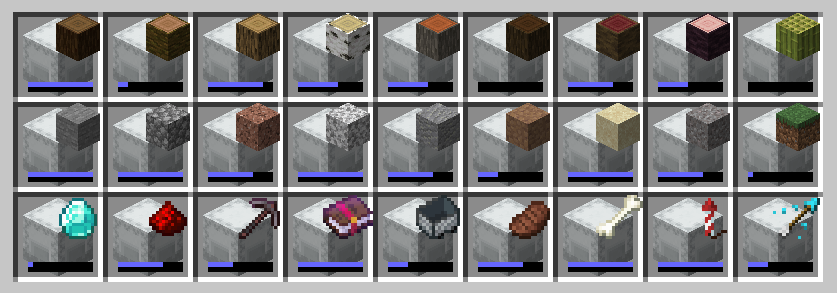
A minecraft fabric mod that displays a configurable icon indicating the contents of a shulker box, as well as a capacity bar.
Screenshots
Über diese Mod
Simple Shulker Preview



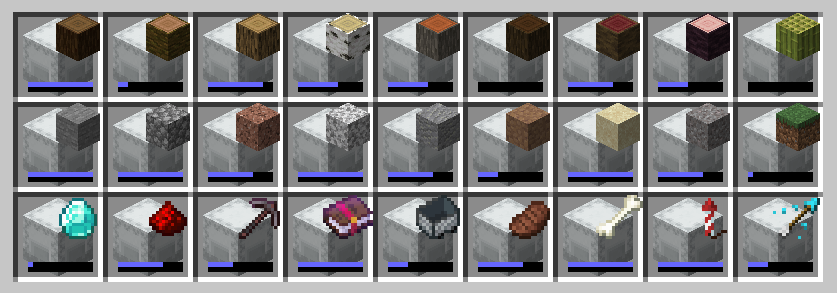
Simple Shulker Preview is a small fabric mod that displays an icon indicating the contents of a shulker. This icon appears on top of the shulker icon in inventory slots.
For other download pages, please see CurseForge or Modrinth.
Dependencies
This mod requires ModMenu to adjust the configs. The Cloth Config API mod is embedded - you don't need to download it yourself.
Configs
I won't go through all the configs, since they've increased over time. A brief overview is as follows:
| Option | Description |
|---|---|
Display Item |
Decides which item in the shulker should be displayed based on position or quantity. |
Custom Name |
Provides options to display an icon based on custom named shulkers |
Icon Positions |
Modify the x and y offsets of the icon, as well as scale. |
Capacity Bar |
Display a capacity bar, indicating how full the shulker box is |
Bar Position |
Set the position, size, and direction the capacity bar is drawn. |
Stack Limits |
Set minimum limits for the number of items required to display an icon |
Enable ... |
Option to enable additional features, such as bundles or recursive shulker support |
Disable Mod |
Disables the mod so that overlay icons are not displayed. |
When using custom named shulkers, you need to name it using the same conventions required for spawning in items. For example, naming a shulker minecraft:grass_block will display a grass block. If an invalid name has been given, it will continue to follow the 'Display Item' configuration (unless 'Custom Name' has been set to 'ALWAYS', of course).
Contributing
Contributions and suggestions are always welcome! Please limit all issues to only one feature at a time - feel free to open multiple at once if you have many ideas. Similarly, please limit pull requests to a single feature at a time and try to follow the existing code style.
To further discuss or get notifications of new updates, check out my Discord. If you like what I do, consider supporting me on Ko-Fi! 
Verfügbare Versionen
Simple Shulker Preview auf deinem Client installieren
Mod-Loader lokal installieren
Installiere fabric für deine lokale Minecraft-Version.
Passende Datei herunterladen
Wähle die Simple Shulker Preview-Datei für fabric und Minecraft 26.2.
Mod installieren
Lege die .jar-Datei in deinem lokalen .minecraft/mods-Ordner ab und starte Minecraft neu. Eine Installation auf dem Server ist nicht nötig.
Kompatibilität
Mod-Loader
Minecraft-Versionen
26.2, 26.1.2, 26.1.1 (+36 weitere)
Server-seitig
✗ Nicht unterstütztEmpfohlener RAM
4 GB(min. 3 GB)Häufige Fragen
Muss Simple Shulker Preview auf dem Minecraft Server installiert werden?
Nein. Modrinth kennzeichnet Simple Shulker Preview serverseitig als nicht unterstützt. Installiere die Mod nur im lokalen Minecraft-Mods-Ordner. Dein Server kann unverändert bleiben, sofern die Mod-Seite keine zusätzliche Abhängigkeit nennt.
Welche Version und welchen Loader braucht Simple Shulker Preview?
Nutze eine Datei für fabric und exakt deine Minecraft-Version. Unterstützte Versionen sind unter anderem 26.2, 26.1.2, 26.1.1. Loader-Dateien sind nicht untereinander austauschbar.
Simple Shulker Preview funktioniert nicht – was kann ich prüfen?
Prüfe zuerst Minecraft-Version, Loader-Version und erforderliche Abhängigkeiten. Lege die .jar-Datei im lokalen .minecraft/mods-Ordner ab und entferne ältere Duplikate. Da die Mod clientseitig ist, löst mehr Server-RAM dieses Problem nicht.
Ähnliche Mods



![[TaCZ] Timeless and Classics Zero](https://cdn.modrinth.com/data/SzzJttH8/fd27766d2bb8390d284696b1dbd358f87e081439_96.webp)


Minecraft Server für deine Gruppe
Simple Shulker Preview bleibt auf deinem Client. Hoste dazu eine kompatible Welt für deine Mitspieler.
Details
- Lizenz
- GNU Lesser General Public License v3.0 only
- Server-seitig
- Nicht unterstützt