
Simulated Addition
A small add-on for Create: Simulated and Create: Aeronautics. It adds highly requested features for players.
Screenshots
Über diese Mod
Simulated Addition
A small add-on for Create: Simulated and Create: Aeronautics. It adds highly requested features for players.
Features currently included
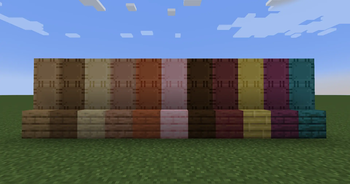
Wooden Sails / Wooden Symmetric Sail
- A sail with half the air resistance, lift, and thrust.
- Since you can craft four at once and don't need wool, it can be used as a low-cost sail.
- Not only can it be used as a low-cost sail, but it can also be used to improve the appearance or when the thrust is too strong for the size of the propeller.
Directional Propeller Bearing
- Propeller Bearings that can change the direction of thrust
- This is useful for turning airships during high-speed flight.
Directional Gyroscopic Propeller Bearing
- Gyroscopic Propeller Bearings that can change the direction of thrust
- It is useful for helicopters and other similar vehicles.
Floatite
- It has extremely strong buoyancy, allowing even very heavy contraptions to float on the water's surface.
- Even if you destroy it, you can recover it as an item.
Ballasite
- It's very heavy and can be used to sink contraptions or adjust the center of gravity.
Features to be added in the future
Phantom Sail
- A sail with double the air resistance, lift, and thrust.
Contra Rotating Propeller Bearing
- Propeller Bearing allows two propellers to rotate in opposite directions.
Analog Torsion Spring
- A block integrating the Torsion Spring and Directional Gearshift.
- Unlike standard torsion springs, the angle can be adjusted precisely.
Verfügbare Versionen
Simulated Addition auf dem Server installieren
Server bestellen
Bestelle einen Minecraft Java Server mit mindestens 3 GB RAM (4 GB empfohlen).
neoforge Loader setzen
Wähle im Panel unter "Egg" den neoforge-Loader und die passende Minecraft-Version (1.21.1).
Mod installieren
Öffne den Mod-Browser im Dashboard und suche nach "Simulated Addition". Klicke "Installieren" – fertig! Alternativ: Lade die .jar via SFTP in den /mods Ordner.
Kompatibilität
Mod-Loader
Minecraft-Versionen
1.21.1
Server-seitig
✓ ErforderlichEmpfohlener RAM
4 GB(min. 3 GB)Häufige Fragen
Simulated Addition Server crasht beim Start – was tun?
Häufigste Ursache: falsche neoforge-Version oder zu wenig RAM. Prüfe im Server-Log (latest.log), ob ein "OutOfMemoryError" oder "Mixin"-Fehler auftritt. Bei Mado Hosting: Stelle sicher, dass mindestens 3 GB RAM zugewiesen sind und der Loader zur Mod-Version passt (1.21.1). Über das Panel kannst du den Loader mit einem Klick wechseln.
Ist Simulated Addition mit neoforge kompatibel?
Simulated Addition unterstützt offiziell neoforge für Minecraft 1.21.1. Im Mado Dashboard werden inkompatible Loader-Kombinationen automatisch erkannt.
Server laggt mit Simulated Addition – wie optimiere ich die Performance?
Empfohlener RAM: 4 GB (+1 GB pro 8 Spieler). Prüfe mit /spark profiler, ob Simulated Addition den meisten Tick-Time verbraucht. Häufige Fixes: Server-View-Distance auf 8-10 reduzieren, bei Forge "performant" oder "starlight" als Zusatz-Mod installieren. Bei Mado Hosting läuft dein Server auf NVMe-SSDs mit dedizierten CPU-Kernen für minimale Latenz.
Ähnliche Mods


Modded Server mieten
Installiere Simulated Addition mit nur einem Klick auf deinem Server.