SkyCubed
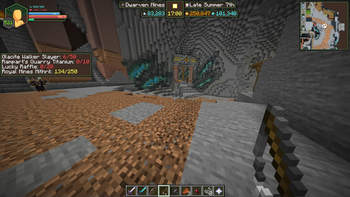
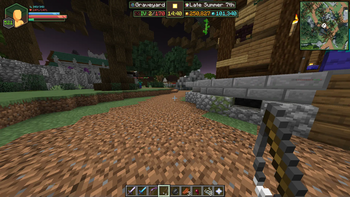
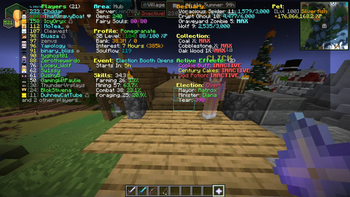
SkyCubed is a Hypixel SkyBlock UI overhaul mod, changing all aspects of the UI in-game to be more inline into it looking like its own game
Screenshots
Über diese Mod
SkyCubed
SkyCubed is a Hypixel SkyBlock UI overhaul mod, changing all aspects of the UI in-game to be more inline into it looking like its own game
Installation Guide
- Prerequisites: Fabric Language Kotlin
- Download into your favourite launcher or into your mods folder directly
- Recommended mods to go with it
Preview
- To check out the features you can go to the features below.
- If you would like to see how it looks check out the gallery
Credits
- ThatGravyBoat - Main Developer
- j10a1n15 - Main Contributor
- meowora - Main Contributor
- SkyGuide/DeDiamondPro - Map Data
- Alychemist - Info Display, RPG HUD, and general palette textures
- CallMeBell - Various little info icons.
- M1lkys - Emotional Support
Features
General Config
- Hidden Actionbar Widgets
- Hidden HUD Elements
- Quick Access to other SkyCubed configs
- Minecraft Keybinds Screen
- SkyCubed Notifications
- SkyCubed SackHud Edit Screen
Overlay Config
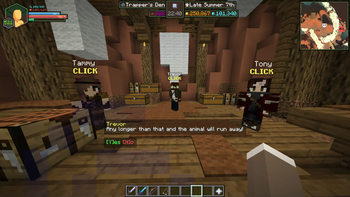
- Info Overlay
- Shows generalised information about your current location centered at the top of the screen.
- RPG Overlay
- RPG style display with health, mana, (skyblock) xp, and air (if in water).
- Text Overlay
- Movable text overlays for health, mana, defense and speed.
- Tablist Overlay
- A compact tablist with player sorting options.
- Sack Overlay
- Displays specified items from your sacks with their amounts.
- You can customize the items shown using
/skycubed sackhud.
- Trophy Fish Overlay
- Displays the amount of each trophy fish you have caught.
- Has different toggles to show not unlocked ones, a checkmark or cross for caught/not caught, and more.
- Best used with the SkyBlock Profile Viewer mod to update your data when out of sync.
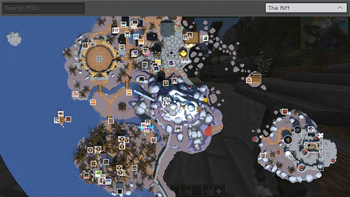
- Map Overlay
- Displays a map of the current area you are in.
- Highlights NPCs and other important locations.
- Can be toggled to show a minimap or a full screen map.
- Also has a rounded shape option as well as an option to rotate the minimap in the players looking direction.
- Dungeon Map Overlay
- Displays the current Dungeon map on your screen.
- With customizable colors.
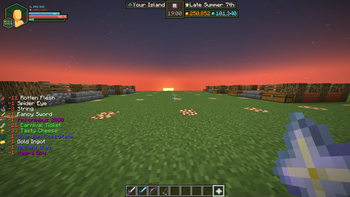
- Pickup Log Overlay
- Displays the items you have picked up or dropped on screen.
- Has an option for a compact view, sack items, and more.
- Commissions Overlay
- Displays your current commissions and their progress on screen.
- NPC Overlay
- Displays NPC messages on screen like in other games.
- Cold Overlay
- When freezing in the Glacite Tunnels or Mineshafts, the vanilla freezing overlay appears on your screen.
- Bossbar Hider
- Hides the vanilla bossbar with or without the bossbar title.
- Movable Hotbar
- Wind Overlay
Screens Config
- Show Equipment
- Like armor, equipment will show up next to your player in the inventory.
- Wardrobe Overlay
- In the wardrobe, your armor will be displayed on a player for a better view.
Items Config
- Item Bars
- Adds durability bars to items like drill to show fuel percentage and for snowballs in snow launchers.
- Cooldowns
- Applies the vanilla cooldown effect to items with cooldowns, like the Grappling Hook.
Chat Config
- Modify Hypixel Commands
- Adds Tab completion to various Hypixel commands.
- Chat Colors
- Changes the color of the tab next to chat messages based on their type, such as private messages, guild messages, system messages, and public messages.
- Compact Chat
- Compacts certain chat messages to reduce clutter, such as Hypixel experience gains, cooldowns, and pickaxe abilities.
- Messages to clean
- Allows you to write your own filters using regular expressions to remove unwanted chat messages.
Notifications Config
- Notifications
- Customizable notifications for various events, actions, and general time sensitive messages.
- Will show up as a toast notification in the top right corner of the screen.
- You can view all notifications in the SkyCubed Notifications screen, which can be found on the top right of the escape menu.
Rendering Config
- Show own Nametag
- While in f3, displays your own nametag above your player.
Verfügbare Versionen
SkyCubed auf deinem Client installieren
Mod-Loader lokal installieren
Installiere fabric für deine lokale Minecraft-Version.
Passende Datei herunterladen
Wähle die SkyCubed-Datei für fabric und Minecraft 26.2.
Mod installieren
Lege die .jar-Datei in deinem lokalen .minecraft/mods-Ordner ab und starte Minecraft neu. Eine Installation auf dem Server ist nicht nötig.
Kompatibilität
Mod-Loader
Minecraft-Versionen
26.2, 26.1.2, 26.1.1 (+10 weitere)
Server-seitig
✗ Nicht unterstütztEmpfohlener RAM
4 GB(min. 3 GB)Häufige Fragen
Muss SkyCubed auf dem Minecraft Server installiert werden?
Nein. Modrinth kennzeichnet SkyCubed serverseitig als nicht unterstützt. Installiere die Mod nur im lokalen Minecraft-Mods-Ordner. Dein Server kann unverändert bleiben, sofern die Mod-Seite keine zusätzliche Abhängigkeit nennt.
Welche Version und welchen Loader braucht SkyCubed?
Nutze eine Datei für fabric und exakt deine Minecraft-Version. Unterstützte Versionen sind unter anderem 26.2, 26.1.2, 26.1.1. Loader-Dateien sind nicht untereinander austauschbar.
SkyCubed funktioniert nicht – was kann ich prüfen?
Prüfe zuerst Minecraft-Version, Loader-Version und erforderliche Abhängigkeiten. Lege die .jar-Datei im lokalen .minecraft/mods-Ordner ab und entferne ältere Duplikate. Da die Mod clientseitig ist, löst mehr Server-RAM dieses Problem nicht.
Ähnliche Mods




Minecraft Server für deine Gruppe
SkyCubed bleibt auf deinem Client. Hoste dazu eine kompatible Welt für deine Mitspieler.