
Snurbo's Shops
Let players create their own shops, sell items, and buy from each other using familiar chest-style GUIs, No physical shop blocks needed.
Screenshots

Über diese Mod
Snurbo's Shops
A player-driven shop mod for Fabric 1.21.1, inspired by Donut SMP.
Players can open shops, list items for sale, and buy from each other — all through real in-game chest GUIs with no physical blocks required.
Features
- Real chest GUIs — no custom rendering, no blur, just vanilla Minecraft chests
- Player head browser —
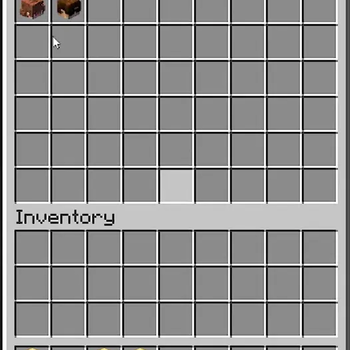
/shopsopens a chest showing every player's head; click to browse their shop - Buy items — left-click any listing to purchase it
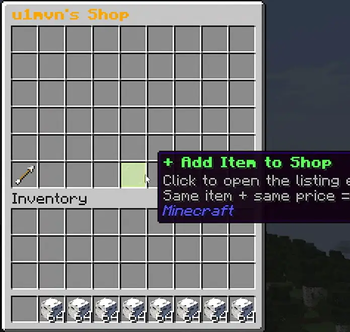
- Sell items — open your own shop, click "+ Add Item", place items, set a price and quantity per sale, then confirm
- Stock is physical — stock equals exactly what you deposited; you can't inflate it
- Restock via double chest — open a listing's edit screen and click "Add Stock" to open a double chest that only accepts the matching item, deposit more anytime
- Quantity per sale — control how many items the buyer receives per purchase (+1/+10/−1/−10 buttons)
- Edit listings — left-click your own listing to adjust price and quantity per sale
- Remove listings — right-click your own listing to remove it and get your remaining stock back
- Out of stock display — sold-out listings show clearly and can't be purchased
- Restock via re-adding — add the same item at the same price via "+ Add Item" and it merges into the existing listing
- Back button — arrow item in the bottom-left always returns you to the shop browser
- Currency mode — optional virtual currency system (op-only to enable)
- Diamond mode — default payment method; buyers pay in physical diamonds
- Auto-pause on currency switch — when an op changes currency mode, every listing across every shop is paused until its owner reviews and re-saves the price, preventing accidental cheap sales at outdated rates
- Scoreboard — when currency mode is on, a live balance sidebar is shown
- Particles & sounds — purchase effects for buyers
Commands
| Command | Permission | Description |
|---|---|---|
/shops |
Everyone | Opens the shop browser |
/shops info |
Everyone | Shows this command list in-chat |
/shops hideboard |
Everyone (only shown while currency mode is ON) | Toggles the currency scoreboard for yourself |
/shops currency true |
OP (level 2+) | Enables virtual $ currency mode, pauses all listings for review |
/shops currency false |
OP (level 2+) | Disables currency mode, reverts to diamonds, pauses all listings for review |
/shops reload |
OP (level 2+) | Reloads shop and currency data from disk |
How to Use
Browsing shops
- Run
/shops - A chest opens showing player heads — one per player
- Click any head to browse that player's shop
- Left-click an item to buy it
- Click the ← Back arrow (bottom-left) to return to the browser
Selling items
- Run
/shopsthen click your own head - Click + Add Item (lime glass pane, bottom-center)
- A staging GUI opens:
- Place items in the top row
- Use Price buttons (−10/−1/+1/+10) to set your asking price
- Use Quantity buttons to set how many items the buyer receives per purchase
- Click the Emerald Block to confirm
- Your listing now appears in your shop
Editing a listing
- Open your shop via
/shops - Left-click any of your listings to open the edit screen
- Adjust price or quantity per sale with the +/− buttons
- Click 📦 Add Stock to open a real double chest and deposit more of that exact item
- Click Save Changes (Emerald Block) to confirm — this also resumes a paused listing
Removing a listing
- Right-click any of your listings to remove it
- Remaining stock is returned to your inventory automatically
Restocking
Two ways:
- Quick way: open "+ Add Item" and place more of the same item at the same price — it merges automatically
- Direct way: left-click the listing → "📦 Add Stock" → a double chest opens that only accepts the matching item type — deposit as much as you want
Currency Mode (Op only)
Enable: /shops currency true
Disable: /shops currency false
- When enabled, prices are in $ (virtual money) instead of diamonds
- Every new player starts with $1000
- The only way to earn money is by selling items
- A sidebar scoreboard shows everyone's balance
- Use
/shops hideboardto hide it for yourself (only available while currency mode is on)
⚠ Important: switching currency modes pauses all shops
Because prices set for diamonds don't make sense as dollars (and vice versa), every listing on the server is automatically paused the moment an op changes currency mode. A server-wide message notifies all players. Paused listings show "⚠ PAUSED" and cannot be bought.
Shop owners must open each paused listing (left-click it), review/adjust the price for the new currency, and click Save Changes to resume selling it. This prevents buyers from snapping up items at prices that no longer make sense after a currency switch.
Data Storage
All shop and currency data is saved in your world folder under:
world/snurbos_shops/
  shops.json     — all player listings
  currency.json  — all player balances
  settings.json  — currency mode toggle
Verfügbare Versionen
Snurbo's Shops auf dem Server installieren
Server bestellen
Bestelle einen Minecraft Java Server mit mindestens 3 GB RAM (4 GB empfohlen).
fabric Loader setzen
Wähle im Panel unter "Egg" den fabric-Loader und die passende Minecraft-Version (1.21.1).
Mod installieren
Öffne den Mod-Browser im Dashboard und suche nach "Snurbo's Shops". Klicke "Installieren" – fertig! Alternativ: Lade die .jar via SFTP in den /mods Ordner.
Kompatibilität
Mod-Loader
Minecraft-Versionen
1.21.1
Server-seitig
✓ ErforderlichEmpfohlener RAM
4 GB(min. 3 GB)Häufige Fragen
Snurbo's Shops Server crasht beim Start – was tun?
Häufigste Ursache: falsche fabric-Version oder zu wenig RAM. Prüfe im Server-Log (latest.log), ob ein "OutOfMemoryError" oder "Mixin"-Fehler auftritt. Bei Mado Hosting: Stelle sicher, dass mindestens 3 GB RAM zugewiesen sind und der Loader zur Mod-Version passt (1.21.1). Über das Panel kannst du den Loader mit einem Klick wechseln.
Ist Snurbo's Shops mit fabric kompatibel?
Snurbo's Shops unterstützt offiziell fabric für Minecraft 1.21.1. Im Mado Dashboard werden inkompatible Loader-Kombinationen automatisch erkannt.
Server laggt mit Snurbo's Shops – wie optimiere ich die Performance?
Empfohlener RAM: 4 GB (+1 GB pro 8 Spieler). Prüfe mit /spark profiler, ob Snurbo's Shops den meisten Tick-Time verbraucht. Häufige Fixes: Server-View-Distance auf 8-10 reduzieren, bei Forge "performant" oder "starlight" als Zusatz-Mod installieren. Bei Mado Hosting läuft dein Server auf NVMe-SSDs mit dedizierten CPU-Kernen für minimale Latenz.
Ähnliche Mods


![CobbleDollars [Cobblemon Addon]](https://cdn.modrinth.com/data/s7N7AsqL/684040a264fc1d7f9b856ec5d2da39767398c7ad.png)

Modded Server mieten
Installiere Snurbo's Shops mit nur einem Klick auf deinem Server.