![[TACZ] NPCs](https://cdn.modrinth.com/data/A3oZ8vhW/15cec5728ce3aa8fe142f0ea0f913b30cb17c98e_96.webp)
[TACZ] NPCs
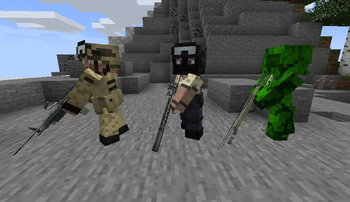
Fully animated neutral and enemy NPCs with loot tables and proper player-like TACZ shooting.
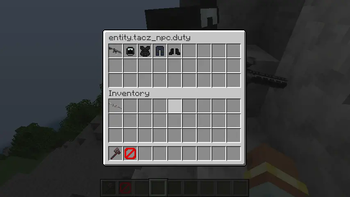
Screenshots
Über diese Mod

Requirements
- TACZ
Features
Rendering and use of armors and TACZ guns - NPCs will use TACZ guns from any addon pack just like a player would, including rocket launchers, grenade launchers and flamethrowers, to name a few.
Full PlayerAnimator and Player skin support - NPCs will use animations from PlayerAnimator and can be configured with Player names and skins
Configuration - Extensive configuration files which can be used to create entirely new NPCs with different relationships, textures and equipment.
Factions and Relationships - Configure the tacznpc_factions.json file to set up various teams and watch them fight out real time battles.
How to Use
See Configuration below on how to modify the mod.
- You can summon npcs with /summon tacznpcs:npc {"template":""}, not adding the template nbt: ({"template":""}) will use the "default" template, otherwise you specify a template name based on the npc_loadouts.json config file.
Configuration
NPCs are configured using the mod's config files.
Custom loot tables or tags should be added the normal Minecraft way using datapacks. IDs can then be referenced by the config.
tacznpc_factions.json
Maps entity IDs to faction names.
{
  "villagers": [
    "minecraft:villager",
    "minecraft:iron_golem"
  ],
  "illagers": [
    "minecraft:pillager",
    "minecraft:evoker"
  ]
}
- Keys are faction names.
- Values are lists of entity IDs.
tacznpc_loadouts.json
Defines NPC equipment, weapons, factions, and textures.
{
  "illagers": { <-- name of loadout
    "aligned": [
      "illagers", <-- Allied factions
      "monster"
    ],
    "opposed": [
      "villagers" <-- factions to attack
    ],
    "equipment": {
      "table": "tacznpcs:npc/illager", <-- the loot table to use for equipment, optional if you just want to modify dropChances
      "dropChances": { <-- dropChances is optional
        "mainhand": 1, <-- each field is optional in dropChances
        "head": 0.2,
        "chest": 0.2,
        "legs": 0.2,
        "feet": 0.2
      }
    },
    "skin": [
      {"id": "tacznpcs:entity/illager1.png", "slim": true}, <-- id=texture location, slim= slim(true) or wide(false) skin, default is false
      {"id": "tacznpcs:entity/illager2.png"} <-- id is required, slim is optional
    ]
  },
  "names": ["Bobert", "Robert"] <-- random names to choose, will show in the nametag, optional (if the field is not used, then no nametag will show and the default entity name will be used)
}
Extra Fields
| Field | Description |
|---|---|
primary |
The NPC's primary weapon or item. |
helmet |
Helmet item (optional). |
chestplate |
Chestplate item (optional). |
leggings |
Leggings item (optional). |
boots |
Boots item (optional). |
ID Prefixes for Extra Fields
Several fields accept different ID types using prefixes:
| Prefix | Meaning | Example |
|---|---|---|
| (none) | Minecraft item ID | minecraft:iron_sword |
% |
TACZ gun ID | %tacz:glock_17 |
# |
Item tag | #c:swords |
$ |
Loot table ID | $minecraft:chests/simple_dungeon |
A default loadout is recommended and is used whenever no other loadout applies.
Built-in Factions
These faction names are always available (case-insensitive):
monstercreatureambientaxolotlsunderground_water_creaturewater_creaturewater_ambientmisc
You may also reference any custom faction defined in npc_factions.json.
tacznpcs_structures.json
Defines structures for specific loadouts to spawn in.
{
 "minecraft:mansion": [ <-- structure id
   { <-- object
     "entities": [
       "minecraft:pillager",
       "minecraft:vindicator"
     ],
     "loadout": "illagers",
     "chance": 0.25
   }
 ],
 "minecraft:village_plains": [
   { <-- there can be more than one spawning object per structure
     "entities": [
       "minecraft:villager" <-- list of entity ids that can be replaced
     ],
     "loadout": "villagers", <-- loadout to replace entities with
     "chance": 0.05 <-- chance for entity to be replaced on spawn
   },
   {
     "entities": [
       "minecraft:iron_golem"
     ],
     "loadout": "villagers",
     "chance": 0.5
   }
 ]
}
I accept commisions or questions on discord @ jeducklet. (DMs open)
Verfügbare Versionen
[TACZ] NPCs auf dem Server installieren
Server bestellen
Bestelle einen Minecraft Java Server mit mindestens 3 GB RAM (4 GB empfohlen).
forge Loader setzen
Wähle im Panel unter "Egg" den forge-Loader und die passende Minecraft-Version (1.21.1).
Mod installieren
Öffne den Mod-Browser im Dashboard und suche nach "[TACZ] NPCs". Klicke "Installieren" – fertig! Alternativ: Lade die .jar via SFTP in den /mods Ordner.
Kompatibilität
Mod-Loader
Minecraft-Versionen
1.21.1, 1.20.1
Server-seitig
✓ ErforderlichEmpfohlener RAM
4 GB(min. 3 GB)Häufige Fragen
[TACZ] NPCs Server crasht beim Start – was tun?
Häufigste Ursache: falsche forge-Version oder zu wenig RAM. Prüfe im Server-Log (latest.log), ob ein "OutOfMemoryError" oder "Mixin"-Fehler auftritt. Bei Mado Hosting: Stelle sicher, dass mindestens 3 GB RAM zugewiesen sind und der Loader zur Mod-Version passt (1.21.1). Über das Panel kannst du den Loader mit einem Klick wechseln.
Ist [TACZ] NPCs mit forge und neoforge kompatibel?
[TACZ] NPCs unterstützt offiziell forge, neoforge für Minecraft 1.21.1, 1.20.1. Im Mado Dashboard werden inkompatible Loader-Kombinationen automatisch erkannt.
Server laggt mit [TACZ] NPCs – wie optimiere ich die Performance?
Empfohlener RAM: 4 GB (+1 GB pro 8 Spieler). Prüfe mit /spark profiler, ob [TACZ] NPCs den meisten Tick-Time verbraucht. Häufige Fixes: Server-View-Distance auf 8-10 reduzieren, bei Forge "performant" oder "starlight" als Zusatz-Mod installieren. Bei Mado Hosting läuft dein Server auf NVMe-SSDs mit dedizierten CPU-Kernen für minimale Latenz.
Ähnliche Mods




Modded Server mieten
Installiere [TACZ] NPCs mit nur einem Klick auf deinem Server.