Terrarium
Earth in Minecraft - Configurable! Spiritual successor to Terra 1:1
Screenshots

Über diese Mod
Terrarium
Pixel-Perfect Earth Terrain for Minecraft
Generate pixel-perfect worlds from real elevation data, with dynamic tile loading and customizable terrain shaping.
- World type is
terrarium:terrariumfor servers, singleplayer, select earth when creating world and choose customize to change settings per world.
🌐 Terrain Data Pipeline
- Source: AWS S3 (
elevation-tiles-prod/terrarium/{zoom}/{x}/{y}.png) - Temperature and Precipitation Personal Source Hosted on GitHub, I compiled this using QGIS. (
clim-monthly/{month}/{zoom}/{x}/{y}) This is a temporary hosting solution - Pixel-to-Block: 1 pixel = 1 Minecraft block.
- Tile System:
- Each tile =
256×256pixels (256×256blocks ingame). zoomlevel determines tile count per axis (2^zoomtiles).- Example:
zoom: 8=2⁸ = 256tiles →256×256 = 65,536blocks wide.
- Example:
- Each tile =
🗃️ Downloads
- You can download indev test versions here
- Support is not guarunteed for those, only alphas, betas, and releases
- FabricAPI is required
🏔️ Technical Notes
- Scale Examples:
- zoom: 10 = 1,024 tiles → 262,144×262,144 blocks.
- zoom: 13 = 8,192 tiles → 2,097,152×2,097,152 blocks.
🌩️ Performance:
- Higher zoom = larger worlds but slower generation.
- Reduce zoom to 8–10 for survival-friendly sizes.
World Size Comparison
- zoom: 10 (small - ~1:48) vs. zoom: 13 (planetary-scale - ~1:6).
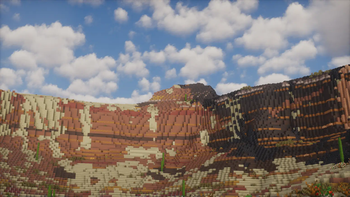
🖼️ Screenshots:
- Taken with v0.0.2-beta.2 + Bliss/Photon + WWOO
Zoom: 13 | Height 768
🛠️ How It Works
- Tile Fetching: Downloads 256×256 PNG tiles from AWS based on zoom and caches.
- Height Mapping: Converts RGB pixels to block heights, scaled by additionalAlt.
- Biome Placement: Vanilla biomes mapped using elevation (startingY + altitudeDropoff).
🔧 Configuration
/config/BlossomMods/Terrarium.json:
{
  "ELEVATION_URL": "https://s3.amazonaws.com/elevation-tiles-prod/terrarium/", //elevation data source
  "TEMPERATURE_URL": "https://raw.githubusercontent.com/ly-nxs/terrarium-data/refs/heads/main/tiles/climate-monthly/", //climate data source
  "CACHE_DIR": "./tiles", //tile cache dir
}
Verfügbare Versionen
Terrarium auf dem Server installieren
Server bestellen
Bestelle einen Minecraft Java Server mit mindestens 4 GB RAM (6 GB empfohlen).
fabric Loader setzen
Wähle im Panel unter "Egg" den fabric-Loader und die passende Minecraft-Version (1.21.8).
Mod installieren
Öffne den Mod-Browser im Dashboard und suche nach "Terrarium". Klicke "Installieren" – fertig! Alternativ: Lade die .jar via SFTP in den /mods Ordner.
Kompatibilität
Mod-Loader
Minecraft-Versionen
1.21.8, 1.21.7, 1.21.6 (+13 weitere)
Server-seitig
✓ ErforderlichEmpfohlener RAM
6 GB(min. 4 GB)Häufige Fragen
Terrarium Server crasht beim Start – was tun?
Häufigste Ursache: falsche fabric-Version oder zu wenig RAM. Prüfe im Server-Log (latest.log), ob ein "OutOfMemoryError" oder "Mixin"-Fehler auftritt. Bei Mado Hosting: Stelle sicher, dass mindestens 4 GB RAM zugewiesen sind und der Loader zur Mod-Version passt (1.21.8). Über das Panel kannst du den Loader mit einem Klick wechseln.
Ist Terrarium mit fabric und neoforge kompatibel?
Terrarium unterstützt offiziell fabric, neoforge für Minecraft 1.21.8, 1.21.7, 1.21.6. Im Mado Dashboard werden inkompatible Loader-Kombinationen automatisch erkannt.
Server laggt mit Terrarium – wie optimiere ich die Performance?
Empfohlener RAM: 6 GB (+1 GB pro 5 Spieler). Prüfe mit /spark profiler, ob Terrarium den meisten Tick-Time verbraucht. Häufige Fixes: Server-View-Distance auf 8-10 reduzieren, bei Forge "performant" oder "starlight" als Zusatz-Mod installieren. Bei Mado Hosting läuft dein Server auf NVMe-SSDs mit dedizierten CPU-Kernen für minimale Latenz.
Ähnliche Mods




Modded Server mieten
Installiere Terrarium mit nur einem Klick auf deinem Server.
Details
- Lizenz
- Creative Commons Attribution Non Commercial Share Alike 4.0 International
- Server-seitig
- Erforderlich