
Thirst Bar
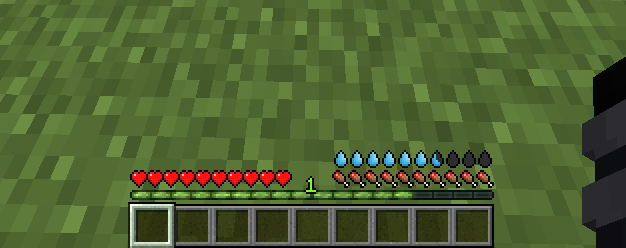
Adds a thirst bar to the game.
Screenshots

Über diese Mod
💧 Thirst Bar
Thirst Bar is a Minecraft datapack+resourcepack/mod that adds a thirst bar to the game.
✨ Features
- The thirst bar can be refilled by drinking water bottles.

- Customizable values.
- As soon as you enter the water, it disappears so that the drowning hud is visible.
- Works in singleplayer and multiplayer.
- Supports Smithed Actionbar Libary.
🛠️ Settings
You can easily customize settings from the config menu.
- To open it use:
/function thirstbar:config

📦 Optional Library Support – Actionbar
This datapack allows the actionbar to be shared across multiple datapacks on a server, preventing conflicts and ensuring compatibility.
🔗 Download: Smithed – Actionbar Library
- Enable/disable from config menu:
/function thirstbar:config
📦 Installation
There are two ways to install:
1️⃣ Mod Version
Download the mod file and add it to your mods folder as you would with any other Minecraft mod. You dont need to install the Resource Pack
2️⃣ Datapack + Resource Pack
First, download the resource pack and place it in your resourcepacks folder.
Then, download the datapack and add it to your world's datapacks folder or your server's datapacks directory.
You can download Resource Pack from the releases page: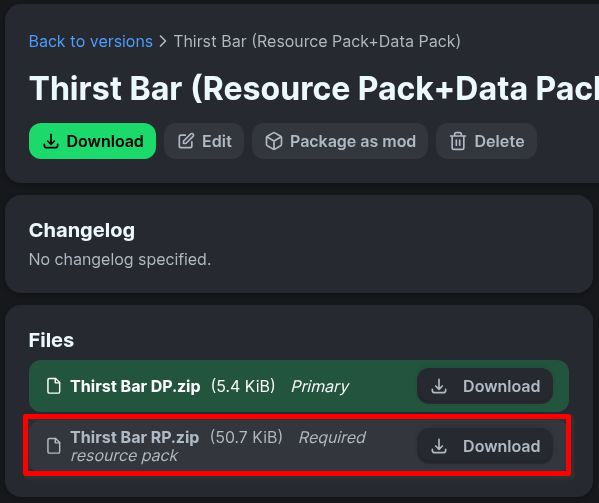
🧱 Compatibility
- Minecraft Java Edition 1.19.3+
- If you choose to use the resource pack, you must also install the datapack
🌐 ITITAN Hosting

💬 Feedback and Request
If you have a request or feedback, please write them in to my discord 3geetr.
Verfügbare Versionen
Thirst Bar auf dem Server installieren
Server bestellen
Bestelle einen Minecraft Java Server mit mindestens 3 GB RAM (4 GB empfohlen).
datapack Loader setzen
Wähle im Panel unter "Egg" den datapack-Loader und die passende Minecraft-Version (26.3).
Mod installieren
Öffne den Mod-Browser im Dashboard und suche nach "Thirst Bar". Klicke "Installieren" – fertig! Alternativ: Lade die .jar via SFTP in den /mods Ordner.
Kompatibilität
Mod-Loader
Minecraft-Versionen
26.3, 26.2, 26.1.2 (+14 weitere)
Server-seitig
✓ ErforderlichEmpfohlener RAM
4 GB(min. 3 GB)Häufige Fragen
Thirst Bar Server crasht beim Start – was tun?
Häufigste Ursache: falsche datapack-Version oder zu wenig RAM. Prüfe im Server-Log (latest.log), ob ein "OutOfMemoryError" oder "Mixin"-Fehler auftritt. Bei Mado Hosting: Stelle sicher, dass mindestens 3 GB RAM zugewiesen sind und der Loader zur Mod-Version passt (26.3). Über das Panel kannst du den Loader mit einem Klick wechseln.
Ist Thirst Bar mit datapack und fabric und forge und neoforge und quilt kompatibel?
Thirst Bar unterstützt offiziell datapack, fabric, forge, neoforge, quilt für Minecraft 26.3, 26.2, 26.1.2. Achtung: Forge- und Fabric-Mods sind NICHT untereinander kompatibel – wähle einen Loader und bleibe dabei. Im Mado Dashboard werden inkompatible Loader-Kombinationen automatisch erkannt.
Server laggt mit Thirst Bar – wie optimiere ich die Performance?
Empfohlener RAM: 4 GB (+1 GB pro 8 Spieler). Prüfe mit /spark profiler, ob Thirst Bar den meisten Tick-Time verbraucht. Häufige Fixes: Server-View-Distance auf 8-10 reduzieren, bei Forge "performant" oder "starlight" als Zusatz-Mod installieren. Bei Mado Hosting läuft dein Server auf NVMe-SSDs mit dedizierten CPU-Kernen für minimale Latenz.
Ähnliche Mods




Modded Server mieten
Installiere Thirst Bar mit nur einem Klick auf deinem Server.