
Thirst Was Taken
A modern take on thirst, compatible with Create, Farmer's Delight & more.
Screenshots

Über diese Mod

💧 1.3.0 Update
- 1.20.1 is now supported (thanks to mlus233)
- Fire protection and fire resistance slow down dehydration
- You can find various drinks in structures' chests
- Piglins now trade Purified Water
- The Sand Filter now has a Ponder scene
Thirst was Taken is a simple mod that adds a thirst mechanic to the game, but that fits well in modpacks (especially aesthetics-oriented ones) by adding diverse features and compatibility with a lot of often-used mods.
💧 Water Purity
Water can have 4 different levels of purity, depending on where it was harvested:
If you drink non-purified water, depending on the purity level, you will have a chance to get sick, or worse, poisoned.
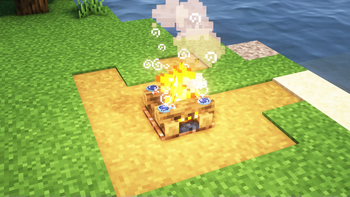
Water can be purified on a campfire or a furnace: a campfire will purify it by 1 unit, and a furnace by 2 (meaning it will go from Dirty to Acceptable, for instance).

☀ Climate & Cold Sweat
The hydration depletion speed is biome-dependent, meaning you will get thirsty more easily in hot or dry biomes, and less so in cold or wet ones. Hydration is more relevant than temperature, so building your base in wet biomes is more advisable than doing so in cold ones.
This system is also compatible with Cold Sweat, and will use their more precise temperature calculations if the mod is present in the pack.
🍖 Farmer's Delight & Co.
The stack size for water bottles has been increased to 64, to make them fit with the foods from Farmer's Delight.
Every food item that should quench your thirst added by farmer's delight, respite, and brewin and chewin' is integrated by default, making teas (or booze) the best late-game hydration source.
⚙ Create
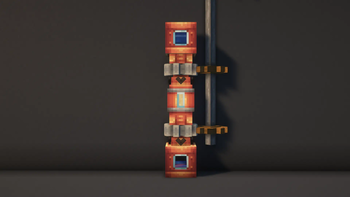
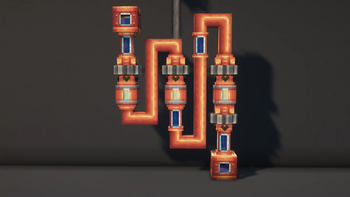
A new block is added if you have Create installed: the Sand Filter, which can purify water fed to it by pipes.

💧 Apple Skin
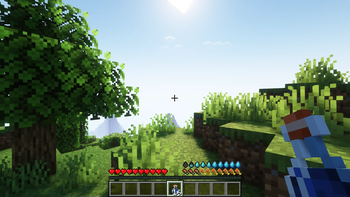
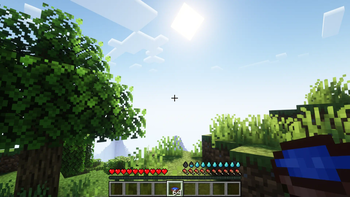
The mod is compatible with apple skin, showing the "quenched" overlay if the mod is present, as well as tooltips for every item that quenches your thirst.

To learn more about the mod, you can check out the Wiki or the Discord
This mod is still very early in development, which means it's filled to the brim with bugs and glitches. Sorry
Verfügbare Versionen
Thirst Was Taken auf dem Server installieren
Server bestellen
Bestelle einen Minecraft Java Server mit mindestens 3 GB RAM (4 GB empfohlen).
forge Loader setzen
Wähle im Panel unter "Egg" den forge-Loader und die passende Minecraft-Version (1.21.1).
Mod installieren
Öffne den Mod-Browser im Dashboard und suche nach "Thirst Was Taken". Klicke "Installieren" – fertig! Alternativ: Lade die .jar via SFTP in den /mods Ordner.
Kompatibilität
Mod-Loader
Minecraft-Versionen
1.21.1, 1.21, 1.20.1 (+5 weitere)
Server-seitig
✓ ErforderlichEmpfohlener RAM
4 GB(min. 3 GB)Häufige Fragen
Thirst Was Taken Server crasht beim Start – was tun?
Häufigste Ursache: falsche forge-Version oder zu wenig RAM. Prüfe im Server-Log (latest.log), ob ein "OutOfMemoryError" oder "Mixin"-Fehler auftritt. Bei Mado Hosting: Stelle sicher, dass mindestens 3 GB RAM zugewiesen sind und der Loader zur Mod-Version passt (1.21.1). Über das Panel kannst du den Loader mit einem Klick wechseln.
Ist Thirst Was Taken mit forge und neoforge kompatibel?
Thirst Was Taken unterstützt offiziell forge, neoforge für Minecraft 1.21.1, 1.21, 1.20.1. Im Mado Dashboard werden inkompatible Loader-Kombinationen automatisch erkannt.
Server laggt mit Thirst Was Taken – wie optimiere ich die Performance?
Empfohlener RAM: 4 GB (+1 GB pro 8 Spieler). Prüfe mit /spark profiler, ob Thirst Was Taken den meisten Tick-Time verbraucht. Häufige Fixes: Server-View-Distance auf 8-10 reduzieren, bei Forge "performant" oder "starlight" als Zusatz-Mod installieren. Bei Mado Hosting läuft dein Server auf NVMe-SSDs mit dedizierten CPU-Kernen für minimale Latenz.
Ähnliche Mods



Modded Server mieten
Installiere Thirst Was Taken mit nur einem Klick auf deinem Server.