
Toggle Resource Pack
A Minecraft mod that lets you toggle resource packs On/Off with keybinds. No more digging through the vanilla resource pack menu every time you want to switch packs.
Screenshots
Über diese Mod

A Minecraft mod that lets you toggle resource packs on/off with keybinds. No more digging through the vanilla resource pack menu every time you want to switch packs!
Features
32 assignable slots — bind a resource pack to any slot and toggle it with a key press
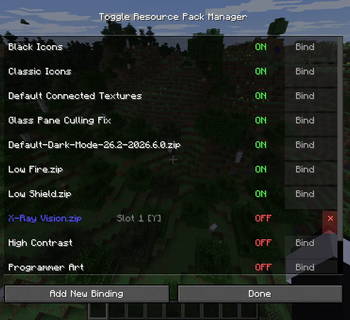
In-game GUI — manage all bindings, see which packs are ON/OFF, which slot they occupy
Keybind-driven — toggle any bound pack without opening the GUI
Add New Binding — auto-assigns the first unbound pack to the first free slot
Persistent configuration — bindings survive restarts (JSON)
ModMenu integration — optional config screen button in the mod list
Installation:
- Install Fabric Loader 0.19.x+ for Minecraft 26.2
- Install Fabric API 0.153.x+ in your mods/ folder
- Place the built JAR in your mods/ folder
- Launch the game
Usage
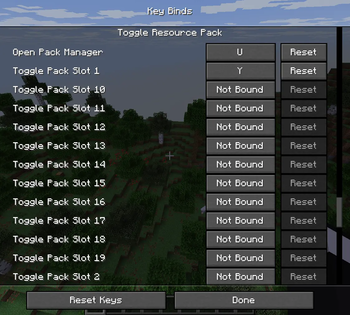
- Press U (default) to open the GUI — rebindable in Controls menu
In the GUI:
Click Bind on an unbound pack to assign it to the first free slot
Click ON/OFF to toggle the pack
Click ✕ (red) to unbind the pack from its slot
Click Add New Binding to auto-assign the first unbound pack to the first free slot
Press the key assigned to a slot to toggle that pack without opening the GUI
Alternatively, open the mod's config screen from ModMenu (click the gear icon next to the mod in the mod list).
Keybinds
Slot keybinds appear in Controls as key.toggle-resource-pack.slot.X (X = 0–31).
None are bound by default — you must assign keys yourself.
The GUI key defaults to U (unbound).
Verfügbare Versionen
Toggle Resource Pack auf dem Server installieren
Server bestellen
Bestelle einen Minecraft Java Server mit mindestens 3 GB RAM (4 GB empfohlen).
fabric Loader setzen
Wähle im Panel unter "Egg" den fabric-Loader und die passende Minecraft-Version (26.2).
Mod installieren
Öffne den Mod-Browser im Dashboard und suche nach "Toggle Resource Pack". Klicke "Installieren" – fertig! Alternativ: Lade die .jar via SFTP in den /mods Ordner.
Kompatibilität
Mod-Loader
Minecraft-Versionen
26.2
Server-seitig
✗ Nicht unterstütztEmpfohlener RAM
4 GB(min. 3 GB)Häufige Fragen
Toggle Resource Pack Server crasht beim Start – was tun?
Häufigste Ursache: falsche fabric-Version oder zu wenig RAM. Prüfe im Server-Log (latest.log), ob ein "OutOfMemoryError" oder "Mixin"-Fehler auftritt. Bei Mado Hosting: Stelle sicher, dass mindestens 3 GB RAM zugewiesen sind und der Loader zur Mod-Version passt (26.2). Über das Panel kannst du den Loader mit einem Klick wechseln.
Ist Toggle Resource Pack mit fabric kompatibel?
Toggle Resource Pack unterstützt offiziell fabric für Minecraft 26.2. Im Mado Dashboard werden inkompatible Loader-Kombinationen automatisch erkannt.
Server laggt mit Toggle Resource Pack – wie optimiere ich die Performance?
Empfohlener RAM: 4 GB (+1 GB pro 8 Spieler). Prüfe mit /spark profiler, ob Toggle Resource Pack den meisten Tick-Time verbraucht. Häufige Fixes: Server-View-Distance auf 8-10 reduzieren, bei Forge "performant" oder "starlight" als Zusatz-Mod installieren. Bei Mado Hosting läuft dein Server auf NVMe-SSDs mit dedizierten CPU-Kernen für minimale Latenz.
Ähnliche Mods






Modded Server mieten
Installiere Toggle Resource Pack mit nur einem Klick auf deinem Server.