
Too Many Bows
An insane amount of epic bows for your adventure!
Screenshots
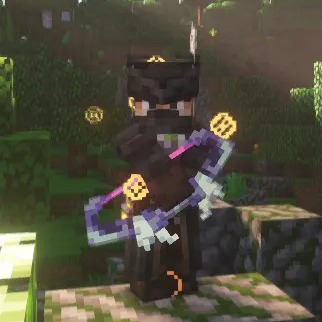
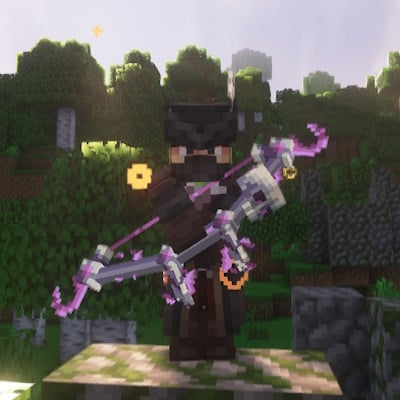
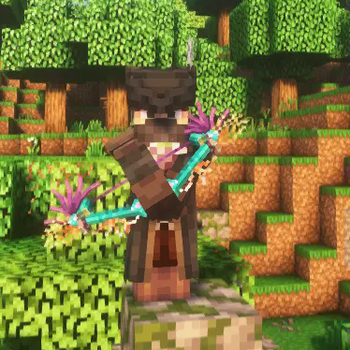
Über diese Mod

Ready to become the ultimate archer in Minecraft? The Too Many Bows mod is here to completely revolutionize your ranged combat experience with exciting new bows, each packed with unique abilities that will take your gameplay to a whole new level.
- Current bow counter: 38 bows done!
- For the most up to date information about this mod please refer to the wiki
🔄 Seamless Compatibility with Better Combat

To truly unlock the potential of this mod, we strongly recommend using it with the Better Combat mod. Experience fluid, dynamic combat that makes every shot feel impactful and satisfying. The combination of Too Many Bows and Better Combat creates a thrilling archery experience unlike anything you've seen before.
🔧 Dependencies 
This mod requires the Architectury API to function. Make sure to download it to enjoy the full experience!
Version 3.0 for 1.21.1 (only) Adds:
Attributes:
- Bow Draw Speed Controls how quickly bows can be drawn. Higher values reduce draw time.
- Bow Damage Increases base damage dealt by bow projectiles.
- Ranged Weapon Damage Affects damage scaling for ranged weapons and special bow projectiles.
Trinkets/Curio items
- Dead Eyes Pendant - Increase Crit change ( stackable )
- Windwoven Gloves - Increase draw speed ( stackable )
- Fletchers Talisman - Reduce durability taken on bows
- Sharpshot Ring - Bow damage boost ( stackable)
- Stormbound Signet - Bow damage boost ( stackable )
All new trinkets are found in loot system
- With this new attribute system other devs can create addon mods for Too Many Bows for more trinkets/Curio items!
🌟 Ongoing Development
This is just the beginning! We're constantly working to add even more powerful bows, custom arrows, and unique abilities to keep the game fresh and exciting. Stay tuned for updates that will introduce new bows, crafting materials, and special enchantments.
📋 Download Now and Transform Your Archery Skills!
Step into a world where your bow is your greatest ally. Download Too Many Bows today and experience the thrill of wielding powerful, unique bows that change the way you approach combat in Minecraft!
Note: More bows and updates are on the way – keep an eye out for future releases!
Verfügbare Versionen
Too Many Bows auf dem Server installieren
Server bestellen
Bestelle einen Minecraft Java Server mit mindestens 3 GB RAM (4 GB empfohlen).
fabric Loader setzen
Wähle im Panel unter "Egg" den fabric-Loader und die passende Minecraft-Version (26.2).
Mod installieren
Öffne den Mod-Browser im Dashboard und suche nach "Too Many Bows". Klicke "Installieren" – fertig! Alternativ: Lade die .jar via SFTP in den /mods Ordner.
Kompatibilität
Mod-Loader
Minecraft-Versionen
26.2, 26.1.2, 1.21.11 (+5 weitere)
Server-seitig
✓ ErforderlichEmpfohlener RAM
4 GB(min. 3 GB)Häufige Fragen
Too Many Bows Server crasht beim Start – was tun?
Häufigste Ursache: falsche fabric-Version oder zu wenig RAM. Prüfe im Server-Log (latest.log), ob ein "OutOfMemoryError" oder "Mixin"-Fehler auftritt. Bei Mado Hosting: Stelle sicher, dass mindestens 3 GB RAM zugewiesen sind und der Loader zur Mod-Version passt (26.2). Über das Panel kannst du den Loader mit einem Klick wechseln.
Ist Too Many Bows mit fabric und forge und neoforge kompatibel?
Too Many Bows unterstützt offiziell fabric, forge, neoforge für Minecraft 26.2, 26.1.2, 1.21.11. Achtung: Forge- und Fabric-Mods sind NICHT untereinander kompatibel – wähle einen Loader und bleibe dabei. Im Mado Dashboard werden inkompatible Loader-Kombinationen automatisch erkannt.
Server laggt mit Too Many Bows – wie optimiere ich die Performance?
Empfohlener RAM: 4 GB (+1 GB pro 8 Spieler). Prüfe mit /spark profiler, ob Too Many Bows den meisten Tick-Time verbraucht. Häufige Fixes: Server-View-Distance auf 8-10 reduzieren, bei Forge "performant" oder "starlight" als Zusatz-Mod installieren. Bei Mado Hosting läuft dein Server auf NVMe-SSDs mit dedizierten CPU-Kernen für minimale Latenz.
Ähnliche Mods



![[TaCZ] Timeless and Classics Zero](https://cdn.modrinth.com/data/SzzJttH8/fd27766d2bb8390d284696b1dbd358f87e081439_96.webp)


Modded Server mieten
Installiere Too Many Bows mit nur einem Klick auf deinem Server.