
Traveler's Compass
A compass that will help you find any mob, block or item nearby
Screenshots
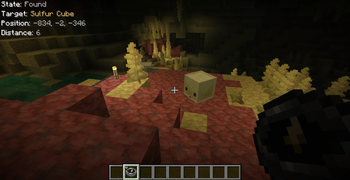




Über diese Mod
About:
The compass can search for mobs (based on their drops or spawn eggs), villagers (based on their goods), blocks or containers (like chests or furnaces) by their contents, and more
How it works:
- Open the Compass menu with RMB
- Put the block or item you want to find into its inventory
- Choose the desired search mode(s)
- Wait while it searches for the item you placed
Features:
- Shift + RMB on a block or mob to add it to the compass inventory
- Shift + RMB on an item in the compass inventory to mark it as priority
- Priority items are searched first
- Configure HUD, ping sound, search range, and more in the compass menu
- Use JEI/REI/EMI to drag and drop items into the compass inventory
Configuration:
- Most values are synchronized from server to client
- Any search mode can be enabled or disabled
- The search range (number of scanned chunks per tick) can be set per compass or globally
- Filtering by item tags, IDs, or mods is available
- Define search costs in XP levels in travelerscompass-cost.toml
- Costs can be set per item ID or per tag
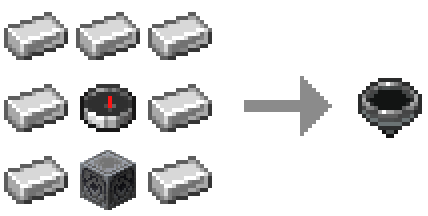
Recipe:
Target position markers (below / same / above): regular & priority
Compatibility with other mods:
JEI / REI / EMI
- Drag & drop items into the compass inventory
- Filtering and XP costs apply
- Can be disabled in config
Lootr
- Search Lootr containers by contents
- Options: only opened / only unopened / any
- Can be disabled or restricted
Jade / The One Probe
- Tooltips show filter restrictions
- Display XP search costs (if set)
- Can be disabled in config
Verfügbare Versionen
Traveler's Compass auf dem Server installieren
Server bestellen
Bestelle einen Minecraft Java Server mit mindestens 3 GB RAM (4 GB empfohlen).
fabric Loader setzen
Wähle im Panel unter "Egg" den fabric-Loader und die passende Minecraft-Version (26.3).
Mod installieren
Öffne den Mod-Browser im Dashboard und suche nach "Traveler's Compass". Klicke "Installieren" – fertig! Alternativ: Lade die .jar via SFTP in den /mods Ordner.
Kompatibilität
Mod-Loader
Minecraft-Versionen
26.3, 26.2, 26.1.2 (+16 weitere)
Server-seitig
✓ ErforderlichEmpfohlener RAM
4 GB(min. 3 GB)Häufige Fragen
Traveler's Compass Server crasht beim Start – was tun?
Häufigste Ursache: falsche fabric-Version oder zu wenig RAM. Prüfe im Server-Log (latest.log), ob ein "OutOfMemoryError" oder "Mixin"-Fehler auftritt. Bei Mado Hosting: Stelle sicher, dass mindestens 3 GB RAM zugewiesen sind und der Loader zur Mod-Version passt (26.3). Über das Panel kannst du den Loader mit einem Klick wechseln.
Ist Traveler's Compass mit fabric und forge und neoforge kompatibel?
Traveler's Compass unterstützt offiziell fabric, forge, neoforge für Minecraft 26.3, 26.2, 26.1.2. Achtung: Forge- und Fabric-Mods sind NICHT untereinander kompatibel – wähle einen Loader und bleibe dabei. Im Mado Dashboard werden inkompatible Loader-Kombinationen automatisch erkannt.
Server laggt mit Traveler's Compass – wie optimiere ich die Performance?
Empfohlener RAM: 4 GB (+1 GB pro 8 Spieler). Prüfe mit /spark profiler, ob Traveler's Compass den meisten Tick-Time verbraucht. Häufige Fixes: Server-View-Distance auf 8-10 reduzieren, bei Forge "performant" oder "starlight" als Zusatz-Mod installieren. Bei Mado Hosting läuft dein Server auf NVMe-SSDs mit dedizierten CPU-Kernen für minimale Latenz.
Ähnliche Mods




Modded Server mieten
Installiere Traveler's Compass mit nur einem Klick auf deinem Server.
Details
- Lizenz
- GNU Lesser General Public License v3.0 or later
- Server-seitig
- Erforderlich