
Traveler's Titles
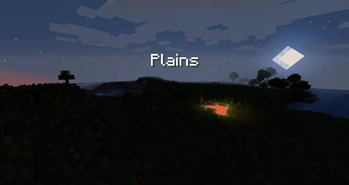
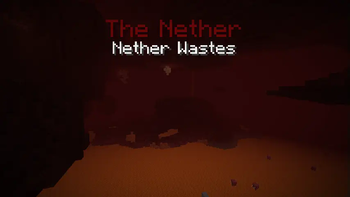
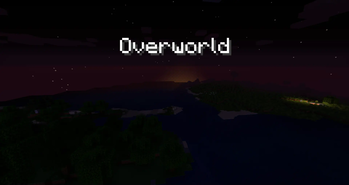
Epic, RPG-like titles when entering biomes & dimensions!
Screenshots
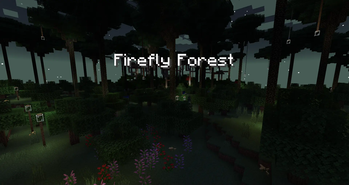
Über diese Mod
Traveler's Titles
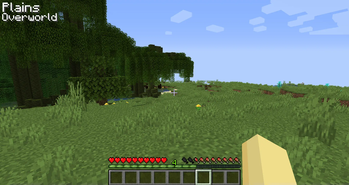
Traveler's Titles is a simple client-side mod that adds RPG-like titles when entering biomes or dimensions.
- Completely customizable - change text size, color, location, duration, & more
- Includes built-in titles for many modded dimensions - Atum, Twilight Forest, Bumblezone, Lost Cities, & more!
- Supports all modded biomes
- Supports custom titles with the Waystones mod! Will display a Waystone's title when you're near it (1.18+ Forge only)
- Supports custom sounds when entering new biomes, dimensions, or Waystone regions
- Dimension & biome blacklisting
Beautiful Custom Dimension Titles
Try out the beautiful Visual Traveler's Titles resource pack add-on by UnRoman for completely custom dimension titles! It includes support for a bunch of modded dimensions.
Adding Custom Sounds
To use custom sounds, all you have to do is create a small resource pack with the namespace travelerstitles. In the sounds folder, you can add any or all of three custom sounds, named dimension.ogg, biome.ogg, and waystone.ogg. Each of these sounds will play when entering a new dimension, biome, and waystone, respectively. If no custom sound is provided for any of these, then no sound will play for the respective type of title.
Additional Customization
Using lang files in resource packs, you can add your own dimension & biome titles!
Dimensions use a lang entry format like the following:
"travelerstitles.namespace.dimensionname": "Title"
Biomes use the same lang entries as always, guaranteeing built-in support for any mod's biomes, like so:
"biome.namespace.biomename": "Title"
However, should you want to change a vanilla or modded biome's title without potentially affecting other areas of the game that might use the biome's translation, you can use a special format specifically for this mod via the following:
"travelerstitles.biome.namespace.biomename": "Title"
Both dimensions and biomes also support an optional color lang entry which will override the configured default text color for that specific dimension or biome. The following is a complete example that adds a red title for the Nether and a green title for the Plains biome:
"travelerstitles.minecraft.the_nether": "The Nether",
"travelerstitles.minecraft.the_nether.color": "ff0000",
"travelerstitles.biome.minecraft.plains": "Plains",
"biome.minecraft.plains.color": "00ff00"
Note that for a biome's color entry, it is also acceptable to have the key start with travelerstitles, and any biome color entry with travelerstitles prepended to it will take priority over other entries.
For example, the following would resullt in blue (0000ff) text for the desert biome, since entries prepended with travelerstitles take priority:
"biome.minecraft.desert.color": "ff0000",
"travelerstitles.biome.desert.color": "0000ff"
Also note that colors are RGB hex-formatted strings.
See here for the lang entries that come included with the mod in 1.19.2. Lang entries for other versions may be available on a different branch.
Debug commands
The following commands work in single player worlds if you have sufficient permissions. They can be used to preview what titles will look like when you encounter them in the game.
/biometitle <biome>
/dimensiontitle <dimension>

Verfügbare Versionen
Traveler's Titles auf deinem Client installieren
Mod-Loader lokal installieren
Installiere fabric für deine lokale Minecraft-Version.
Passende Datei herunterladen
Wähle die Traveler's Titles-Datei für fabric und Minecraft 26.1.2.
Mod installieren
Lege die .jar-Datei in deinem lokalen .minecraft/mods-Ordner ab und starte Minecraft neu. Eine Installation auf dem Server ist nicht nötig.
Kompatibilität
Mod-Loader
Minecraft-Versionen
26.1.2, 26.1.1, 1.21.4 (+8 weitere)
Server-seitig
✗ Nicht unterstütztEmpfohlener RAM
4 GB(min. 3 GB)Häufige Fragen
Muss Traveler's Titles auf dem Minecraft Server installiert werden?
Nein. Modrinth kennzeichnet Traveler's Titles serverseitig als nicht unterstützt. Installiere die Mod nur im lokalen Minecraft-Mods-Ordner. Dein Server kann unverändert bleiben, sofern die Mod-Seite keine zusätzliche Abhängigkeit nennt.
Welche Version und welchen Loader braucht Traveler's Titles?
Nutze eine Datei für fabric, forge, neoforge und exakt deine Minecraft-Version. Unterstützte Versionen sind unter anderem 26.1.2, 26.1.1, 1.21.4. Loader-Dateien sind nicht untereinander austauschbar.
Traveler's Titles funktioniert nicht – was kann ich prüfen?
Prüfe zuerst Minecraft-Version, Loader-Version und erforderliche Abhängigkeiten. Lege die .jar-Datei im lokalen .minecraft/mods-Ordner ab und entferne ältere Duplikate. Da die Mod clientseitig ist, löst mehr Server-RAM dieses Problem nicht.
Ähnliche Mods




Minecraft Server für deine Gruppe
Traveler's Titles bleibt auf deinem Client. Hoste dazu eine kompatible Welt für deine Mitspieler.
Details
- Lizenz
- GNU Lesser General Public License v3.0 only
- Server-seitig
- Nicht unterstützt