
Unify
Unify resources, items, tags, loot tables, recipes and advancements effortlessly. Fully configurable. And more ...
Screenshots
Über diese Mod

Unify Mod for Minecraft
The "Unify" Minecraft mod is designed to simplify gameplay by reducing item duplication. Here's a breakdown of how it works and its configuration options:
How It Works
Item Unification: The mod uses regex to search for items whose paths match specific patterns. Items are unified if they have the same path or belong to the same group of paths. If it finds duplicates, it selects one as the unified version and removes the others from various game elements like loot tables, tags, recipes, creative tabs, advancements and recipe viewers (REI, JEI, ...).
Inheritance: The unified version inherits tags, recipes, etc., from its duplicate versions, ensuring that functionality is preserved.
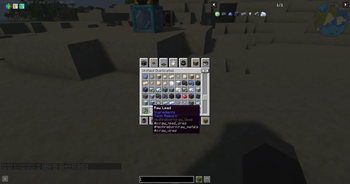
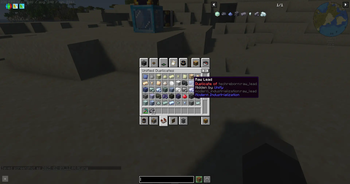
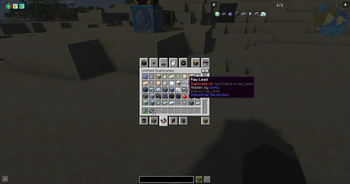
Creative Tab: You can find duplicate items in the Unify creative tab, with a tooltip indicating the unified version.
Replace on Right-Click: Duplicate items can be replaced with their unified version by right-clicking them.
Unification Recipes: Crafting recipes are added to replace duplicates with their unified version.
Configuration
The mod is highly configurable, allowing you to customize which items are unified and how duplicates are identified. Here's a detailed look at the configuration options:
globalSearch: This section allows you to set global rules for identifying duplicate items.
itemsToIgnore: List of items that the mod will ignore. These items won't be unified or considered duplicates.
"itemsToIgnore": [ "examplemod:lead_block" ]namespacePriorities: A prioritization list of namespaces. The mod will favor items from these namespaces in the order they appear to be the unified version.
"namespacePriorities": [ "techreborn", "modern_industrialization" ]pathStartsWith: Specifies patterns that the start of the item identifier path must match. This can be a string or a list of strings. When a list is provided, items matching any of the patterns in the list will be grouped together.
"pathStartsWith": [ "raw_" ]pathEndsWith: Specifies patterns that the end of the item identifier path must match. This can be a string or a list of strings. When a list is provided, items matching any of the patterns in the list will be grouped together.
"pathEndsWith": [
  "_ore",
  [
    "_block",
    "_storage_block"
  ],
  "_ingot",
  "_nugget",
  "_dust",
  "_plate",
  "_rod",
  "_gear"
]
itemsToUnify: This section allows you to manually specify which items should be unified. The key is the unified item, and the value is an array of duplicate items.
"itemsToUnify": { "modern_industrialization:lead_block": [ "techreborn:lead_storage_block" ] }replaceOnUse: Allows replacing duplicate items with their unified version by right-clicking.
"replaceOnUse": truegenerateUnificationRecipes: Adds crafting recipes to replace duplicates with their unified version.
"generateUnificationRecipes": truehideDuplicatesInItemGroups: Hide duplicates in Creative Item Groups.
"hideDuplicatesInItemGroups": truehideDuplicatesInRecipeViewers: Hide duplicates in recipes viewers (REI, JEI, ...).
"hideDuplicatesInRecipeViewers": true
Example Configuration
Here's an example configuration that demonstrates how you might set up the mod:
{
  "globalSearch": {
    "itemsToIgnore": [
      "examplemod:lead_block"
    ],
    "namespacePriorities": [
      "techreborn",
      "modern_industrialization"
    ],
    "pathStartsWith": [
      "raw_"
    ],
    "pathEndsWith": [
      "_ore",
      [
        "_block",
        "_storage_block"
      ],
      "_ingot",
      "_nugget",
      "_dust",
      "_plate",
      "_rod",
      "_gear"
    ]
  },
  "itemsToUnify": {
    "modern_industrialization:lead_block": [
      "techreborn:lead_storage_block"
    ]
  },
  "replaceOnUse": true,
  "generateUnificationRecipes": true,
  "hideDuplicatesInItemGroups": true,
  "hideDuplicatesInRecipeViewers": true
}
This configuration ensures that items like raw_lead from different mods are unified according to the specified patterns and priorities, while examplemod:lead_block is ignored. Items like lead_block and lead_storage_block will be grouped together, with one being the unified version and the other a duplicate.
By customizing these settings, you can tailor the mod to fit your specific needs and preferences, streamlining your Minecraft gameplay experience.
Verfügbare Versionen
Unify auf dem Server installieren
Server bestellen
Bestelle einen Minecraft Java Server mit mindestens 3 GB RAM (4 GB empfohlen).
fabric Loader setzen
Wähle im Panel unter "Egg" den fabric-Loader und die passende Minecraft-Version (1.21.4).
Mod installieren
Öffne den Mod-Browser im Dashboard und suche nach "Unify". Klicke "Installieren" – fertig! Alternativ: Lade die .jar via SFTP in den /mods Ordner.
Kompatibilität
Mod-Loader
Minecraft-Versionen
1.21.4, 1.21.1, 1.20.1
Server-seitig
✓ ErforderlichEmpfohlener RAM
4 GB(min. 3 GB)Häufige Fragen
Unify Server crasht beim Start – was tun?
Häufigste Ursache: falsche fabric-Version oder zu wenig RAM. Prüfe im Server-Log (latest.log), ob ein "OutOfMemoryError" oder "Mixin"-Fehler auftritt. Bei Mado Hosting: Stelle sicher, dass mindestens 3 GB RAM zugewiesen sind und der Loader zur Mod-Version passt (1.21.4). Über das Panel kannst du den Loader mit einem Klick wechseln.
Ist Unify mit fabric kompatibel?
Unify unterstützt offiziell fabric für Minecraft 1.21.4, 1.21.1, 1.20.1. Im Mado Dashboard werden inkompatible Loader-Kombinationen automatisch erkannt.
Server laggt mit Unify – wie optimiere ich die Performance?
Empfohlener RAM: 4 GB (+1 GB pro 8 Spieler). Prüfe mit /spark profiler, ob Unify den meisten Tick-Time verbraucht. Häufige Fixes: Server-View-Distance auf 8-10 reduzieren, bei Forge "performant" oder "starlight" als Zusatz-Mod installieren. Bei Mado Hosting läuft dein Server auf NVMe-SSDs mit dedizierten CPU-Kernen für minimale Latenz.
Ähnliche Mods



Modded Server mieten
Installiere Unify mit nur einem Klick auf deinem Server.