
Useful Spyglass
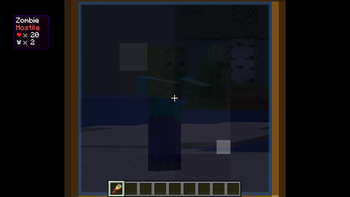
Viewing a mob or player with a spyglass displays some information on the screen. Also adds a unique enchantment for the spyglass.
Screenshots
Über diese Mod
Useful Spyglass
Features:
This mod allows players to view information on mobs when viewing them through a spyglass, such as name, health, armor, and hostility.
Enchantments:
As of 0.6.0, usage of any enchantment will put the spyglass on cooldown. No other spyglass enchantments can be used while the cooldown is active. Marking effects applied through enchantments are only visible to the user as of update 0.7.0.
- Marking: Pressing the attack keybind marks mobs viewed through a spyglass. Puts the spyglass on cooldown for 0.8x of the marking duration.
- Precision: Offhanding a spyglass and crouching while using a ranged weapon grants zoom. Projectiles gain perfect accuracy and deal extra damage. 4 second cooldown by default.
- Spotter: Pressing the attack keybind while looking through a spyglass summons an eye of ender to constantly mark entities near the targeted position. Requires line of sight and can detect invisible entities. Cooldown time is 1.4x the active duration.
Configuration:
- Block display, entity display, and HUD position can be adjusted in the client side config.
- Cooldown times and enchantment settings can be adjusted in the server side config.
Compatibility:
- If Jade is installed, its overlay will be shown instead of the builtin one. This is configurable. Requires version 0.8.0+.
- If Enchantment descriptions is installed, the details of each enchantment will be displayed in-game.
- Compatible with Spyglass improvements. Spyglass enchantments can be used if the spyglass is placed in the curio/trinkets slot. Requires Accessories/Accessories compat layer for 1.21.1-0.7.0, curios/trinkets for 1.20.1 or 0.8.0+.
- Precision can be made compatible with ranged weapons from other mods from versions 1.21.1-0.7.0 or 0.8.0+. Check the github readme for details.
Modpacks:
- This mod can be included in any Modrinth modpack.
Verfügbare Versionen
Useful Spyglass auf dem Server installieren
Server bestellen
Bestelle einen Minecraft Java Server mit mindestens 3 GB RAM (4 GB empfohlen).
fabric Loader setzen
Wähle im Panel unter "Egg" den fabric-Loader und die passende Minecraft-Version (1.21.1).
Mod installieren
Öffne den Mod-Browser im Dashboard und suche nach "Useful Spyglass". Klicke "Installieren" – fertig! Alternativ: Lade die .jar via SFTP in den /mods Ordner.
Kompatibilität
Mod-Loader
Minecraft-Versionen
1.21.1, 1.20.1, 1.19.2 (+1 weitere)
Server-seitig
✓ ErforderlichEmpfohlener RAM
4 GB(min. 3 GB)Häufige Fragen
Useful Spyglass Server crasht beim Start – was tun?
Häufigste Ursache: falsche fabric-Version oder zu wenig RAM. Prüfe im Server-Log (latest.log), ob ein "OutOfMemoryError" oder "Mixin"-Fehler auftritt. Bei Mado Hosting: Stelle sicher, dass mindestens 3 GB RAM zugewiesen sind und der Loader zur Mod-Version passt (1.21.1). Über das Panel kannst du den Loader mit einem Klick wechseln.
Ist Useful Spyglass mit fabric und forge und neoforge kompatibel?
Useful Spyglass unterstützt offiziell fabric, forge, neoforge für Minecraft 1.21.1, 1.20.1, 1.19.2. Achtung: Forge- und Fabric-Mods sind NICHT untereinander kompatibel – wähle einen Loader und bleibe dabei. Im Mado Dashboard werden inkompatible Loader-Kombinationen automatisch erkannt.
Server laggt mit Useful Spyglass – wie optimiere ich die Performance?
Empfohlener RAM: 4 GB (+1 GB pro 8 Spieler). Prüfe mit /spark profiler, ob Useful Spyglass den meisten Tick-Time verbraucht. Häufige Fixes: Server-View-Distance auf 8-10 reduzieren, bei Forge "performant" oder "starlight" als Zusatz-Mod installieren. Bei Mado Hosting läuft dein Server auf NVMe-SSDs mit dedizierten CPU-Kernen für minimale Latenz.
Ähnliche Mods



![[TaCZ] Timeless and Classics Zero](https://cdn.modrinth.com/data/SzzJttH8/fd27766d2bb8390d284696b1dbd358f87e081439_96.webp)


Modded Server mieten
Installiere Useful Spyglass mit nur einem Klick auf deinem Server.