
VaultSMP Administrator Utilities
Adds many utilities for Admins.
Screenshots
Über diese Mod
VaultSMP Administrator Utilities
This mod adds features that help admins on survival servers.
Features
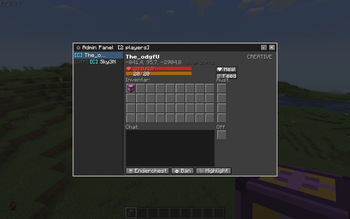
Admin Panel
The Admin Panel is an ingame panel that can be opened with .
In it you can see a list of all Players and if there online or not. You can also see usefull information about the players such as:
- HP and Hunger
- Location
- Inventory and E-chest
- chat log
- Gamemode
In the GUI there are buttons that have various funktions such as:
- Giving Regeneration
- Giving Saturation
- looking in the Players E-chest
- Banning the Player
- Highlighting the Player (only Visible to Admins)
chat logs get saved in the server files under: ...\Server\adminutility\chatlogs
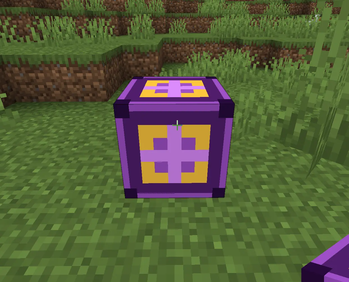
Zone Block
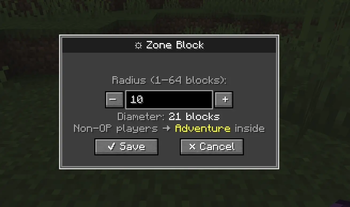
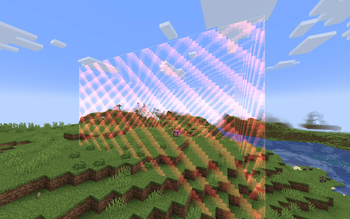
The Zone Block is a utility Block that sets non operators into adventure mode when they enter the radius and get changed back when they exit
- You can toggle the visibility of the borders with a button that can be changed in the control settings
- you can change the radius of the block
- Players in it dont recieve damage
- inside the zone explosions do not destroy blocks
- Block cant be mined or destroyed
- Block can be found in the operator item tab in the creative inventory
Verfügbare Versionen
VaultSMP Administrator Utilities auf dem Server installieren
Server bestellen
Bestelle einen Minecraft Java Server mit mindestens 3 GB RAM (4 GB empfohlen).
fabric Loader setzen
Wähle im Panel unter "Egg" den fabric-Loader und die passende Minecraft-Version (1.20.1).
Mod installieren
Öffne den Mod-Browser im Dashboard und suche nach "VaultSMP Administrator Utilities". Klicke "Installieren" – fertig! Alternativ: Lade die .jar via SFTP in den /mods Ordner.
Kompatibilität
Mod-Loader
Minecraft-Versionen
1.20.1
Server-seitig
✓ ErforderlichEmpfohlener RAM
4 GB(min. 3 GB)Häufige Fragen
VaultSMP Administrator Utilities Server crasht beim Start – was tun?
Häufigste Ursache: falsche fabric-Version oder zu wenig RAM. Prüfe im Server-Log (latest.log), ob ein "OutOfMemoryError" oder "Mixin"-Fehler auftritt. Bei Mado Hosting: Stelle sicher, dass mindestens 3 GB RAM zugewiesen sind und der Loader zur Mod-Version passt (1.20.1). Über das Panel kannst du den Loader mit einem Klick wechseln.
Ist VaultSMP Administrator Utilities mit fabric kompatibel?
VaultSMP Administrator Utilities unterstützt offiziell fabric für Minecraft 1.20.1. Im Mado Dashboard werden inkompatible Loader-Kombinationen automatisch erkannt.
Server laggt mit VaultSMP Administrator Utilities – wie optimiere ich die Performance?
Empfohlener RAM: 4 GB (+1 GB pro 8 Spieler). Prüfe mit /spark profiler, ob VaultSMP Administrator Utilities den meisten Tick-Time verbraucht. Häufige Fixes: Server-View-Distance auf 8-10 reduzieren, bei Forge "performant" oder "starlight" als Zusatz-Mod installieren. Bei Mado Hosting läuft dein Server auf NVMe-SSDs mit dedizierten CPU-Kernen für minimale Latenz.
Ähnliche Mods






Modded Server mieten
Installiere VaultSMP Administrator Utilities mit nur einem Klick auf deinem Server.