
VeinMine
Veinmine is a simple, lightweight, multi- loader, and fast-updating Minecraft mod that allows players to efficiently mine connected blocks of the same type.
Screenshots



Über diese Mod
Vein Mine - Minecraft Mod
English | 简体中文
Introduction
Vein Mine is a lightweight, fast-updating vein mining mod for Minecraft that allows players to efficiently mine connected blocks of the same type.
Whether you’re mining ores, chopping trees, harvesting crops, or gathering building materials, Vein Mine helps you do it faster while remaining highly configurable and multiplayer-friendly.
Unlike many vein mining mods, Vein Mine provides advanced block matching options, allowing players and server owners to precisely control which blocks should be considered part of the same vein.
Features
Vein Mining
- Mine connected blocks with a single action.
- Works with vanilla and modded blocks.
- Configurable activation mode (Toggle or Hold).
Advanced Block Matching (1.4.1+)
- Distinguish mature and immature crops.
- Distinguish dyed block color variants.
- Distinguish deepslate ores and normal ores.
- Optional one-block gap bridging.
Tool Protection
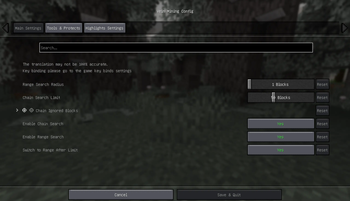
- Prevent tools from breaking unexpectedly.
- Configurable durability protection threshold.
- Custom protected tool list support.
Multiplayer Friendly
- Server-controlled configuration.
- Client settings automatically respect server rules.
- Consistent behavior across multiplayer environments.
Highlighting
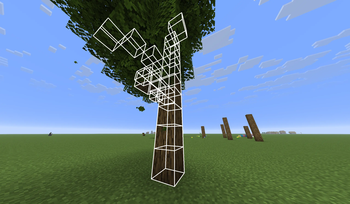
- Real-time target highlighting.
- Preview exactly which blocks will be mined before breaking them.
Configuration
1.4.0+
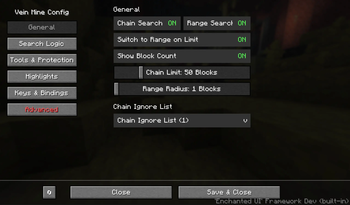
Open the configuration screen using: V + M (default)
Older Versions
For Fabric: Install Mod Menu and open Vein Mine through the Mods menu.
For NeoForge: Open Vein Mine through the Mods menu
Manual Configuration
Edit:
.minecraft/config/veinmine.jsonFor dedicated servers, the configuration file located in
<your server's path>/config/veinmine.jsonUse
/veinmine reloadcommand to reload configuration from file.For detailed explanations of all available options, see:
Controls
- ~ (default): Toggle Vein Mine
- V + M (default): Open Configuration Screen (1.4.0+)
Notes
Feature availability may vary between older releases and the latest version.
Support & Feedback
If you encounter any issues or have any suggestions, feel free to open an issue on our GitHub Issues page.
Or, if you'd like to contribute to the project, welcome to open a PR on GitHub!
License
This mod is licensed under the GNU General Public License Version 3. See LICENSE for details.
Verfügbare Versionen
VeinMine auf dem Server installieren
Server bestellen
Bestelle einen Minecraft Java Server mit mindestens 3 GB RAM (4 GB empfohlen).
fabric Loader setzen
Wähle im Panel unter "Egg" den fabric-Loader und die passende Minecraft-Version (26.3).
Mod installieren
Öffne den Mod-Browser im Dashboard und suche nach "VeinMine". Klicke "Installieren" – fertig! Alternativ: Lade die .jar via SFTP in den /mods Ordner.
Kompatibilität
Mod-Loader
Minecraft-Versionen
26.3, 26.3-snapshot-9, 26.2 (+22 weitere)
Server-seitig
✓ ErforderlichEmpfohlener RAM
4 GB(min. 3 GB)Häufige Fragen
VeinMine Server crasht beim Start – was tun?
Häufigste Ursache: falsche fabric-Version oder zu wenig RAM. Prüfe im Server-Log (latest.log), ob ein "OutOfMemoryError" oder "Mixin"-Fehler auftritt. Bei Mado Hosting: Stelle sicher, dass mindestens 3 GB RAM zugewiesen sind und der Loader zur Mod-Version passt (26.3). Über das Panel kannst du den Loader mit einem Klick wechseln.
Ist VeinMine mit fabric und neoforge kompatibel?
VeinMine unterstützt offiziell fabric, neoforge für Minecraft 26.3, 26.3-snapshot-9, 26.2. Im Mado Dashboard werden inkompatible Loader-Kombinationen automatisch erkannt.
Server laggt mit VeinMine – wie optimiere ich die Performance?
Empfohlener RAM: 4 GB (+1 GB pro 8 Spieler). Prüfe mit /spark profiler, ob VeinMine den meisten Tick-Time verbraucht. Häufige Fixes: Server-View-Distance auf 8-10 reduzieren, bei Forge "performant" oder "starlight" als Zusatz-Mod installieren. Bei Mado Hosting läuft dein Server auf NVMe-SSDs mit dedizierten CPU-Kernen für minimale Latenz.
Ähnliche Mods




Modded Server mieten
Installiere VeinMine mit nur einem Klick auf deinem Server.