
VillagersPlus
A villager extension mod, adding new villager types, trades and beautiful workstations.
Screenshots
Über diese Mod

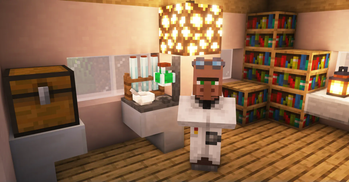
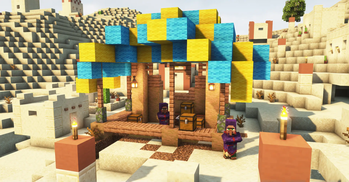
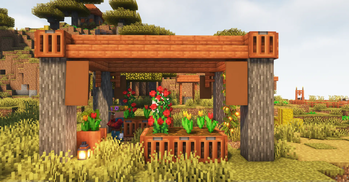
VillagersPlus adds new villagers, trades and unique and beautiful workstations.
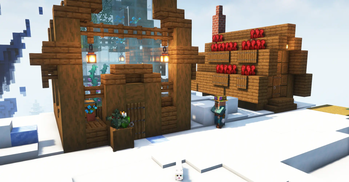
Every villager outfit, house and workstation was designed with a lot of attention to detail to create an immersive experience for you.
Versions: 1.19-1.20.1, 1.21.1, 1.21.8
Loader: Fabric, NeoForge, Forge
Support my work on


Requires VillagerTradingPlus
VillagersPlus needs VillagersTradingPlus to run. It is the library that builds every trade in this mod, on Fabric as well as on NeoForge. Without it the game will not start.
On Fabric you also need Fabric API. On NeoForge you do not.
Professions
| Profession | Workstation | Theme |
|---|---|---|
| Horticulturist | Flower Tub | Flowers, saplings, leaves and everything that grows |
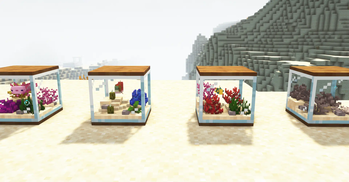
| Oceanographer | Aquarium | Corals, sea plants and the creatures that live in them |
| Alchemist | Alchemist Table | Potions, brewing ingredients and nether loot |
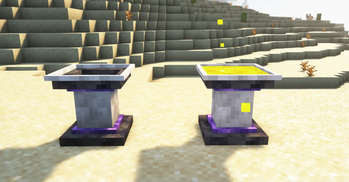
| Occultist | Enchanted Basin | Amethyst, candles, soul fire and experience |
| Miner | Ore Grinder | Ores, rails, pickaxes and everything below y=0 |
Workstations
Flower Tub (Horticulturist) Holds up to 4 small plants or 1 tall plant: flowers, saplings, corals, grass and more. Comes in every wood variant.
Aquarium (Oceanographer) Holds up to 4 sea plants and 1 bucketable entity. Feed it Fish Food to enlarge the fish, Diet Food to shrink it again, and Calming Food to settle it down. Place more aquariums next to it to create an even larger one.
Enchanted Basin (Occultist) Stores experience. Right-click to take experience out, sneak right-click to store it.
Alchemist Table (Alchemist) Insert gunpowder as fuel, three empty bottles and one potion as the ingredient. With a 1 in 3 chance the three bottles are converted into random potions, each of them either a normal or a splash potion. Otherwise the table explodes and the bottles and fuel are lost. The terrain stays intact, and the explosion can be switched off in the config.
Ore Grinder (Miner) A furnace-style ore doubler with four slots: input, fuel, output and a pickaxe.
- The pickaxe material sets the speed: no pickaxe 800 ticks, wood 600, stone 300, iron 200, diamond 150, netherite 133, gold 100.
- Fortune on the pickaxe adds extra yield on top of the doubling.
- The pickaxe takes durability damage per grind and breaks when depleted.
- A redstone signal pauses the machine.
The Miner's mineshaft
A shaft descends from underneath every miner's house. By default it ends in a real vanilla mineshaft, with corridors, crossings, rails, cobwebs and minecart chests, instead of dead-ending. The miner's house generates in plains, savanna and taiga villages.
Trades and datapacks
Every trade in this mod is defined as JSON and served by VillagersTradingPlus. A datapack can add, replace or delete trades, change the currency away from emeralds, gate trades behind conditions and reprice them, for the VillagersPlus professions as well as the vanilla ones and the wandering trader. The full trade format is documented on that project's page.
Configuration
Workstations
- Max experience storable in the Enchanted Basin, and the amount per interaction
- Whether the Alchemist Table can explode, and how likely it is
- Ore Grinder output multiplier, Fortune bonus and pickaxe damage per grind
Worldgen
- The weight of every VillagersPlus house in each village type
- Whether the miner's shaft opens into a real vanilla mineshaft
Trade counts, price scaling and the trading screen controls live in VillagerTradingPlus' own config, because they apply to every mod feeding the library.
Trades
Horticulturist - Level 1:
- Oxeye Daisy, Poppy, Allium, Azure Bluet, Cornflower, Lily of the Valley, Dandelion - Buy 1 for 2 Emeralds
- Wheat Seeds - Sell 4 for 1 Emerald
- Beetroot Seeds, Melon Seeds, Pumpkin Seeds - Sell 2 for 1 Emerald
Horticulturist - Level 2:
- All leaves blocks - Buy 2 for 4 Emeralds
- Dead Bush - Buy 1 for 3 Sticks, 1 Emerald
- Short Grass - Sell 4 for 1 Emerald
- Fern - Sell 2 for 1 Emerald
Horticulturist - Level 3:
- All tulips - Buy 1 for 4 Emeralds
- Flower Pot - Buy 1 for 5 Emeralds
- All saplings - Sell 1 for 2 Emeralds
Horticulturist - Level 4:
- Sunflower, Rose Bush, Lilac, Peony - Buy 1 for 5 Emeralds
- Rooted Dirt, Podzol - Sell 2 for 1 Emerald
Horticulturist - Level 5:
- Pink Petals - Buy 1 for 4 Emeralds
- Blue Orchid - Buy 1 for 4 Emeralds
- Wither Rose - Buy 1 for 8 Emeralds
- Spore Blossom - Buy 1 for 12 Emeralds
- Flowering Azalea Leaves - Buy 2 for 4 Emeralds
- Moss Block - Sell 2 for 1 Emerald
- Bone Meal - Sell 4 for 1 Emerald
Occultist - Level 1:
- All Amethyst Buds - Buy 1 for 1, 2, 3 or 5 Emeralds
- Tinted Glass - Buy 4 for 8 Emeralds
- Glow Ink Sac - Sell 1 for 1 Emerald
- Amethyst Shard - Sell 3 for 1 Emerald
Occultist - Level 2:
- Soul Lantern - Buy 1 for 4 Emeralds
- Soul Torch - Buy 1 for 2 Emeralds
- Glowstone Dust - Buy 2 for 4 Emeralds
- Soul Sand, Soul Soil - Sell 2 for 1 Emerald
Occultist - Level 3:
- All colored candles - Buy 2 for 4 Emeralds
Occultist - Level 4:
- Quartz - Buy 2 for 4 Emeralds
- Spectral Arrow - Buy 2 for 2 Emeralds
- Candle - Buy 2 for 4 Emeralds
Occultist - Level 5:
- Experience Bottle - Buy 1 for 3 Emeralds
- Poisonous Potato - Sell 1 for 10 Emeralds
Oceanographer - Level 1:
- Sea Pickle - Buy 1 for 3 Emeralds
- Water Bucket - Buy 1 for 5 Emeralds
- Fish Food, Diet Food, Calming Food - Buy 1 for 4 Emeralds
- Seagrass - Sell 4 for 1 Emerald
- Kelp - Sell 8 for 2 Emeralds
Oceanographer - Level 2:
- All corals - Buy 1 for 3 Emeralds
- All dead corals - Exchange for living coral + 1 Emerald
Oceanographer - Level 3:
- All coral fans - Buy 1 for 3 Emeralds
- All dead coral fans - Exchange for living coral fan + 1 Emerald
Oceanographer - Level 4:
- All coral blocks - Buy 1 for 5 Emeralds
- All dead coral blocks - Exchange for living coral block + 1 Emerald
Oceanographer - Level 5:
- Nautilus Shell - Buy 1 for 6 Emeralds
- Sponge - Buy 1 for 8 Emeralds
- Turtle Scute - Sell 1 for 4 Emeralds
- Tropical Fish Bucket, Axolotl Bucket, Pufferfish Bucket - Sell 1 for 5 Emeralds
Alchemist - Level 1:
- Sugar, Brown Mushroom, Red Mushroom - Buy 1 for 3 Emeralds
- Nether Wart - Buy 1 for 5 Emeralds
- Glass Bottle - Sell 3 for 1 Emerald
Alchemist - Level 2:
- Magma Cream - Buy 1 for 4 Emeralds
- Pufferfish, Fermented Spider Eye - Buy 1 for 5 Emeralds
- Any potion - Exchange for a random potion + 5 Emeralds
Alchemist - Level 3:
- Blaze Powder, Ghast Tear, Phantom Membrane - Buy 1 for 5 Emeralds
- Gunpowder - Buy 1 for 3 Emeralds
- Blaze Rod - Sell 1 for 4 Emeralds
- Ender Pearl - Sell 1 for 2 Emeralds
Alchemist - Level 4:
- Any potion - Exchange for a random splash potion + 8 Emeralds
Alchemist - Level 5:
- Dragon Breath - Buy 1 for 8 Emeralds
- Glistering Melon Slice - Buy 1 for 4 Emeralds
- Rabbit's Foot - Buy 1 for 4 Emeralds
Miner - Level 1:
- Coal - Sell 15 for 1 Emerald
- Cobblestone - Sell 20 for 1 Emerald
- Torch - Buy 8 for 1 Emerald
- Ladder - Buy 6 for 1 Emerald
- Rail - Buy 4 for 1 Emerald
Miner - Level 2:
- Raw Iron - Sell 4 for 1 Emerald
- Raw Iron - Exchange for Iron Ingot + 1 Emerald
- Lantern - Buy 1 for 3 Emeralds
- Minecart - Buy 1 for 4 Emeralds
- Iron Bars - Buy 8 for 2 Emeralds
Miner - Level 3:
- Raw Copper - Sell 6 for 1 Emerald
- Cobbled Deepslate - Buy 8 for 1 Emerald
- Tuff - Buy 8 for 1 Emerald
- Powered Rail - Buy 2 for 3 Emeralds
- Chain - Buy 4 for 2 Emeralds
- Iron Pickaxe with Efficiency II - Buy 1 for 9 Emeralds
Miner - Level 4:
- Raw Gold - Sell 4 for 1 Emerald
- Glowstone - Buy 4 for 3 Emeralds
- TNT - Buy 1 for 8 Emeralds
Miner - Level 5:
- Diamond - Buy 1 for 10 Emeralds
- Diamond Pickaxe with Efficiency IV - Buy 1 for 32 Emeralds
- Amethyst Shard - Buy 1 for 1 Emerald
- Obsidian - Buy 2 for 3 Emeralds
- Ancient Debris - Sell 1 for 8 Emeralds
Verfügbare Versionen
VillagersPlus auf dem Server installieren
Server bestellen
Bestelle einen Minecraft Java Server mit mindestens 4 GB RAM (6 GB empfohlen).
fabric Loader setzen
Wähle im Panel unter "Egg" den fabric-Loader und die passende Minecraft-Version (1.21.8).
Mod installieren
Öffne den Mod-Browser im Dashboard und suche nach "VillagersPlus". Klicke "Installieren" – fertig! Alternativ: Lade die .jar via SFTP in den /mods Ordner.
Kompatibilität
Mod-Loader
Minecraft-Versionen
1.21.8, 1.21.1, 1.20.1 (+6 weitere)
Server-seitig
✓ ErforderlichEmpfohlener RAM
6 GB(min. 4 GB)Häufige Fragen
VillagersPlus Server crasht beim Start – was tun?
Häufigste Ursache: falsche fabric-Version oder zu wenig RAM. Prüfe im Server-Log (latest.log), ob ein "OutOfMemoryError" oder "Mixin"-Fehler auftritt. Bei Mado Hosting: Stelle sicher, dass mindestens 4 GB RAM zugewiesen sind und der Loader zur Mod-Version passt (1.21.8). Über das Panel kannst du den Loader mit einem Klick wechseln.
Ist VillagersPlus mit fabric und forge und neoforge kompatibel?
VillagersPlus unterstützt offiziell fabric, forge, neoforge für Minecraft 1.21.8, 1.21.1, 1.20.1. Achtung: Forge- und Fabric-Mods sind NICHT untereinander kompatibel – wähle einen Loader und bleibe dabei. Im Mado Dashboard werden inkompatible Loader-Kombinationen automatisch erkannt.
Server laggt mit VillagersPlus – wie optimiere ich die Performance?
Empfohlener RAM: 6 GB (+1 GB pro 5 Spieler). Prüfe mit /spark profiler, ob VillagersPlus den meisten Tick-Time verbraucht. Häufige Fixes: Server-View-Distance auf 8-10 reduzieren, bei Forge "performant" oder "starlight" als Zusatz-Mod installieren. Bei Mado Hosting läuft dein Server auf NVMe-SSDs mit dedizierten CPU-Kernen für minimale Latenz.
Ähnliche Mods




Modded Server mieten
Installiere VillagersPlus mit nur einem Klick auf deinem Server.
Details
- Lizenz
- GNU Lesser General Public License v3.0 only
- Server-seitig
- Erforderlich