
vProxyManager
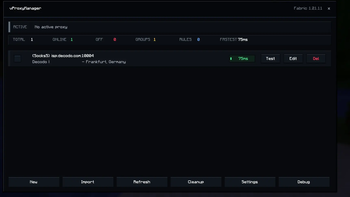
vProxyManager is a client-side proxy manager for Fabric. It lets you import and manage SOCKS/HTTP proxies, organize them into groups, test their status, and assign specific proxy rules per multiplayer server.
Screenshots
Über diese Mod
vProxyManager
vProxyManager is a powerful client-side proxy manager for Fabric. It makes proxy routing in Minecraft simple, secure, and fully controllable from inside the game.
Add and organize proxies, test their connection quality, create server-specific rules, automatically avoid failing proxies, and choose exactly how every multiplayer server should be joined.
No server-side installation is required.
Features
- SOCKS5, SOCKS4, and HTTP proxy support
- Global active proxy
- Per-server proxy rules
- Wildcard rules such as
*.example.net - Fixed proxy selection for individual servers
- Rotate through all proxies or selected groups
- Automatically select the fastest tested proxy
- Direct connections for selected servers
- Enable or disable individual proxies
- Intelligent cooldown for failing proxies
- Automatic fallback when a proxy fails
- Proxy groups and favorites
- Search, filters, and multiple sorting modes
- Built-in connection and latency testing
- Reliability and quality information
- IP and location lookup after testing
- Automatic proxy refresh
- Connection history
- Duplicate and invalid-entry cleanup
- Import and export tools
- Safe export without passwords
- Server-list proxy badges
- Join overlay showing the selected route
- Configurable manager button and badge positions
- Integrated Modrinth update checks
- Mod Menu support
- Custom dark interface designed for Minecraft
Secure Password Storage
Saved proxy passwords are encrypted locally using AES-256-GCM.
- Existing plain-text passwords are migrated automatically
- Encryption uses a local installation-specific key
- Passwords are no longer stored as readable text
- Missing or invalid encryption keys are detected safely
- Your proxy credentials are never uploaded by vProxyManager
Keep your
vproxymanager.keyfile when moving an existing configuration. Encrypted passwords cannot be restored without the matching key.
Server Rules
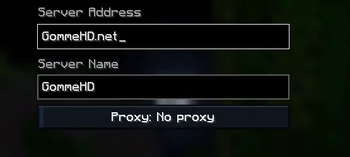
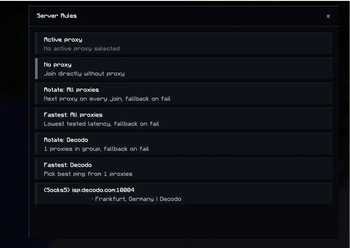
Every server can use its own routing behavior:
- Active Proxy — Uses the currently active global proxy
- No Proxy — Connects directly without proxy routing
- Fixed Proxy — Always uses one selected proxy
- Rotate All — Selects the next available proxy on every connection
- Fastest All — Uses the fastest available tested proxy
- Rotate Group — Rotates through proxies in one group
- Fastest Group — Uses the fastest proxy from one group
Wildcard rules can cover multiple addresses at once:
*.example.net
*.hypixel.net
play.*
Exact server rules take priority over wildcard rules.
Intelligent Cooldown and Fallback
Failed proxies are temporarily placed on cooldown instead of being retried continuously.
When automatic fallback is enabled, vProxyManager can select another available proxy after a connection failure. Disabled, offline, or cooling-down proxies are excluded automatically.
Cooldown duration and automatic refresh behavior can be configured in the settings.
Proxy Testing
The integrated tester displays useful information for every proxy:
- Online or offline state
- Connection latency
- Reliability rating
- Last test time
- Detected IP address
- Approximate location
- Authentication problems
- Active cooldown
Proxies can be tested individually or refreshed together.
Connection History
vProxyManager records recent routing attempts locally, including:
- Target server
- Selected proxy or direct connection
- Connection result
- Failure reason
- Connection time
The history size is configurable and can be cleared at any time.
Search and Organization
Large proxy lists can be managed using:
- Text search
- Groups
- Favorites
- Online and offline filters
- Name sorting
- Latency sorting
- Quality sorting
- Group sorting
- Type sorting
- Status sorting
Supported Import Formats
vProxyManager recognizes common proxy formats:
host:port
host:port:user:password
user:password@host:port

socks5://host:port
socks5://user:password@host:port
socks4://host:port
http://host:port
http://user:password@host:port

(Socks5) host:port
(Socks5) host:port:user:password
(Socks4) host:port
(Http) host:port:user:password
The importer detects duplicates and invalid entries before saving them. A specific proxy type can also be forced during import.
Languages
A language selection screen appears when vProxyManager is started for the first time.
Currently supported:
- English
- German
- Russian
- Spanish
- French
- Simplified Chinese
The language can be changed later from the settings menu.
Supported Minecraft Versions
Separate optimized JAR files are available for:
- Minecraft 1.21–1.21.11
- Minecraft 26.1
- Minecraft 26.1.1
- Minecraft 26.1.2
- Minecraft 26.2
Make sure to download the JAR made for your exact Minecraft version.
Java Requirements
- Minecraft 1.21–1.21.11: Java 21 or newer
- Minecraft 26.1–26.2: Java 25 or newer
Installation
- Install the Fabric Loader for your Minecraft version.
- Install the matching Fabric API version.
- Download the vProxyManager JAR for your exact Minecraft version.
- Place the JAR inside your profile's
modsfolder. - Start Minecraft and select your preferred language.
- Open vProxyManager using the menu button, Mod Menu, or the configurable keybind.
Important Notes
- vProxyManager is a client-side mod.
- The mod does not provide or sell proxies.
- Proxy quality depends on your proxy provider.
- Some Minecraft servers may restrict or block proxy connections.
- Keep backups of your configuration and encryption key.
- Never share exported proxy lists containing credentials.
Support and Community
Need help, found a bug, or have an idea for the mod?
Verfügbare Versionen
vProxyManager auf deinem Client installieren
Mod-Loader lokal installieren
Installiere fabric für deine lokale Minecraft-Version.
Passende Datei herunterladen
Wähle die vProxyManager-Datei für fabric und Minecraft 26.3.
Mod installieren
Lege die .jar-Datei in deinem lokalen .minecraft/mods-Ordner ab und starte Minecraft neu. Eine Installation auf dem Server ist nicht nötig.
Kompatibilität
Mod-Loader
Minecraft-Versionen
26.3, 26.2, 26.1.2 (+14 weitere)
Server-seitig
✗ Nicht unterstütztEmpfohlener RAM
4 GB(min. 3 GB)Häufige Fragen
Muss vProxyManager auf dem Minecraft Server installiert werden?
Nein. Modrinth kennzeichnet vProxyManager serverseitig als nicht unterstützt. Installiere die Mod nur im lokalen Minecraft-Mods-Ordner. Dein Server kann unverändert bleiben, sofern die Mod-Seite keine zusätzliche Abhängigkeit nennt.
Welche Version und welchen Loader braucht vProxyManager?
Nutze eine Datei für fabric und exakt deine Minecraft-Version. Unterstützte Versionen sind unter anderem 26.3, 26.2, 26.1.2. Loader-Dateien sind nicht untereinander austauschbar.
vProxyManager funktioniert nicht – was kann ich prüfen?
Prüfe zuerst Minecraft-Version, Loader-Version und erforderliche Abhängigkeiten. Lege die .jar-Datei im lokalen .minecraft/mods-Ordner ab und entferne ältere Duplikate. Da die Mod clientseitig ist, löst mehr Server-RAM dieses Problem nicht.
Ähnliche Mods





Minecraft Server für deine Gruppe
vProxyManager bleibt auf deinem Client. Hoste dazu eine kompatible Welt für deine Mitspieler.