Auto Supports
Provides buildables for automatically building support structures.
Beschreibung
Auto Supports
! This mod is currently NOT multiplayer compatible !
Mod page: [Auto Supports](https://ficsit.app/mod/AutoSupport)
Overview
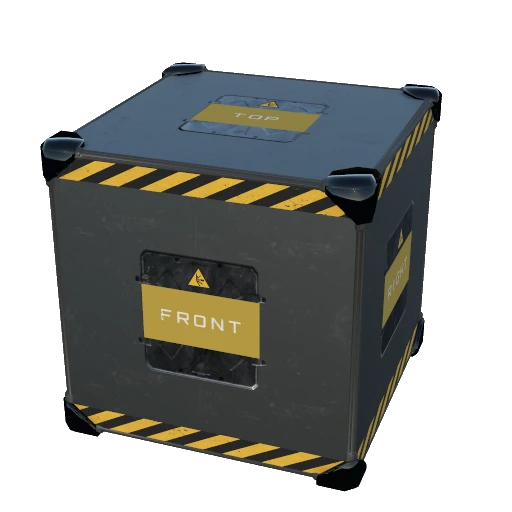
This mod adds a new unlockable AWESOME shop schematic that includes 1m, 2m, and 4m variants of buildable AutoSupport
cubes. These cubes can be placed in the world and interacted with to configure them. Configuring involves selecting
a build direction relative to the cube, parts for start, middle, and end positions, and other customization details.
There are several convenience features, including saving presets and a new dismantle mode that works similar to blueprint
dismantle mode. It helps make your factory look better and not float as much!
Demo
Click below to watch a demo:
[](https://youtu.be/FlEAij2_L3M)
Screenshots


Features
- Adds a new schematic that unlocks an Auto Support cube buildable with 3 size variants of 1m, 2m, and 4m.- The schematic can be unlocked in the AWESOME shop for 20 FICSIT coupons (convenience comes at a price).
- The schematic requires other schematics before the cubes can be built.
- Includes configurable mod settings to tweak various behaviors and constraints.
- The Auto Support cube buildable has an interaction dialog to configure how the support is built. The configuration and
space available in the build path affect the final result.
- The Auto Support cube buildable has direction labels on each cube face. These directions correspond to the directions
available in the interaction dialog.
- When building the support from the Auto Support, a trace will be done to figure out how much space is available.
- The build direction of the support can be configured. This is the cube face from which the support will build outwards from.
- The build will start at the cube face opposite of the selected direction. For example, if the "Top" direction is
selected, the build will start at and be flush with the "Bottom" cube face and build towards the direction of the
"Top" face. This allows the support to take the place of the cube rather than be offset from it.
- Parts can be selected for the start, middle, and end positions of the support.
- At least one position must have a part to build a support.
- In each support position, a part's orientation can be configured. The easiest way to determine the orientation is imagining
you're placing the part with the build gun. An orientation of "Bottom" is the same as if you're building the part on
a floor below you. An orientation of "Front"/"Left" is the same as if you're building the part on a wall in front/left
of you.
- Some parts are not the most intuitive to configure. For example, H-Beams should be set to "Left"/"Right"
to be oriented correctly. Some parts also have custom placement behavior depending on the surface they are being built
on, making it harder to determine the correct orientation to select. Some trial and error may be needed.
- In each support position, a part's color customization can be configured.
- For the end support position, the part's terrain bury distance can be configured. If the end piece ends up resting
against terrain, this will bury the part 0–50% of its height into the terrain to avoid awkward looking placements.
- A toggle to only intersect terrains is available, ignoring any obstacles except terrain when the tracing is done. This
can be useful when building blueprints with Auto Supports from scaffolding or to ignore certain obstacles like trees.
- When the support is built, the build logic will offset the end part to be flush with the blocking surface
(while also respecting bury distance). If needed, an extra middle part will be built to avoid gaps.
- Auto Support configurations can be copied and pasted.
- Auto Support presets can be saved, loaded, and deleted, allowing quick access to your favorite configurations.
- For ultra convenience, when Auto Supports are built standalone, they will be preconfigured to the last used configuration.
The last used configuration is unique per size variant of the Auto Support cube. This last used configuration is
set during the following events:
- Changing something in the Auto Support interaction dialog.
- Copying or pasting settings.
- Saving or loading a preset.
- Auto Support cubes can be built and customized in blueprints. Building supports via the cube is not supported in
Blueprint designers.
- By default, per the mod settings, building Auto Support cubes via blueprints will attempt to automatically build the
supports when the blueprint is placed.
- A custom keybind can be held when building Auto Supports standalone or via Blueprints to toggle "Auto Build"
- This keybind can be configured in the Keybinds menu.
- Auto Build will only take place if you have the supplies required to build the support.
- The keybind must be held when placing a standalone Auto Support to take advantage of Auto Build.
- When building Auto Support cubes via blueprints, the keybind will allow you to negate the "Automatic blueprint build"
mod setting.
- A new dismantle mode is added for dismantling Auto Support built parts in bulk. This works the same as blueprint dismantle
mode does for blueprints.
Possible future enhancements
- Multiplayer support.
- Snap placement improvements (for example, directly below rails).
- Preview holograms before building, at least when using the "auto-build" keybinding.
- Build direction arrow on hologram for easier Top/Front recognition.
- An auto-configure part orientation button for well-known parts.
- Inject supports built via cubes in blueprints into the blueprint proxy, allowing dismantling the supports via Blueprint
dismantle. I experimented with this but was encountering problems.
- Using blueprints as part selections.
Known incompatibilities
- [No Clearance](https://ficsit.app/mod/NoClearance) mod. Use [UniversalSoftClearance](https://ficsit.app/mod/UniversalSoftClearance) instead.
Credits
Thanks to Coffee Stain Studios for the awesome game.
Thank you to the maintainers of [Satisfactory Mod Loader](https://ficsit.app/) for making this mod possible.
Thank you to the documentation maintainers at the
[Satisifactory Modding Wiki](https://docs.ficsit.app/satisfactory-modding/latest/index.html)
This helped considerably when I started.
Thanks to the friendly people on the [Satisfactory Modding Discord](https://discord.ficsit.app/) for answering my
random questions. Robb (extra busy), Archengius, Rex, D4rk, SirDigby, and possibly a few others.
Tip Jar
Like the mod? Buy me a coffee! [Tip me](https://ko-fi.com/R6R615ZO0)
Versionen
Auto Supports auf dem Server installieren
Satisfactory Server bestellen
Bestelle einen Satisfactory Server mit mindestens 4 GB RAM (6 GB empfohlen). Bei Multiplayer: +1 GB pro 4 Spieler.
Mod installieren
Öffne den Mod-Manager im Dashboard und suche nach "Auto Supports". Installations-Dependencies werden automatisch mitinstalliert.
Server neu starten
Starte den Server neu, damit die Mod geladen wird. Spieler müssen die Mod ebenfalls lokal installiert haben.
Häufige Fragen
Auto Supports funktioniert nicht nach Update – was tun?
Nach einem Satisfactory-Update müssen Mods aktualisiert werden. Prüfe auf ficsit.app, ob Auto Supports bereits für die neue Game-Version aktualisiert wurde. Bei Mado Hosting: Öffne den Mod-Manager und klicke "Alle aktualisieren". Wenn die Mod noch nicht aktualisiert ist, entferne sie temporär, damit der Server startet.
Auto Supports verursacht Crashes im Multiplayer – Lösung
Häufigste Ursache: alle Spieler müssen exakt die gleiche Mod-Version installiert haben. Prüfe in den Server-Logs nach "ModMismatch" oder "Version Conflict". Stelle sicher, dass alle Spieler Auto Supports v1.2.1 und den gleichen SML verwenden. Bei Mado Hosting laufen Satisfactory Server mit 6 GB RAM für stabile Multiplayer-Performance.
Ist Auto Supports mit anderen Satisfactory Mods kompatibel?
Auto Supports nutzt den Satisfactory Mod Loader (SML). Generell sind SML-basierte Mods untereinander kompatibel, aber Mods die gleiche Game-Systeme ändern, können Konflikte verursachen. Teste neue Mod-Kombinationen am besten auf einem Backup-Save. Im Mado Dashboard werden bekannte Konflikte automatisch erkannt und du wirst gewarnt.
Auto Supports Server mieten
Spiele Auto Supports auf deinem eigenen Satisfactory Server mit Mod-Support.
Mod Informationen
- Ersteller
- Storm
- Neueste Version
- v1.2.1
- Erstellt am
- 20. Juli 2025
- Zuletzt aktualisiert
- 8. Juli 2026
- Quellcode
- GitHub →