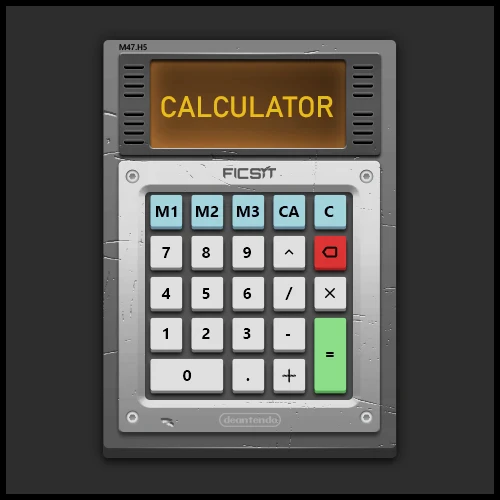
In Game Calculator Mod
Adds a real calculator and Sticky Notes
Beschreibung
SF Calculator & Sticky Notes: Your In-Game Math Wizard
Tired of juggling numbers and forgetting important notes in Satisfactory? Fear not, for the SF Calculator & Sticky Notes mod is here to save the day!
#
Ficsit Calculator
#
Sticky Notes
Key Features:
- Calculator: Perform complex calculations without leaving the game.
- Sticky Notes: Jot down important information, recipes, or reminders.
- Customizable: Adjust key bindings, sticky note transparency, and more.
- User-Friendly: Intuitive interface and easy-to-use controls.
How to Use:
- Open Calculator: Press F9 to summon your trusty calculator.
- Calculate Away: Use the buttons or number pad to perform calculations.
- Create Sticky Notes: Press F8 to create a new note.
- Customize Notes: Change colours, resize, and drag them around.
Additional Features:
- Toggle Mouse Cursor: Press F6 to switch between the game and the calculator.
- Hide/Show Notes: Use F7 and Shift+F7 to manage note visibility.
- Remap Key Bindings: Customize shortcuts to your liking.
Important Note: Key bindings only work when you're not actively using the calculator.
Known Limitations:
While the mod is stable, minor bugs may still exist. Please report any issues on the GitHub repository.
Not all original features from the previous version have been ported yet.
Contributing:
- Report Issues: Share bugs or suggestions on the GitHub issues page.
- Request Features: Suggest new functionalities for future updates.
- Provide Feedback: Let us know your thoughts and experiences with the mod.
Credits:
- Rusketh/Marcess: Primary developer and creator.
- Deantendo: Designer of the mod's graphics.
- SML Mod Team: Essential contributors to the Satisfactory modding community.
Versionen
In Game Calculator Mod auf dem Server installieren
Satisfactory Server bestellen
Bestelle einen Satisfactory Server mit mindestens 4 GB RAM (6 GB empfohlen). Bei Multiplayer: +1 GB pro 4 Spieler.
Mod installieren
Öffne den Mod-Manager im Dashboard und suche nach "In Game Calculator Mod". Installations-Dependencies werden automatisch mitinstalliert.
Server neu starten
Starte den Server neu, damit die Mod geladen wird. Spieler müssen die Mod ebenfalls lokal installiert haben.
Häufige Fragen
In Game Calculator Mod funktioniert nicht nach Update – was tun?
Nach einem Satisfactory-Update müssen Mods aktualisiert werden. Prüfe auf ficsit.app, ob In Game Calculator Mod bereits für die neue Game-Version aktualisiert wurde. Bei Mado Hosting: Öffne den Mod-Manager und klicke "Alle aktualisieren". Wenn die Mod noch nicht aktualisiert ist, entferne sie temporär, damit der Server startet.
In Game Calculator Mod verursacht Crashes im Multiplayer – Lösung
Häufigste Ursache: alle Spieler müssen exakt die gleiche Mod-Version installiert haben. Prüfe in den Server-Logs nach "ModMismatch" oder "Version Conflict". Stelle sicher, dass alle Spieler In Game Calculator Mod v1.0.1 und den gleichen SML verwenden. Bei Mado Hosting laufen Satisfactory Server mit 6 GB RAM für stabile Multiplayer-Performance.
Ist In Game Calculator Mod mit anderen Satisfactory Mods kompatibel?
In Game Calculator Mod nutzt den Satisfactory Mod Loader (SML). Generell sind SML-basierte Mods untereinander kompatibel, aber Mods die gleiche Game-Systeme ändern, können Konflikte verursachen. Teste neue Mod-Kombinationen am besten auf einem Backup-Save. Im Mado Dashboard werden bekannte Konflikte automatisch erkannt und du wirst gewarnt.
In Game Calculator Mod Server mieten
Spiele In Game Calculator Mod auf deinem eigenen Satisfactory Server mit Mod-Support.
Mod Informationen
- Ersteller
- Rusketh
- Neueste Version
- v1.0.1
- Erstellt am
- 20. September 2024
- Zuletzt aktualisiert
- 8. Juli 2026
- Quellcode
- GitHub →