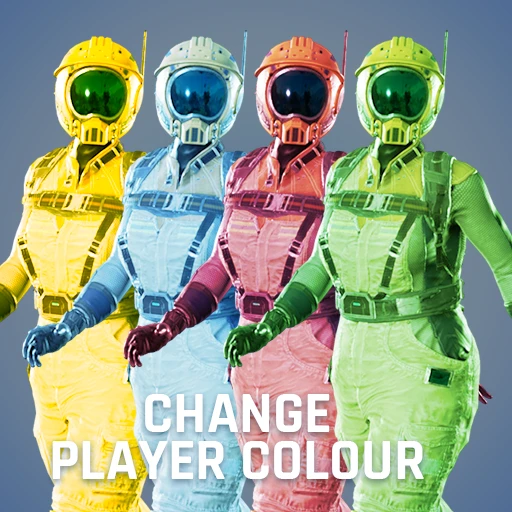
Skin It - Change Player Color
Change the color of your clothes. Aka Colourful Gloves.
Beschreibung
<center><img src="https://github.com/DellAquila/Layout/raw/main/New/CABECALHO.png"></center>
Change the color of your biggest companion.
Type in Chat:
/color
Its not /GLOVES anymore.
PS: Only the "server" can change color and share it with other players. The clients can change the color, but only the own client will see the change.
Customize it:


<br/><img src="https://github.com/DellAquila/Layout/raw/main/Videos_Up.png"><br/>
[](https://www.youtube.com/watch?v=oi_3KwGo_iQ)
<br/><img src="https://github.com/DellAquila/Layout/raw/main/Videos_Down.png"><br/>
<br/>Credits: Icons, UI and Graphic advices from <a href="https://discord.gg/xkVJ73E">Deantendo: The UI guy!</A> <br/>
________
<br/>I'm having a lot of fun making Satisfactory Mods and I hope you are enjoying them! If you want to [donate](https://www.paypal.com/cgi-bin/webscr?cmd=_s-xclick&hosted_button_id=U96NB4W469FR2&source=url), i would be very grateful.<br/><br/>[](https://discord.gg/xkVJ73E)<br/>[](https://store.steampowered.com/app/1958750/Hexfactory/)<br/>[](https://www.patreon.com/AndreAquila)<br/>[](https://ko-fi.com/aquilaindustrial)<br/>[](https://www.paypal.com/cgi-bin/webscr?cmd=_s-xclick&hosted_button_id=U96NB4W469FR2&source=url)
Versionen
Skin It - Change Player Color auf dem Server installieren
Satisfactory Server bestellen
Bestelle einen Satisfactory Server mit mindestens 4 GB RAM (6 GB empfohlen). Bei Multiplayer: +1 GB pro 4 Spieler.
Mod installieren
Öffne den Mod-Manager im Dashboard und suche nach "Skin It - Change Player Color". Installations-Dependencies werden automatisch mitinstalliert.
Server neu starten
Starte den Server neu, damit die Mod geladen wird. Spieler müssen die Mod ebenfalls lokal installiert haben.
Häufige Fragen
Skin It - Change Player Color funktioniert nicht nach Update – was tun?
Nach einem Satisfactory-Update müssen Mods aktualisiert werden. Prüfe auf ficsit.app, ob Skin It - Change Player Color bereits für die neue Game-Version aktualisiert wurde. Bei Mado Hosting: Öffne den Mod-Manager und klicke "Alle aktualisieren". Wenn die Mod noch nicht aktualisiert ist, entferne sie temporär, damit der Server startet.
Skin It - Change Player Color verursacht Crashes im Multiplayer – Lösung
Häufigste Ursache: alle Spieler müssen exakt die gleiche Mod-Version installiert haben. Prüfe in den Server-Logs nach "ModMismatch" oder "Version Conflict". Stelle sicher, dass alle Spieler Skin It - Change Player Color v1.0.4 und den gleichen SML verwenden. Bei Mado Hosting laufen Satisfactory Server mit 6 GB RAM für stabile Multiplayer-Performance.
Ist Skin It - Change Player Color mit anderen Satisfactory Mods kompatibel?
Skin It - Change Player Color nutzt den Satisfactory Mod Loader (SML). Generell sind SML-basierte Mods untereinander kompatibel, aber Mods die gleiche Game-Systeme ändern, können Konflikte verursachen. Teste neue Mod-Kombinationen am besten auf einem Backup-Save. Im Mado Dashboard werden bekannte Konflikte automatisch erkannt und du wirst gewarnt.
Skin It - Change Player Color Server mieten
Spiele Skin It - Change Player Color auf deinem eigenen Satisfactory Server mit Mod-Support.
Mod Informationen
- Ersteller
- Andre Aquila
- Neueste Version
- v1.0.4
- Erstellt am
- 21. Januar 2022
- Zuletzt aktualisiert
- 8. Juli 2026
- Quellcode
- GitHub →