Disassembler
Breaks down solids into as many items as it took to form them
Beschreibung
<div style="background:#5682BBFF; padding:5px; margin-top:10px; border-radius:10px; box-shadow: 5px 5px 3px #37567DFF;" >
<h1 id="Title" align="center" style="text-shadow: black 5px 2px 10px;">Disassembler <img width="64" src=https://github.com/Evasion4D/Satisfactory_Mods/raw/main/Images/Satisfactory_12_tag.png></h1>
</div>
Breaks down solids into as many items as it took to form them<br>
(The recipes used are the basic ones, so no alternative recipes)
<br>
Unlock at Tier 3<br>
How does it work?<br>
Inputs<br>
1/ Feed items through the conveyor (Sushi or not sushi)<br>
All solid resources, even radioactive waste, are accepted <br>2/ Feed empty containers through the conveyor<br>
If the items to be decomposed contain gas and/or liquid, introduce the appropriate empty containers, otherwise the gases and fluids will be destroyed.| Empty Fuild Tank | Empty Canister |
|:-------------:|:-------------:|
|||<br>
<U>Example</U>:<br>
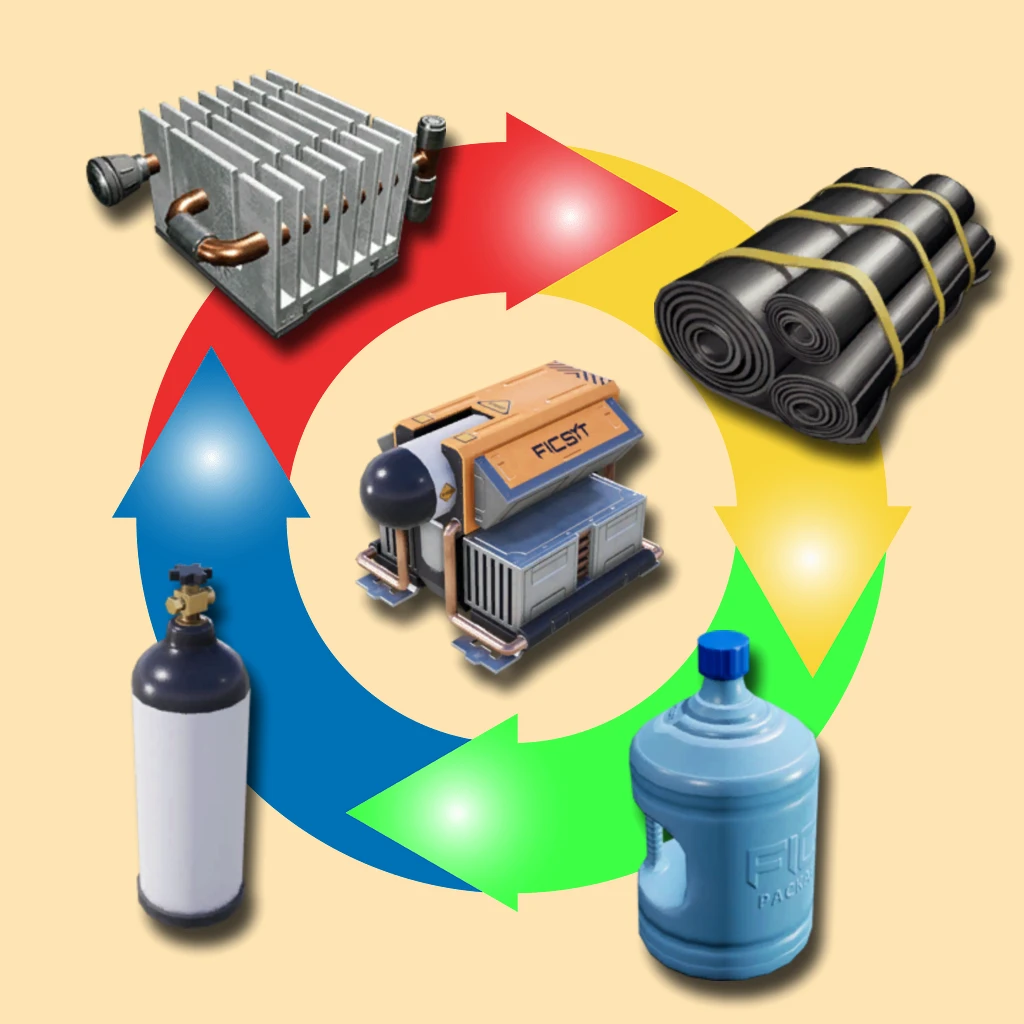
Cooling System <br>Will be broken down into:<br>
| Heat Sink | Rubber | Packaged Nitrogen Gas | Packaged Water ||:-------------:|:-------------:|:-------------:|:-------------:|
|  |  |  |  |
<br>
Outputs<br>
<br>1/ Main output<br>
A conveyor must be connected to it to collect the items resulting from the decomposition.<br>2/ Output of packaged gases and liquids<br>
(If there are enough empty containers)3/ Output of raw materials (Ores)<br>
4/ Outputs of elements that cannot be decomposed into solid, liquid or gase
(For example, a power shard comes out as is, because it should give slug (invalid resource)<br>
<br>
<U>Attention:</U><br>
If there is no conveyor connected to outputs 2, 3 or 4, the respective items will be switched to the main output (1)<br>
If you want the complete decomposition, so until you get the raw materials:
Place several disassemblers in series (Output 1 -> Input 1)* Or make a loop by connecting a conveyor from output 1 to input 1 of the same machine<br>

Widget<br>
1/ Inventory of empty containers<br>
Maximum 500 units of each<br>The surplus is sent to output 4<br>
2/ Control the sound of the machine in operation
You can choose from 12 different sounds and adjust the volume-----------
Images from [Wiki](https://satisfactory.wiki.gg/wiki/ "Satisfactory Wiki")
<div style="background:#5682BBFF; padding:5px; margin-top:10px; border-radius:10px; box-shadow: 5px 5px 3px #37567DFF;" >
<h5 align="center" style="color:black; text-shadow: white 0px 0px 5px;">You can contact me on the 2 Satisfactory discords (Jean Michel (jeanmichel4d ))</h5>
</div>
Versionen
Disassembler auf dem Server installieren
Satisfactory Server bestellen
Bestelle einen Satisfactory Server mit mindestens 4 GB RAM (6 GB empfohlen). Bei Multiplayer: +1 GB pro 4 Spieler.
Mod installieren
Öffne den Mod-Manager im Dashboard und suche nach "Disassembler". Installations-Dependencies werden automatisch mitinstalliert.
Server neu starten
Starte den Server neu, damit die Mod geladen wird. Spieler müssen die Mod ebenfalls lokal installiert haben.
Häufige Fragen
Disassembler funktioniert nicht nach Update – was tun?
Nach einem Satisfactory-Update müssen Mods aktualisiert werden. Prüfe auf ficsit.app, ob Disassembler bereits für die neue Game-Version aktualisiert wurde. Bei Mado Hosting: Öffne den Mod-Manager und klicke "Alle aktualisieren". Wenn die Mod noch nicht aktualisiert ist, entferne sie temporär, damit der Server startet.
Disassembler verursacht Crashes im Multiplayer – Lösung
Häufigste Ursache: alle Spieler müssen exakt die gleiche Mod-Version installiert haben. Prüfe in den Server-Logs nach "ModMismatch" oder "Version Conflict". Stelle sicher, dass alle Spieler Disassembler v3.0.0 und den gleichen SML verwenden. Bei Mado Hosting laufen Satisfactory Server mit 6 GB RAM für stabile Multiplayer-Performance.
Ist Disassembler mit anderen Satisfactory Mods kompatibel?
Disassembler nutzt den Satisfactory Mod Loader (SML). Generell sind SML-basierte Mods untereinander kompatibel, aber Mods die gleiche Game-Systeme ändern, können Konflikte verursachen. Teste neue Mod-Kombinationen am besten auf einem Backup-Save. Im Mado Dashboard werden bekannte Konflikte automatisch erkannt und du wirst gewarnt.
Disassembler Server mieten
Spiele Disassembler auf deinem eigenen Satisfactory Server mit Mod-Support.
Mod Informationen
- Ersteller
- Jean Michel
- Neueste Version
- v3.0.0
- Erstellt am
- 20. Januar 2025
- Zuletzt aktualisiert
- 8. Juli 2026
- Quellcode
- GitHub →