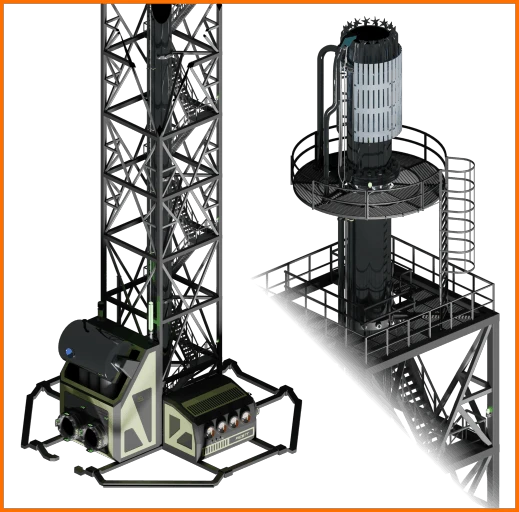
Industrial Flare Stack
The Industrial Flare Stack is a unit designed to vent excess combustible liquids and gases to prevent production stalls.
Beschreibung
<h1 align="center"><font color="#ff8e3c">INDUSTRIAL FLARE STACK</font></h1>
<blockquote><font color="#ff8e3c"><b>A.D.A. NOTICE:</b></font> "Pioneer, your downstream consumption has reached a state of terminal saturation. To prevent a total hydrostatic seizure of your refinery infrastructure, FICSIT Inc. has authorized the <b>Industrial Flare Stack</b> to convert your excess energy into atmospheric waste. It is an inefficient sacrifice, but a necessary one. The flame is the only thing standing between you and a dead factory. Burn the surplus. Save the system. <br><br>The Industrial Flare Stack facilitates the rapid conversion of your logistical failures into atmospheric pollutants. Note: Planetary heating is within acceptable corporate parameters. Your breathing remains a secondary priority."</blockquote>
<p align="center"><i>"Efficiency through elimination. FICSIT Inc. approved."</i></p>
<hr>
<h2><font color="#ff8e3c">🏭 OVERVIEW</font></h2>
The <b>Industrial Flare Stack</b> is a high-capacity relief unit designed to vent excess combustible liquids and gases to prevent production stalls.
While I am not a professional game developer, I am a professional industrial machine engineer. This model was fully engineered from the ground up in Autodesk Inventor Pro to ensure real-world parametric CAD precision and functional structural logic. To bridge the gap into a AAA game environment like Satisfactory, the asset underwent a massive optimization pipeline in Blender (which was a 'shock' for a CAD guy), decimating the high-density CAD geometry from 34 million polygons down to approximately 673,000 faces to guarantee solid in-game performance.
<ul>
<li> <b>Max Consumption:</b> 250 m³/min.</li>
<li> <b>Audio:</b> Custom <b>Wwise</b> integration with a 9s pressure spool-up.</li>
<li> <b>Visuals:</b> Real-time Analog/Digital machine status gauges and BlackBody thermal shaders.</li>
<li> <b>Burnable Feedstock:</b> Crude Oil, Heavy Oil Residue (HOR), Fuel, Turbo Fuel, Biofuel, Rocket Fuel, and Ionized Rocket Fuel.</li>
<li> <b>Dimensions:</b> 20m × 20m Base | 84m Height (Requires approximately a 3×3 Foundation footprint).</li>
</ul>
<hr>
<h2><font color="#ff8e3c">📦 INSTALLATION</font></h2>
This mod cannot be installed manually via GitHub source files.
<br><br>
To install, download the official <b><a href="https://ficsit.app/guide/9mD6G768gYisAs">Satisfactory Mod Manager (SMM)</a></b>, search for <code>FlareStack</code>, and click install. The manager will automatically handle all required dependencies (SML).
<hr>
<h2><font color="#ff8e3c">⚠️ BYPRODUCT: CONDENSATE</font></h2>
Incineration produces <b>Condensate</b>, a toxic liquid waste.
<ul>
<li> <b>Handling:</b> Must be stored in (Industrial) Fluid Buffers. Condensate processing is planned for V2.0.</li>
<li> <b>Logistical Constraint:</b> Like Uranium Waste, Condensate is a "dead-end" byproduct. Manual pipe flushing is discouraged to maintain the Tier 8 challenge.</li>
</ul>
<hr>
<h2><font color="#ff8e3c">🛠️ GETTING STARTED & USAGE</font></h2>
<b>Game Video Settings:</b> VFX Setting:</b> ULTRA </b>.<br><br>
<b>Unlock:</b> HUB Milestone <b>Tier 8</b> under the group <b>"Industrial Process Control"</b>.
<br><br>
<b>Build Menu Location:</b> Found under the <b>Logistics</b> tab, inside the <b>Group 8: Process Control</b> category.
<br><br>
<b>Static Drain Logic:</b> In V1.0, the Flare Stack functions as a manual relief machine. It will draw fluid immediately upon connection.
<ul>
<li> <b>Gauges:</b> <b>GAS</b> fuel burn rate in m³/min. <b>WATER</b> water consumption in m³/min. <b>GUARD</b> shows if guard flame is active. <b>CONDENSATE</b> internal buffer level of condensate in m³ (max capacity 100m³).</li>
<li> <b>The Valve Toggle:</b> Install a <b>Valve</b> on the feedline to act as a manual remote switch. Open it only when your system backs up; close it once the line pressure is relieved. This prevents you from having to manually toggle the building at the stack itself.</li>
<li> <b>Safety:</b> Use the <b>Crouch (C)</b> key on the final maintenance stair to access the lower deck without sustaining cranial trauma.</li>
</ul>
<br>
<b>Help/Questions:</b> Contact me on Discord: <b>xpsion</b> for questions or issues.
<hr>
<p align="center">
<img src="https://raw.githubusercontent.com/Alex1965/Satisfactory-mods/main/FlareStackv1.0SMRMD.png" alt="Industrial Flare Stack" width="100%">
</p>
<p align="center">
<img src="https://raw.githubusercontent.com/Alex1965/Satisfactory-mods/main/Flare Stack v 1.0.webp" alt="Flare Stack Animation" width="100%">
</p>
<h2><font color="#ff8e3c">🛰️ PROJECT ROADMAP</font></h2>
<ul>
<li><b>V1.0.0 (Released):</b> Initial Release. Static Drain logic, Wwise Audio, and 3D-modeled gauges.</li>
<li><b>V1.1.0 (Released):</b> <b>The Voice & Interface Update.</b> Added ADA voice triggers and the static visual control panel.</li>
<li><b>V1.2.0 (Current):</b> Compatibility Update. Tweaks and Satisfactory 1.2 update.
<br><i>Known Limitations: Non-paintable surfaces; minor shadow errors on Superheater. Dedicated Server support untested. VFX currently requires ULTRA setting to render.</i></li>
<li><b>V1.3.0 (Next):</b> <b>The Control Update.</b> Activating the physical control panel interface, and long-range telemetry performance tuning (500m to 10km LOD curves).</li>
<li><b>V1.4.0 (Planned):</b> <b>The Sensing Update.</b> Introduction of the JTRONICX External Sensor Valve (Pressure-Aware automated logic), paintable surfaces, and 14 dynamic steam injector Niagara VFX tied to fuel burn rates.</li>
<li><b>V2.0.0 (Future):</b> <b>The Treatment Update.</b> Condensate Treatment Plant utilizing a thermal cracker unit for advanced byproduct recycling.</li>
</ul>
<hr>
<h2><font color="#ff8e3c">🙌 ACKNOWLEDGEMENTS</font></h2>
<p>A massive thank you to the core members of the Satisfactory modding Discord who stepped up with critical help and support whenever I hit a wall and couldn't find a solution:</p>
<ul>
<li> <b>Robb</b> – Without the SML Modding documentation, creating a mod from scratch would be an insurmountable wall.</li>
<li> <b>Archengius</b> – For providing code clarity when script overrides wouldn't behave.</li>
<li> <b>AngryBeaver</b> – For helping unblock backend issues to keep development moving forward.</li>
</ul>
<hr>
<p align="center">
<b>Technical:</b> JTRONICX Industrial Series<br>
<b>Discord:</b> <code>xpsion</code><br><br>
<font color="#ff8e3c"><b>FICSIT INC. PROPERTY - WASTE IS A CHOICE</b></font><br>
<small><i>JTRONICX is a trademark of xpsion. Industrial Flare Stack is a fan-made modification for Satisfactory.<br>FICSIT Inc., ADA, and Satisfactory are trademarks of Coffee Stain Studios.</i></small></p>
Versionen
Industrial Flare Stack auf dem Server installieren
Satisfactory Server bestellen
Bestelle einen Satisfactory Server mit mindestens 4 GB RAM (6 GB empfohlen). Bei Multiplayer: +1 GB pro 3 Spieler.
Mod installieren
Öffne den Mod-Manager im Dashboard und suche nach "Industrial Flare Stack". Installations-Dependencies werden automatisch mitinstalliert.
Server neu starten
Starte den Server neu, damit die Mod geladen wird. Spieler müssen die Mod ebenfalls lokal installiert haben.
Häufige Fragen
Industrial Flare Stack funktioniert nicht nach Update – was tun?
Nach einem Satisfactory-Update müssen Mods aktualisiert werden. Prüfe auf ficsit.app, ob Industrial Flare Stack bereits für die neue Game-Version aktualisiert wurde. Bei Mado Hosting: Öffne den Mod-Manager und klicke "Alle aktualisieren". Wenn die Mod noch nicht aktualisiert ist, entferne sie temporär, damit der Server startet.
Industrial Flare Stack verursacht Crashes im Multiplayer – Lösung
Häufigste Ursache: alle Spieler müssen exakt die gleiche Mod-Version installiert haben. Prüfe in den Server-Logs nach "ModMismatch" oder "Version Conflict". Stelle sicher, dass alle Spieler Industrial Flare Stack v1.2.0 und den gleichen SML verwenden. Bei Mado Hosting laufen Satisfactory Server mit 6 GB RAM für stabile Multiplayer-Performance.
Ist Industrial Flare Stack mit anderen Satisfactory Mods kompatibel?
Industrial Flare Stack nutzt den Satisfactory Mod Loader (SML). Generell sind SML-basierte Mods untereinander kompatibel, aber Mods die gleiche Game-Systeme ändern, können Konflikte verursachen. Teste neue Mod-Kombinationen am besten auf einem Backup-Save. Im Mado Dashboard werden bekannte Konflikte automatisch erkannt und du wirst gewarnt.
Industrial Flare Stack Server mieten
Spiele Industrial Flare Stack auf deinem eigenen Satisfactory Server mit Mod-Support.
Mod Informationen
- Ersteller
- Alex1965
- Neueste Version
- v1.2.0
- Erstellt am
- 27. Mai 2026
- Zuletzt aktualisiert
- 8. Juli 2026
- Quellcode
- GitHub →