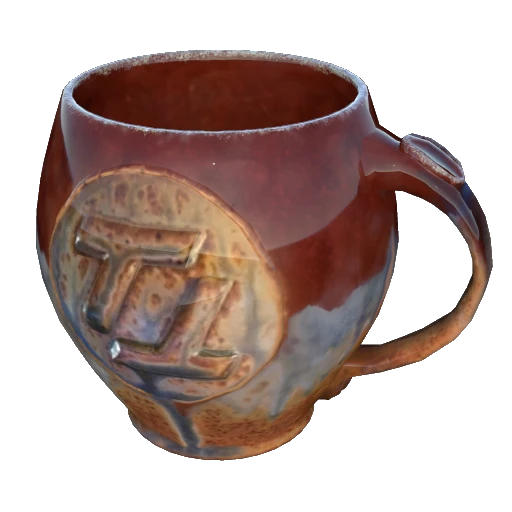
TangoTek Mugificator
Adds TangoTek's iconic mug to the AWESOME Shop
Beschreibung
Overview
Adds TangoTek's iconic mug, created by Matthew Kelly, to the game as an equipable item similar to the FICSIT Coffee Cup™.
The mug is purchasable under the equipment section of the AWESOME Shop.
In order to allow the mug's logo to be seen ingame, the handle has been swapped to the opposite side.
This mod is fully functional, however, due to the technical difficulty of implementing new animations into a mod, currently all player animations are being reused from other parts of the game, leading to some clipping and strange finger placement on the mug handle. This will be addressed in an upcoming update.
<img src="https://github.com/reumarks/Mugificator/blob/main/Screenshot%202025-01-18%20112139.png?raw=true" width="700">
<img src="https://raw.githubusercontent.com/reumarks/Mugificator/refs/heads/main/Slide.png?raw=true" width="700">
If you run into any issues, or anything is not working as intended, please feel free to reach out to me on the Satisfactory Modding Discord @reumarks.
#
Upcoming Changes and TODOs:
- Add custom normal and reflection mappings to the mug- Optimize textures and model
- Make mod open source
- Add custom drinking and cheers animations
TangoTek Mugificator auf dem Server installieren
Satisfactory Server bestellen
Bestelle einen Satisfactory Server mit mindestens 4 GB RAM (6 GB empfohlen). Bei Multiplayer: +1 GB pro 4 Spieler.
Mod installieren
Öffne den Mod-Manager im Dashboard und suche nach "TangoTek Mugificator". Installations-Dependencies werden automatisch mitinstalliert.
Server neu starten
Starte den Server neu, damit die Mod geladen wird. Spieler müssen die Mod ebenfalls lokal installiert haben.
Häufige Fragen
TangoTek Mugificator funktioniert nicht nach Update – was tun?
Nach einem Satisfactory-Update müssen Mods aktualisiert werden. Prüfe auf ficsit.app, ob TangoTek Mugificator bereits für die neue Game-Version aktualisiert wurde. Bei Mado Hosting: Öffne den Mod-Manager und klicke "Alle aktualisieren". Wenn die Mod noch nicht aktualisiert ist, entferne sie temporär, damit der Server startet.
TangoTek Mugificator verursacht Crashes im Multiplayer – Lösung
Häufigste Ursache: alle Spieler müssen exakt die gleiche Mod-Version installiert haben. Prüfe in den Server-Logs nach "ModMismatch" oder "Version Conflict". Stelle sicher, dass alle Spieler TangoTek Mugificator v1.0.0 und den gleichen SML verwenden. Bei Mado Hosting laufen Satisfactory Server mit 6 GB RAM für stabile Multiplayer-Performance.
Ist TangoTek Mugificator mit anderen Satisfactory Mods kompatibel?
TangoTek Mugificator nutzt den Satisfactory Mod Loader (SML). Generell sind SML-basierte Mods untereinander kompatibel, aber Mods die gleiche Game-Systeme ändern, können Konflikte verursachen. Teste neue Mod-Kombinationen am besten auf einem Backup-Save. Im Mado Dashboard werden bekannte Konflikte automatisch erkannt und du wirst gewarnt.
TangoTek Mugificator Server mieten
Spiele TangoTek Mugificator auf deinem eigenen Satisfactory Server mit Mod-Support.
Mod Informationen
- Ersteller
- reumarks
- Neueste Version
- v1.0.0
- Erstellt am
- 18. Januar 2025
- Zuletzt aktualisiert
- 8. Juli 2026