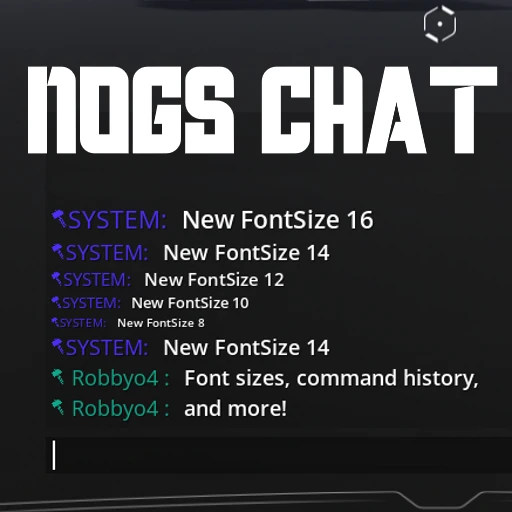
Nog's Chat
Chat font resizing, command autocomplete, sent message history
Beschreibung
This mod is not currently planned to be updated, use https://ficsit.app/mod/NewChat instead!
This mod currently maintained by Robb#6731
This mod works in multiplayer - host and client can have separate settings.
See the mod icon for an example screenshot.
This mod enhances the in-game Chat and lets you...
- Adjust the font size (8, 10, 12, 14, 16 accepted)
- Fit more messages on screen at once, or make the chat window take up less space
- Clients must use the Mod Configs screen (not the chat commands) to change the configs for the client side.
- Store history of your past entered commands, stored per-game save file.
- Use the Up and Down arrow keys to navigate command history while chat is open
- 100 items saved by default, configurable from the Mod Configs screen.
- Press TAB to autocomplete the slash command you're typing
- See it in action here: <https://streamable.com/ry33nz> (HUD flashing in the video due to a graphics issue with my recording software, it doesn't do that in-game)
Configure these settings via chat commands (explained by a help tooltip in-game) or from the Mod Configs screen.
Questions? Suggestions? Join the [Nog's Mods Discord server](https://discord.gg/CPeJJrXpth)
Known Bugs
- Saved command history only works correctly for the host
These two base-game bugs currently affect the chat window and are not due to Nog's Chat:
- [Pressing escape to close chat requires pressing enter twice to open it next time](https://questions.satisfactorygame.com/post/64c4673e87a1e63b6cee92c3)
- [Clicking in the chat history scrollbox locks you into the chat widget](https://questions.satisfactorygame.com/post/64c4686487a1e63b6cee92c5)
Versionen
Nog's Chat auf dem Server installieren
Satisfactory Server bestellen
Bestelle einen Satisfactory Server mit mindestens 4 GB RAM (6 GB empfohlen). Bei Multiplayer: +1 GB pro 4 Spieler.
Mod installieren
Öffne den Mod-Manager im Dashboard und suche nach "Nog's Chat". Installations-Dependencies werden automatisch mitinstalliert.
Server neu starten
Starte den Server neu, damit die Mod geladen wird. Spieler müssen die Mod ebenfalls lokal installiert haben.
Häufige Fragen
Nog's Chat funktioniert nicht nach Update – was tun?
Nach einem Satisfactory-Update müssen Mods aktualisiert werden. Prüfe auf ficsit.app, ob Nog's Chat bereits für die neue Game-Version aktualisiert wurde. Bei Mado Hosting: Öffne den Mod-Manager und klicke "Alle aktualisieren". Wenn die Mod noch nicht aktualisiert ist, entferne sie temporär, damit der Server startet.
Nog's Chat verursacht Crashes im Multiplayer – Lösung
Häufigste Ursache: alle Spieler müssen exakt die gleiche Mod-Version installiert haben. Prüfe in den Server-Logs nach "ModMismatch" oder "Version Conflict". Stelle sicher, dass alle Spieler Nog's Chat v1.0.1 und den gleichen SML verwenden. Bei Mado Hosting laufen Satisfactory Server mit 6 GB RAM für stabile Multiplayer-Performance.
Ist Nog's Chat mit anderen Satisfactory Mods kompatibel?
Nog's Chat nutzt den Satisfactory Mod Loader (SML). Generell sind SML-basierte Mods untereinander kompatibel, aber Mods die gleiche Game-Systeme ändern, können Konflikte verursachen. Teste neue Mod-Kombinationen am besten auf einem Backup-Save. Im Mado Dashboard werden bekannte Konflikte automatisch erkannt und du wirst gewarnt.
Nog's Chat Server mieten
Spiele Nog's Chat auf deinem eigenen Satisfactory Server mit Mod-Support.
Mod Informationen
- Ersteller
- Nogg-aholic, Robb
- Neueste Version
- v1.0.1
- Erstellt am
- 8. Juni 2021
- Zuletzt aktualisiert
- 8. Juli 2026
- Quellcode
- GitHub →