SatisManager
Check all aspects of your factories from anywhere! HUD Ping, Map Ping, Teleport to Machine included!
Beschreibung
<span style="color:#1BA300;">You can open the mod interface by pressing 'G' (can be changed in game setting menu).</span>
<br>
Features:
Quick Building Access
Every building icon has 4 small icons on top</u>.> Ping - HUD ping at location(same as regular alt+click ping visual)
> Show on map- Open map and places a temporarily orange dot in place of building.
> Teleport - Teleports player to that building.
> Start/Stop - Put building on pause or start it.
<br>
Quality of Life
> Auto-Open HUB/MAM - Will open interface on ship return/research completion. <br><span style="color:#FF0000;">(If no other window is opened and no hostile creatures nearby)</span>
<span style="color:#FFA500;">
>
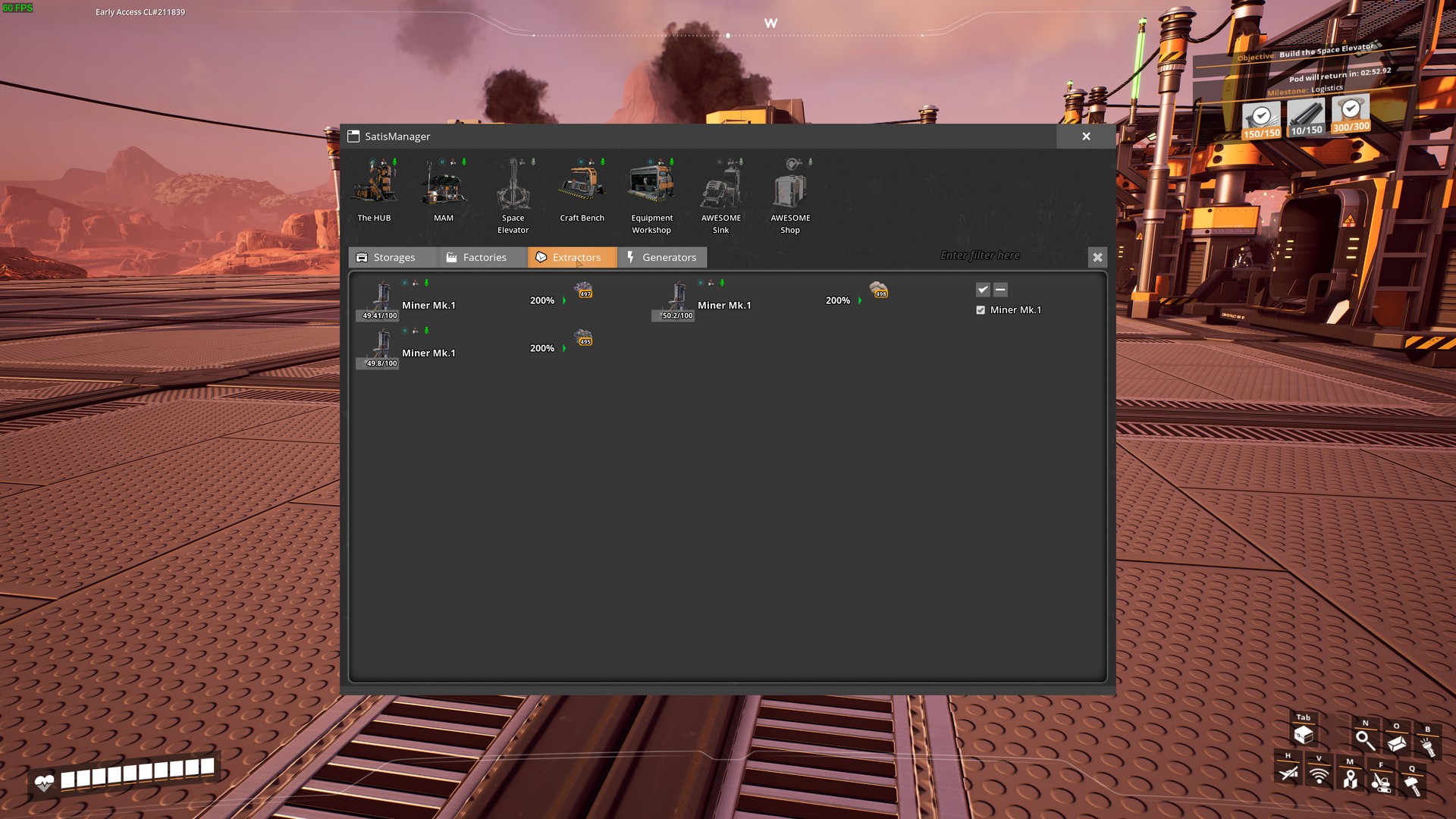
Highlight nearby pickupable items - Press "L" to highlight items. <br> <span style="color:#009EE3;">(Can be changed in game settings menu)</span>> Area with buttons to access game-significant buildings anywhere. Greyed out is not built. (HUB/MAM/Space Elevator/Workbench/Equipment Workshop/AWESOME Sink/AWESOME Shop/<span style="color:#FFD700;">PowerSuit Fabrication Station</span><span style="color:#FF0000;"><a href="https://ficsit.app/mod/ArmorModules__Modpack_All" >[Requires PowerSuit mod]</a>
4 Tabs with Different Building Categories.
StorageProduction
Extractors
Generators
#
Tab Options
Main Filter field - if anything is entered in this field, tabs will be filtered by name and content. <br><span style="color:#FF0000;">(MP Compatibility<sup>1</sup>)</span>
Building Type filter on every tab - Only those buildings of checked type will be shown. <br>
<span style="color:#009EE3;">(Stacks with main filter)</span>
><span style="color:#FFA500;"><i>For example</i> :</span> If you select coal, than only buildings with coal in name/inventory<span style="color:#009EE3;">(for storages)</span>, or in recipe<span style="color:#009EE3;">(for factories)</span> ,or in fuel<span style="color:#009EE3;">(for generators)</span>,or in resource<span style="color:#009EE3;">(for extractors)</span> will be shown. Click on building icon - Will open its interaction interface.
* Click on building name - Will let you enter a custom name for that building.
Factories, extractors and generators will sometimes have a <span style="color:#FF0000;">red</span>/<span style="color:#ddee00;">yellow</span> border around some of their contents. </span>
<span style="color:#FF0000;">Red</span> means that there is not enough of that resource to start production cycle/produce power. <span style="color:#ddee00;">Yellow</span> means the stack is full.
>> <span style="color:#FF0000;"><sup>1</sup>MP Compatibility</span> - if you're not the host, then there is no live updates on building contents, and filtering is performed only by building's names.
Screenshots:




You can leave any issue, suggestions on [My github](https://github.com/DeadMor0z/SatisfactoryMods/issues) page.
Or contact me (DeadMoroz#9600) on [Discord](https://discord.com/invite/xkVJ73E)
Big thanks [xXdrewbaccaXx](https://ficsit.app/user/12NfPnFLRcnmRP/) for mod icon!
Versionen
SatisManager auf dem Server installieren
Satisfactory Server bestellen
Bestelle einen Satisfactory Server mit mindestens 4 GB RAM (6 GB empfohlen). Bei Multiplayer: +1 GB pro 3 Spieler.
Mod installieren
Öffne den Mod-Manager im Dashboard und suche nach "SatisManager". Installations-Dependencies werden automatisch mitinstalliert.
Server neu starten
Starte den Server neu, damit die Mod geladen wird. Spieler müssen die Mod ebenfalls lokal installiert haben.
Häufige Fragen
SatisManager funktioniert nicht nach Update – was tun?
Nach einem Satisfactory-Update müssen Mods aktualisiert werden. Prüfe auf ficsit.app, ob SatisManager bereits für die neue Game-Version aktualisiert wurde. Bei Mado Hosting: Öffne den Mod-Manager und klicke "Alle aktualisieren". Wenn die Mod noch nicht aktualisiert ist, entferne sie temporär, damit der Server startet.
SatisManager verursacht Crashes im Multiplayer – Lösung
Häufigste Ursache: alle Spieler müssen exakt die gleiche Mod-Version installiert haben. Prüfe in den Server-Logs nach "ModMismatch" oder "Version Conflict". Stelle sicher, dass alle Spieler SatisManager v1.1.4 und den gleichen SML verwenden. Bei Mado Hosting laufen Satisfactory Server mit 6 GB RAM für stabile Multiplayer-Performance.
Ist SatisManager mit anderen Satisfactory Mods kompatibel?
SatisManager nutzt den Satisfactory Mod Loader (SML). Generell sind SML-basierte Mods untereinander kompatibel, aber Mods die gleiche Game-Systeme ändern, können Konflikte verursachen. Teste neue Mod-Kombinationen am besten auf einem Backup-Save. Im Mado Dashboard werden bekannte Konflikte automatisch erkannt und du wirst gewarnt.
SatisManager Server mieten
Spiele SatisManager auf deinem eigenen Satisfactory Server mit Mod-Support.
Mod Informationen
- Ersteller
- xXdrewbaccaXx, DeadMoroz
- Neueste Version
- v1.1.4
- Erstellt am
- 27. Mai 2023
- Zuletzt aktualisiert
- 8. Juli 2026