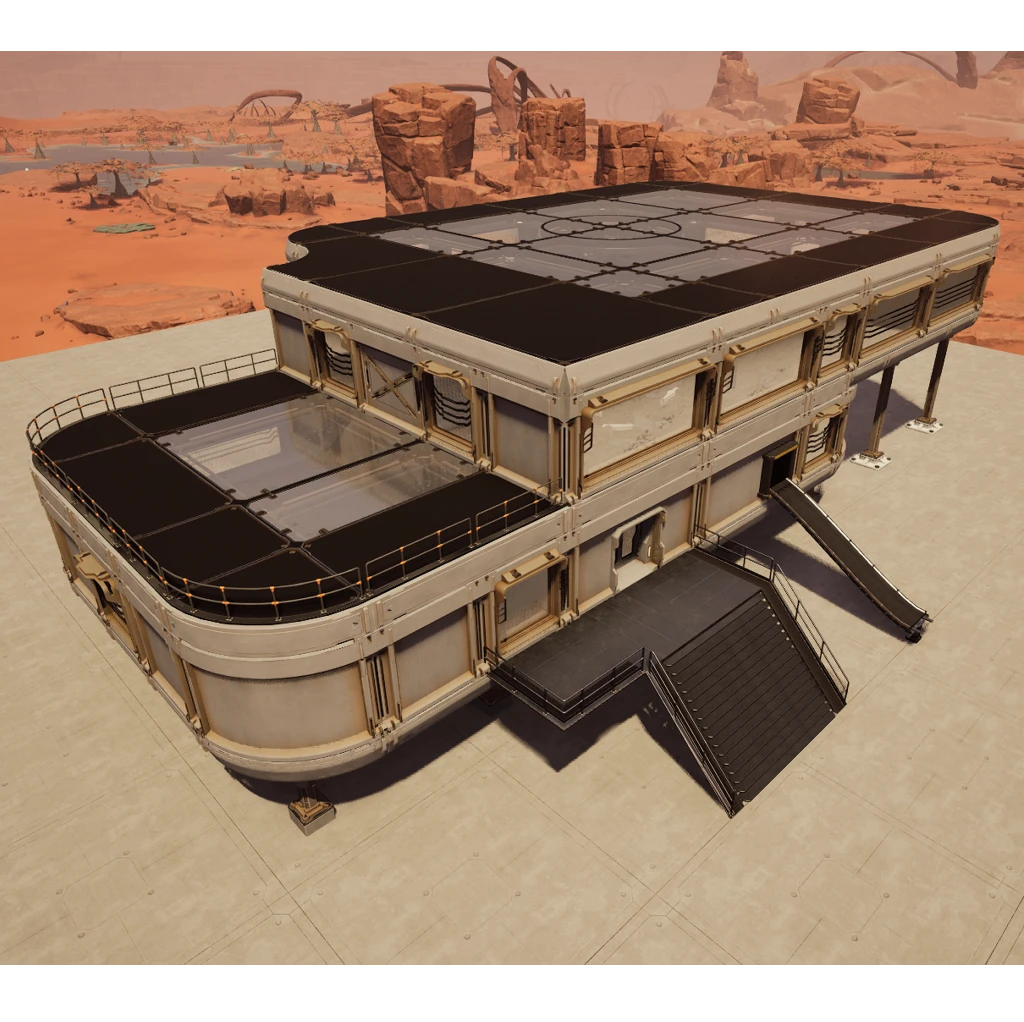
SciFi 01
Architectural elements for a futuristic base
Beschreibung
<div style="background:#78B3FFFF; padding:5px; margin-top:10px; border-radius:10px; box-shadow: 5px 5px 3px #40628FFF;" >
<h1 id="Title" align="center" style="text-shadow: black 5px 2px 10px;">Architectural elements for a futuristic base </h1>
</div>
<div style="background:#78B3FFFF; padding:5px; margin-top:10px; border-radius:10px; box-shadow: 5px 5px 3px #40628FFF;" >
<h5 align="center" style="color:black; text-shadow: white 0px 0px 5px;">3 new foundation types + 3 new wall types</h5>
<h3 align="center" style="text-shadow: black 5px 2px 10px;"> Unlock them in the Awesome</h3>
<div style="display:flex; justify-content:center; gap:20px; flex-wrap:wrap; margin:0px;" align="center">
<img src=https://github.com/Evasion4D/Satisfactory_Mods/raw/main/SciFi01/Images/Awesome_Foundations.png>
<img src=https://github.com/Evasion4D/Satisfactory_Mods/raw/main/SciFi01/Images/Awesome_Walls.png>
<img src=https://github.com/Evasion4D/Satisfactory_Mods/raw/main/SciFi01/Images/Customizer_Materials.png "Customizer Materials")>
<h5 align="center" style="color:black; text-shadow: white 0px 0px 5px;">They have a default primary and secondary color (which can be changed).</h5>
<img src=https://github.com/Evasion4D/Satisfactory_Mods/raw/main/SciFi01/Images/Customizer_Color.png "Customizer Colors")>
</div>
<div align="center" style="color:black;">
<h4 align="center" style="color:green; text-shadow: white 0px 0px 5px;">Swatch color compatibility</h4>
These two swatches are compatible with the following three mods:<br>
- More Swatch Slots<br>
- +64 Extra Swatch Slots<br>
- +128 Extra Swatch Slots<br>
But there is a conflict with Universal Swatch Slots, <a style="color:blue;" href="https://discord.com/channels/555424930502541343/1457327462038896825/1461422072533221531" target="_blank" rel="noopener noreferrer">resolved by Drangir</a>
</div>
</div>
<div style="background:#78B3FFFF; padding:5px; margin-top:10px; border-radius:10px; box-shadow: 5px 5px 3px #40628FFF;" >
<h3 align="center" style="text-shadow: black 5px 2px 10px;"> Unlock the elements in the Milestone Tier 3</h3>
<div style="display:flex; justify-content:center; gap:20px; flex-wrap:wrap; margin:0px;" align="center">
<img src=https://github.com/Evasion4D/Satisfactory_Mods/raw/main/SciFi01/Images/Milestone_3.png>
</div>
<h5 align="center" style="color:black; text-shadow: white 0px 0px 5px;">Find all the elements in the new Sci-Fi 01 category</h5>
<div style="display:flex; justify-content:center; gap:20px; flex-wrap:wrap; margin:0px;" align="center">
<img src=https://github.com/Evasion4D/Satisfactory_Mods/raw/main/SciFi01/Images/Categories_110.png>
</div>
</div>
<div style="background:#78B3FFFF; padding:5px; margin-top:10px; border-radius:10px; box-shadow: 5px 5px 3px #40628FFF;" >
<h5 align="center" style="color:black; text-shadow: white 0px 0px 5px;">Filter the items</h5>
<div style="display:flex; justify-content:center; gap:20px; flex-wrap:wrap; margin:0px;" align="center">
<img src=https://github.com/Evasion4D/Satisfactory_Mods/raw/main/SciFi01/Images/Filter_Walls.png>
<img src=https://github.com/Evasion4D/Satisfactory_Mods/raw/main/SciFi01/Images/Filter_Foundations.png>
</div>
</div>
<div style="background:#78B3FFFF; padding:5px; margin-top:10px; border-radius:10px; box-shadow: 5px 5px 3px #40628FFF;" >
<h5 align="center" style="color:black; text-shadow: white 0px 0px 5px;">Solid 8x4x1 walls are compatible and interchangeable with vanilla walls.</h5>
<h5 align="center" style="color:black; text-shadow: white 0px 0px 5px;">Foundations 8x8x1, 8x4x1 are compatible and interchangeable with vanilla foundations.</h5>
</div>
<div style="background:#78B3FFFF; padding:5px; margin-top:10px; border-radius:10px; box-shadow: 5px 5px 3px #40628FFF;" >
<h5 align="center" style="color:black; text-shadow: white 0px 0px 5px;">Foundations Inner and outer corner are compatible and interchangeable with vanilla foundations.</h5>
<img src=https://github.com/Evasion4D/Satisfactory_Mods/raw/main/SciFi01/Images/Inner-Outer-Foundations.png>
</div>
<div style="background:#78B3FFFF; padding:5px; margin-top:10px; border-radius:10px; box-shadow: 5px 5px 3px #40628FFF;" >
<h5 align="center" style="color:black; text-shadow: white 0px 0px 5px;">Solid 4x4x1 walls are compatible and interchangeable with vanilla walls in my <a style="color:blue;" href="https://ficsit.app/mod/Architecture02" target="_blank">Architecture + 02 mod</a></h5>
<img src=https://github.com/Evasion4D/Satisfactory_Mods/raw/main/SciFi01/Images/Walls.png>
<h5 align="center" style="color:black; text-shadow: white 0px 0px 5px;">Foundations 4x4x1 are compatible and interchangeable with vanilla foundations in my <a style="color:blue;" href="https://ficsit.app/mod/Architecture" target="_blank">Architecture + mod</a></h5>
<img src=https://github.com/Evasion4D/Satisfactory_Mods/raw/main/SciFi01/Images/Foundations.png>
</div>
<div style="background:#78B3FFFF; padding:5px; margin-top:10px; border-radius:10px; box-shadow: 5px 5px 3px #40628FFF;" >
<h3 align="center" style="text-shadow: black 5px 2px 10px;">How do I position the door and the gate?</h3>
<img src=https://github.com/Evasion4D/Satisfactory_Mods/raw/main/SciFi01/Images/Door.png>
</div>
<div style="background:#78B3FFFF; padding:5px; margin-top:10px; border-radius:10px; box-shadow: 5px 5px 3px #40628FFF;" >
<h3 align="center" style="text-shadow: black 5px 2px 10px;">Door configuration</h3>
<img src=https://github.com/Evasion4D/Satisfactory_Mods/raw/main/SciFi01/Images/Door-Gate.png>
<div align="center" style="color:black;">
<h4 align="center" style="color:green; text-shadow: white 0px 0px 5px;">Configuration in the widget</h4>
1/ Select mode (Auto - Always Open - Always Closed)<br>
2/ Select the sound for the movement of the doors (6 different sounds)<br>
3/ Adjust the volume of this sound<br>
4/ Adjust the speed of this sound<br>
Copy and paste the parameters between the doors and gates using CTRL-C & CTRL-V
</div>
</div>
<div style="background:#78B3FFFF; padding:5px; margin-top:10px; border-radius:10px; box-shadow: 5px 5px 3px #40628FFF;" >
<h3 align="center" style="text-shadow: black 5px 2px 10px;"><h3 align="center" style="text-shadow: black 5px 2px 10px;">Possibility of removing dirt and details </h3></h3>
<h5 align="center" style="color:black; text-shadow: white 0px 0px 5px;">(to achieve a pure, vibrant color)</h5>
<img src=https://github.com/Evasion4D/Satisfactory_Mods/raw/main/SciFi01/Images/Session.png>
<h5 align="center" style="color:black; text-shadow: white 0px 0px 5px;">Checked and unchecked</h5>
<img src=https://github.com/Evasion4D/Satisfactory_Mods/raw/main/SciFi01/Images/Checked.png>
<img src=https://github.com/Evasion4D/Satisfactory_Mods/raw/main/SciFi01/Images/Unchecked.png>
</div>
<div style="background:#78B3FFFF; padding:5px; margin-top:10px; border-radius:10px; box-shadow: 5px 5px 3px #40628FFF;" >
<h3 align="center" style="text-shadow: black 5px 2px 10px;">2 types of lamps to connect to Light Control Panel</h3>
<h5 align="center" style="color:black; text-shadow: white 0px 0px 5px;">Wall and Ceiling</h5>
<img src=https://github.com/Evasion4D/Satisfactory_Mods/raw/main/SciFi01/Images/Light-Wall.png>
<img src=https://github.com/Evasion4D/Satisfactory_Mods/raw/main/SciFi01/Images/Light-Ceiling.png>
</div>
<div style="background:#78B3FFFF; padding:5px; margin-top:10px; border-radius:10px; box-shadow: 5px 5px 3px #40628FFF;" >
<h3 align="center" style="text-shadow: black 5px 2px 10px;">All elements are modular</h3>
<h5 align="center" style="color:black; text-shadow: white 0px 0px 5px;">Example 1 <a style="color:blue;" href="https://skfb.ly/pF9vr" target="_blank">Assembling a base support</a></h5>
<h5 align="center" style="color:black; text-shadow: white 0px 0px 5px;">Example 2 <a style="color:blue;" href="https://skfb.ly/pF9QF" target="_blank">Assembling the windows</a></h5>
<h5 align="center" style="color:black; text-shadow: white 0px 0px 5px;">Example 3 <a style="color:blue;" href="https://skfb.ly/pFvUX" target="_blank">Assembling the door, gate and ark</a></h5>
<h5 align="center">Use precise positioning with the 'H' key if necessary (with Ctrl).</h5>
</div>
<div style="background:#78B3FFFF; padding:5px; margin-top:10px; border-radius:10px; box-shadow: 5px 5px 3px #40628FFF;" >
<h3 align="center" style="text-shadow: black 5px 2px 10px;">Credits</h3>
<h5 align="center" style="color:black; text-shadow: white 0px 0px 5px;">Adaptation of a pack I bought in 2024: <a style="color:blue;" href="https://www.fab.com/listings/aab28a31-74b2-4ee5-9b7e-5818047d97d7" target="_blank">Modular Sci-Fi Environment L</a></h5>
<h5 align="center" style="color:black; text-shadow: white 0px 0px 5px;">License terms: <a style="color:blue;" href="https://skfb.ly/pF9QF" target="_blank">https://www.fab.com/eula</a></h5>
</div>
<div style="background:#78B3FFFF; padding:5px; margin-top:10px; border-radius:10px; box-shadow: 5px 5px 3px #40628FFF;" >
<h3 align="center" style="text-shadow: black 5px 2px 10px;">Thank you to</h3>
<h5 align="center" style="color:black; text-shadow: white 0px 0px 5px;">Robb and D4rk for helping me with the <a style="color:blue;" href="https://discord.com/channels/555424930502541343/1441027604894453892" target="_blank">Swatch Color</a></h5>
<h5 align="center" style="color:black; text-shadow: white 0px 0px 5px;">Robb, D4rk and SirDigby for helping me with the <a style="color:blue;" href="https://discord.com/channels/555424930502541343/1441819368185921636/1441819368185921636" target="_blank">Sessions</a></h5>
</div>
<div style="background:#78B3FFFF; padding:5px; margin-top:10px; border-radius:10px; box-shadow: 5px 5px 3px #40628FFF;" >
<h5 align="center" style="color:black; text-shadow: white 0px 0px 5px;">You can contact me on the 2 Satisfactory discords (Jean Michel (jeanmichel4d ))</h5>
<h5 align="center" style="color:black; text-shadow: white 0px 0px 5px;">Submit your questions, ideas, and images <a style="color:blue;" href="https://discord.com/channels/555424930502541343/1457327462038896825" target="_blank"> here</a></h5>
</div>
<div style="background:grey; padding:5px; margin-top:10px; border-radius:10px; box-shadow: 5px 5px 3px #3e3e3e;" >
<h5 align="center" style="color:white; text-shadow: black 1px 1px 1px;">User interface modifications (widgets):</h5><h5 align="center" style="color:orange; text-shadow: black 1px 1px 1px;">do not work in multiplayer mode on a G-portal server,</h5>
<h5 align="center" style="color:green; text-shadow: black 1px 1px 1px;">but work in single player mode and on other servers.</h5>
</div>
<div style="background:#78B3FFFF; padding:5px; margin-top:10px; border-radius:10px; box-shadow: 5px 5px 3px #40628FFF;" >
<h5 align="center" style="color:black; text-shadow: white 0px 0px 5px;">Version 1.1.0: Added Ladders</h5>
<img src=https://github.com/Evasion4D/Satisfactory_Mods/raw/main/SciFi01/Images/Ladders.png>
</div>
<div style="background:#78B3FFFF; padding:5px; margin-top:10px; border-radius:10px; box-shadow: 5px 5px 3px #40628FFF;" >
<img src=https://github.com/Evasion4D/Satisfactory_Mods/raw/main/SciFi01/Images/Example01.png>
</div>
<div style="background:#78B3FFFF; padding:5px; margin-top:10px; border-radius:10px; box-shadow: 5px 5px 3px #40628FFF;" >
<img src=https://github.com/Evasion4D/Satisfactory_Mods/raw/main/SciFi01/Images/Example02.png>
</div>
<div style="background:#78B3FFFF; padding:5px; margin-top:10px; border-radius:10px; box-shadow: 5px 5px 3px #40628FFF;" >
<img src=https://github.com/Evasion4D/Satisfactory_Mods/raw/main/SciFi01/Images/Example03.png>
</div>
<div style="background:#78B3FFFF; padding:5px; margin-top:10px; border-radius:10px; box-shadow: 5px 5px 3px #40628FFF;" >
<img src=https://github.com/Evasion4D/Satisfactory_Mods/raw/main/SciFi01/Images/Example04.png>
</div>
<div style="background:#78B3FFFF; padding:5px; margin-top:10px; border-radius:10px; box-shadow: 5px 5px 3px #40628FFF;" >
<img src=https://github.com/Evasion4D/Satisfactory_Mods/raw/main/SciFi01/Images/Example05.png>
</div>
<div style="background:#78B3FFFF; padding:5px; margin-top:10px; border-radius:10px; box-shadow: 5px 5px 3px #40628FFF;" >
<img src=https://github.com/Evasion4D/Satisfactory_Mods/raw/main/SciFi01/Images/Example06.png>
</div>
<div style="background:#78B3FFFF; padding:5px; margin-top:10px; border-radius:10px; box-shadow: 5px 5px 3px #40628FFF;" >
<img src=https://github.com/Evasion4D/Satisfactory_Mods/raw/main/SciFi01/Images/Example07.png>
</div>
<div style="background:#78B3FFFF; padding:5px; margin-top:10px; border-radius:10px; box-shadow: 5px 5px 3px #40628FFF;" >
<img src=https://github.com/Evasion4D/Satisfactory_Mods/raw/main/SciFi01/Images/Example08.png>
</div>
Versionen
SciFi 01 auf dem Server installieren
Satisfactory Server bestellen
Bestelle einen Satisfactory Server mit mindestens 4 GB RAM (6 GB empfohlen). Bei Multiplayer: +1 GB pro 4 Spieler.
Mod installieren
Öffne den Mod-Manager im Dashboard und suche nach "SciFi 01". Installations-Dependencies werden automatisch mitinstalliert.
Server neu starten
Starte den Server neu, damit die Mod geladen wird. Spieler müssen die Mod ebenfalls lokal installiert haben.
Häufige Fragen
SciFi 01 funktioniert nicht nach Update – was tun?
Nach einem Satisfactory-Update müssen Mods aktualisiert werden. Prüfe auf ficsit.app, ob SciFi 01 bereits für die neue Game-Version aktualisiert wurde. Bei Mado Hosting: Öffne den Mod-Manager und klicke "Alle aktualisieren". Wenn die Mod noch nicht aktualisiert ist, entferne sie temporär, damit der Server startet.
SciFi 01 verursacht Crashes im Multiplayer – Lösung
Häufigste Ursache: alle Spieler müssen exakt die gleiche Mod-Version installiert haben. Prüfe in den Server-Logs nach "ModMismatch" oder "Version Conflict". Stelle sicher, dass alle Spieler SciFi 01 v2.0.3 und den gleichen SML verwenden. Bei Mado Hosting laufen Satisfactory Server mit 6 GB RAM für stabile Multiplayer-Performance.
Ist SciFi 01 mit anderen Satisfactory Mods kompatibel?
SciFi 01 nutzt den Satisfactory Mod Loader (SML). Generell sind SML-basierte Mods untereinander kompatibel, aber Mods die gleiche Game-Systeme ändern, können Konflikte verursachen. Teste neue Mod-Kombinationen am besten auf einem Backup-Save. Im Mado Dashboard werden bekannte Konflikte automatisch erkannt und du wirst gewarnt.
SciFi 01 Server mieten
Spiele SciFi 01 auf deinem eigenen Satisfactory Server mit Mod-Support.
Mod Informationen
- Ersteller
- Jean Michel
- Neueste Version
- v2.0.3
- Erstellt am
- 12. Januar 2026
- Zuletzt aktualisiert
- 8. Oktober 2026
- Quellcode
- GitHub →