PixelArt to Vanilla Signs
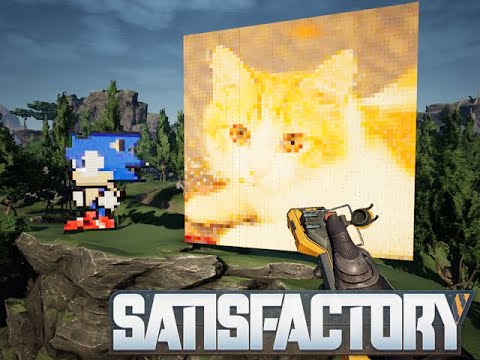
Easily make pixelarts from your images with vanilla signs.
Beschreibung
<center><img src="https://github.com/DellAquila/Layout/raw/main/New/CABECALHO.png"></center>
Easily make pixelarts from your images with vanilla signs.
Turns CSS code into Vanila Signs.
ATTENTION Dont abuse it. As any entity, a lot of signs can make your fps drop.


If you dont like, type in CHAT ->
/deletepixel
To remove the last creation.
----
How to make it:
1. Access https://www.pixelartcss.com/ and click LOAD (you can just paint a pixel art too)

2. Click Load from Image

3. Click Browse

4. Select an image (Try to make them round pixels, like 650x360 / 100x100 / 1500x300 )

5. Make only 1 FRAME and the be careful with Frame Size (not be too big. Ex: 10x10 = 100 signs / 50x50 = 2500 signs) . For that make the Pixel Size bigger.

5.5 VERY IMPORTANT!!!!! After getting the image in pixels , always set the Pixel Size to 10 !

6. Click in CSS to copy the code

7. Copy the code

8. Put the Sign Pixel Art on your world (In the Special Tab)

9. Paste the CSS code and choose emissiviness and glossines:

10. Will spawn the Vanilla signs:

<br/><img src="https://github.com/DellAquila/Layout/raw/main/Videos_Up.png"><br/>
[](https://www.youtube.com/watch?v=_cR_gvX3Nk4)
<br/><img src="https://github.com/DellAquila/Layout/raw/main/Videos_Down.png"><br/>
<br/>Credits: Icons, UI and Graphic advices from <a href="https://discord.gg/xkVJ73E">Deantendo: The UI guy!</A> <br/>
________
<br/>I'm having a lot of fun making Satisfactory Mods and I hope you are enjoying them! If you want to [donate](https://www.paypal.com/cgi-bin/webscr?cmd=_s-xclick&hosted_button_id=U96NB4W469FR2&source=url), i would be very grateful.<br/><br/>[](https://discord.gg/xkVJ73E)<br/>[](https://store.steampowered.com/app/1958750/Hexfactory/)<br/>[](https://www.patreon.com/AndreAquila)<br/>[](https://ko-fi.com/aquilaindustrial)<br/>[](https://www.paypal.com/cgi-bin/webscr?cmd=_s-xclick&hosted_button_id=U96NB4W469FR2&source=url)
Versionen
PixelArt to Vanilla Signs auf dem Server installieren
Satisfactory Server bestellen
Bestelle einen Satisfactory Server mit mindestens 4 GB RAM (6 GB empfohlen). Bei Multiplayer: +1 GB pro 4 Spieler.
Mod installieren
Öffne den Mod-Manager im Dashboard und suche nach "PixelArt to Vanilla Signs". Installations-Dependencies werden automatisch mitinstalliert.
Server neu starten
Starte den Server neu, damit die Mod geladen wird. Spieler müssen die Mod ebenfalls lokal installiert haben.
Häufige Fragen
PixelArt to Vanilla Signs funktioniert nicht nach Update – was tun?
Nach einem Satisfactory-Update müssen Mods aktualisiert werden. Prüfe auf ficsit.app, ob PixelArt to Vanilla Signs bereits für die neue Game-Version aktualisiert wurde. Bei Mado Hosting: Öffne den Mod-Manager und klicke "Alle aktualisieren". Wenn die Mod noch nicht aktualisiert ist, entferne sie temporär, damit der Server startet.
PixelArt to Vanilla Signs verursacht Crashes im Multiplayer – Lösung
Häufigste Ursache: alle Spieler müssen exakt die gleiche Mod-Version installiert haben. Prüfe in den Server-Logs nach "ModMismatch" oder "Version Conflict". Stelle sicher, dass alle Spieler PixelArt to Vanilla Signs v1.0.1 und den gleichen SML verwenden. Bei Mado Hosting laufen Satisfactory Server mit 6 GB RAM für stabile Multiplayer-Performance.
Ist PixelArt to Vanilla Signs mit anderen Satisfactory Mods kompatibel?
PixelArt to Vanilla Signs nutzt den Satisfactory Mod Loader (SML). Generell sind SML-basierte Mods untereinander kompatibel, aber Mods die gleiche Game-Systeme ändern, können Konflikte verursachen. Teste neue Mod-Kombinationen am besten auf einem Backup-Save. Im Mado Dashboard werden bekannte Konflikte automatisch erkannt und du wirst gewarnt.
PixelArt to Vanilla Signs Server mieten
Spiele PixelArt to Vanilla Signs auf deinem eigenen Satisfactory Server mit Mod-Support.
Mod Informationen
- Ersteller
- Andre Aquila
- Neueste Version
- v1.0.1
- Erstellt am
- 31. Januar 2022
- Zuletzt aktualisiert
- 8. Juli 2026
- Quellcode
- GitHub →