
TFIT - Ficsit Information Tool
Your ultimate source for more information about whatever it is you're looking at!
Beschreibung
TFIT - The Ficsit Information Tool
Your ultimate source for more information about whatever it is you're looking at. Highly configurable and easily extensible by other mods.

Multiplayer Compatible!
Feature Highlights
- Find out what mod added whatever you're looking at to the game, be it a building, item, recipe, or more.
- Looking for information about HUB milestones and MAM trees? Check out [MAM Enhancer](https://ficsit.app/mod/MAMTips)!
- Get useful contextual information about what you're looking at in the world
- Easily find out what items stack to and how many AWESOME Sink points they're worth
- Additional information provided by other mods you have installed
If you have any ideas or feature request join our Discord:
<https://discord.gg/ds696q4>
Full Feature List
"What am I Looking At?" Overlay
- You can enable/disable the overlay from the mod configs.
- Names of Buildings and what Recipe they are set to
- Don't want this info? Turn it off in the configs.
- 
- 
- Name, health, AI task status, and drops of Creatures
- 
- Potential drops from Foliage
- Don't want this info? Turn it off in the configs.
- 
- Contents of Item Pickups (like dropped items and plants) and how long it is until they respawn
- 
- 
- Ore type and purity of Resource Nodes and Resource Wells
- 

- Ore type and contained quantity of Resource Clusters (the ones found on top of resource nodes)
- 
- Name, speed, and fuel status of Vehicles
- 
- Name, power status, next destination, mass and cargo mass, and speed/docking/derailment of Trains
- <video controls="" width="360" height="203">
<source src="https://i.imgur.com/vxe5c52.mp4" autoplay="" controls="" type="video/mp4">
</video>
<!-- - https://streamable.com/mre83a -->
- Fuel, home port, destination port, docking status, and speed of Drones
- 
- Flow rate and contents information of Pipelines and Fluid Storages
- 
- 
- Color information about Painted Structures
- Visualize the swatch and see the color hexes used
- Ignores buildings with the default swatch by default (can modify this in the configs)
- Don't want this info? Turn it off in the configs.
- 
- Resource and mining progress of Portable Miners
- 
- Opening status, requirements, and power consumption of Drop Pods
- 
Item Tooltips
- You can enable/disable all of these from the mod configs.
- Collapse Recipes Section - By default, you must hold your Sprint key to see the recipes section of the tooltip. This can be reversed in the mod configs.
- 
- Mod Name - Wondering what mod added this item? Now you can see it in the tooltip!
- Optionally disable for content added by Satisfactory itself
- 
- Dimensional Depot Stockpile - Upload it or trash it? How much of this item is in your Dimensional Depot right now? No need to search it to find out!
- Optionally also show this for Liquids and Gasses
- 
- Resource Sink Points - Find out how many AWESOME Points you'll get from shredding this item, or a whole stack of it. If you can't sink it, it will say so as well.
- Optionally disable for items that can't be sunk
- Optionally also show for exactly how many items are in the stack, ex. "points for 4 assembly director systems"
- Tells you how many points Liquids and Gasses would be worth if they could be sunk
- 
- 
- Radioactive Items - Items that are radioactive will now have a radioactive symbol in their tooltip and have the header bar turn lime green.
- 
- Stack Size and Form - See what the max stack size of the item you're looking at is, and if it's a liquid or solid.
- 
- 
- 
- Fuel Energy Value - Find out how much juice is stored this item, or a whole stack of it.
- Disabled by default for items with no energy value
- Optionally also show for exactly how many items are in the stack, ex. "energy for 28.3 L of fuel"
- 
- 
Recipe Information
- Additional information is now added to the recipe section of tooltips, which also appears in the in-game Codex. You can enable/disable all of these from the mod configs.
- Recipes are renamed to their display name, if they have one.
- 
- Mod Name - Wondering what mod added this recipe? Now you can see it in the tooltip!
- Optionally disable for recipes added by Satisfactory itself
- 
- Sink Points Profit - Find out how many AWESOME Points using the recipe nets you.
- Format: `Sum of Recipe Ingredients Points` → `Sum of Recipe Product Points` (±`Percentage difference`)
- It will attempt to estimate when unsinkable items are involved in the recipe, displaying a warning symbol when estimates are made. Hover over the warning symbol (in the codex) to see an explanation.
- Optionally enable displaying a points per minute calculation
- 

Build Gun Menu
- Makes the Info Sidebar in the Build Gun scrollable. A scrollbar will appear if information displayed by this mod (or any other mod) would make it longer than the normal window.
- What Mod Added This Category?
- Tooltip will say what mod added the build category to the left sidebar
- Disabled by default for categories added by Satisfactory itself
- 
- What Mod Added This Building?
- Info Sidebar will tell you what mod added the building
- Also works for the Customizer tab
- If the mod that added the recipe for the building is different from the one that added the building, it will also be displayed
- Disabled by default for buildings added by Satisfactory itself (except if a mod provides an alternate building recipe for the building)
- 
Additional Configuration
- Configure the position, scale, color, and transparency of the overlay
- Configure if you must hold the Sprint key to expand/collapse recipe display in item tooltips
Support The Developers
Robb
If you enjoy Robb's work, please consider donating to his [completely optional tip jar](https://ko-fi.com/robb4).
blockout22
[](https://paypal.me/blockout22)
[](https://www.patreon.com/blockout22)
For Mod Developers
Developer Utilities
TFIT also includes a number of helpful tools for mod development and troubleshooting.
A quick summary:
- Overlay
- Debugging info (off by default)
- Hit actor blueprint path and hit component name, exact position in world
- Recipe Path Display
- View the blueprint path of a recipe for troubleshooting and research
- Click it (from the codex) to copy the path to clipboard
- 
- Descriptor Path Display
- View the blueprint path of a descriptor for troubleshooting and research
- 
- Buildgun Recipe Path Display
- View the blueprint path of a building's recipe for troubleshooting and research
- Click it to copy the path to clipboard
- 
- Automatic Sink Point Calculation!
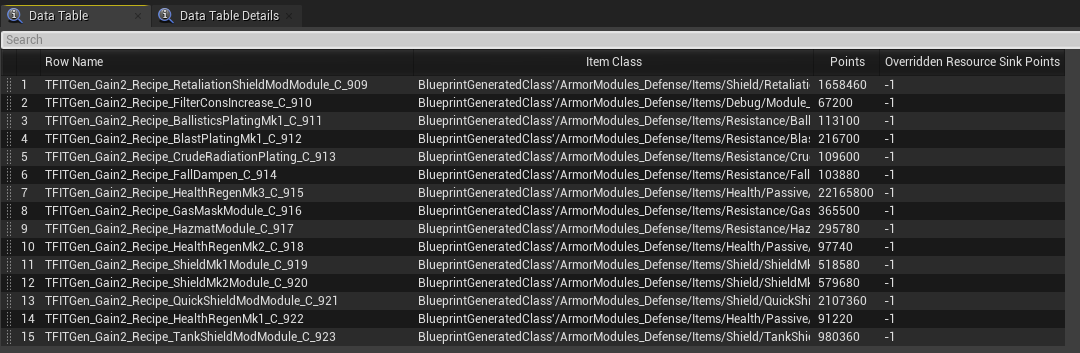
- You can use TFIT to semi-automatically calculate sink points for your own mods' items!
- The tool will suggest a points value for the first output product of a recipe based on the input points of the recipe and an "improvement multiplier" that you determine. A good value is `2.0` for +100% points.
- Once enabled in the mod config, use the chat command `/tfit_suggest_points <output mult of input ex. 2.0 for +100%> [mod reference filter]`
- It will process every registered recipe in the game unless you filter it down by supplying a mod reference filter
- The command generate two files in the `\FactoryGame\Mods\TFIT\Output` folder. One of them is a CSV file ready for import into the editor as a data table. The second is a CSV file that contains metadata such as items that could not be factored into the calculation (had no points or was a fluid)
- The equation used is `output mult * (sum of ingredients input points) / output count`. It does not traverse any further than one level of recipe products, so you may need to selectively bring in pieces at a time to "build out" the points for the items involved in a processing chain.
- 
- 
Using TFIT in your Mod
Your mod doesn't need to dependency-require TFIT to still benefit from and extend its feature set!
You can find information on how to extend TFIT's features with your own here: <https://github.com/blockout22/TFIT/blob/main/DEV_README.md>
Credits
- Original mod by blockout22#1880
- 2.0.0 update by Robb#6731
- Icon design by Deantendo#4265
Versionen
TFIT - Ficsit Information Tool auf dem Server installieren
Satisfactory Server bestellen
Bestelle einen Satisfactory Server mit mindestens 4 GB RAM (6 GB empfohlen). Bei Multiplayer: +1 GB pro 4 Spieler.
Mod installieren
Öffne den Mod-Manager im Dashboard und suche nach "TFIT - Ficsit Information Tool". Installations-Dependencies werden automatisch mitinstalliert.
Server neu starten
Starte den Server neu, damit die Mod geladen wird. Spieler müssen die Mod ebenfalls lokal installiert haben.
Häufige Fragen
TFIT - Ficsit Information Tool funktioniert nicht nach Update – was tun?
Nach einem Satisfactory-Update müssen Mods aktualisiert werden. Prüfe auf ficsit.app, ob TFIT - Ficsit Information Tool bereits für die neue Game-Version aktualisiert wurde. Bei Mado Hosting: Öffne den Mod-Manager und klicke "Alle aktualisieren". Wenn die Mod noch nicht aktualisiert ist, entferne sie temporär, damit der Server startet.
TFIT - Ficsit Information Tool verursacht Crashes im Multiplayer – Lösung
Häufigste Ursache: alle Spieler müssen exakt die gleiche Mod-Version installiert haben. Prüfe in den Server-Logs nach "ModMismatch" oder "Version Conflict". Stelle sicher, dass alle Spieler TFIT - Ficsit Information Tool v2.8.0 und den gleichen SML verwenden. Bei Mado Hosting laufen Satisfactory Server mit 6 GB RAM für stabile Multiplayer-Performance.
Ist TFIT - Ficsit Information Tool mit anderen Satisfactory Mods kompatibel?
TFIT - Ficsit Information Tool nutzt den Satisfactory Mod Loader (SML). Generell sind SML-basierte Mods untereinander kompatibel, aber Mods die gleiche Game-Systeme ändern, können Konflikte verursachen. Teste neue Mod-Kombinationen am besten auf einem Backup-Save. Im Mado Dashboard werden bekannte Konflikte automatisch erkannt und du wirst gewarnt.
TFIT - Ficsit Information Tool Server mieten
Spiele TFIT - Ficsit Information Tool auf deinem eigenen Satisfactory Server mit Mod-Support.
Mod Informationen
- Ersteller
- blockout22, Robb
- Neueste Version
- v2.8.0
- Erstellt am
- 28. November 2021
- Zuletzt aktualisiert
- 7. Oktober 2026
- Quellcode
- GitHub →