Tier Overflow Lib
Extend the game by adding a scroller to the list of tiers. Allows modders to add new tiers beyond the default limit and unlock.
Beschreibung

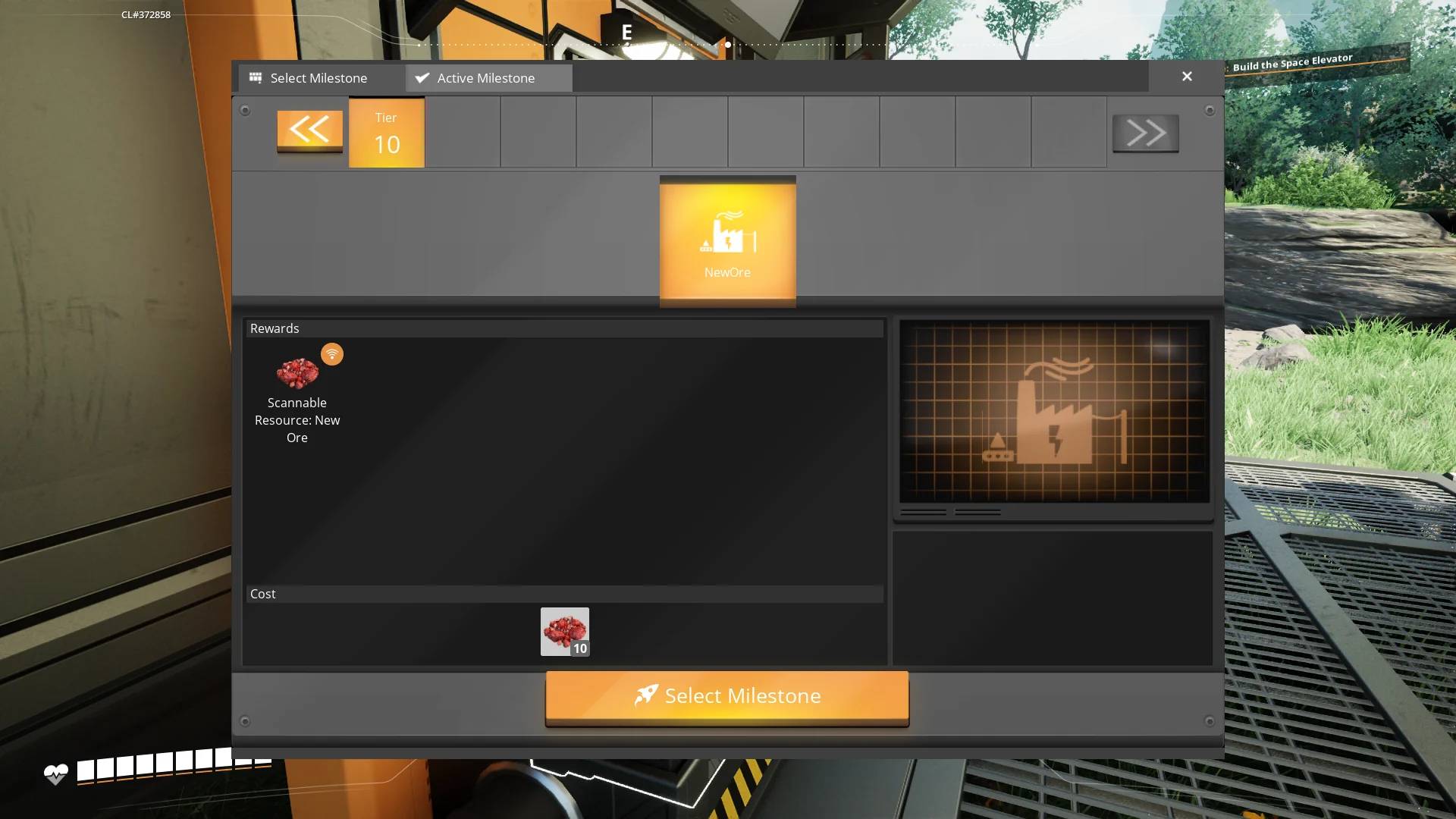
TierOverflowLib is a library mod for Satisfactory that extend the game by adding a scroller to the list of tiers. This allows modders to add new tiers beyond the default limit and unlock them via a method or a Blueprint node.

Features
- Scrollable Tier List: Adds a scroller to the tier list, allowing for an extended number of tiers.
- Dynamic Tier Addition: Enables adding new tiers beyond the default game limit.
- Unlock Mechanisms: Unlock new tiers using a method call or a Blueprint node.
Changelogs
- v1.0.2:
- Added 1.1 support
- v1.0.1:
- Fixed a miss click which made the game crash when loading the mod (empty subsystem field)
- Added a setting "AlwaysShowTierArrows" which always show the tier arrows, even if there is no new tier.
Usage (for modders)
First you need to clone this repository into the 'mods' folder of your modding UE project ('mods' is in the same folder as the .uproject file)Then run the project with Unreal Engine, rebuild TierOverflowLib if the prompt which asking it appears.
Adding New Tiers
To add a new tier to the game:
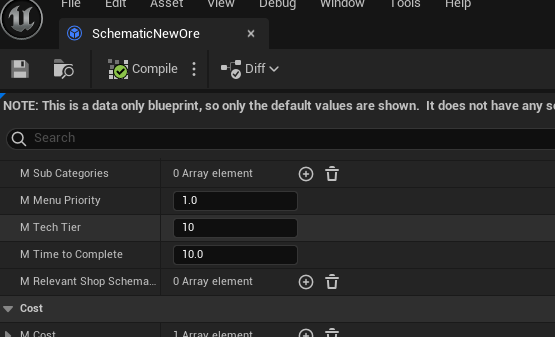
1. Simply create a new schematic in your mod and put it the TechTier int of your choice.
2. Add the schematic in your mod's GameWorldModule as on the modding docs.
Unlocking Tiers
Unlock new tiers using one of the following methods:
- Blueprint Node: Use the `ApplyMaxTier` Blueprint node in your Unreal Engine Blueprints.
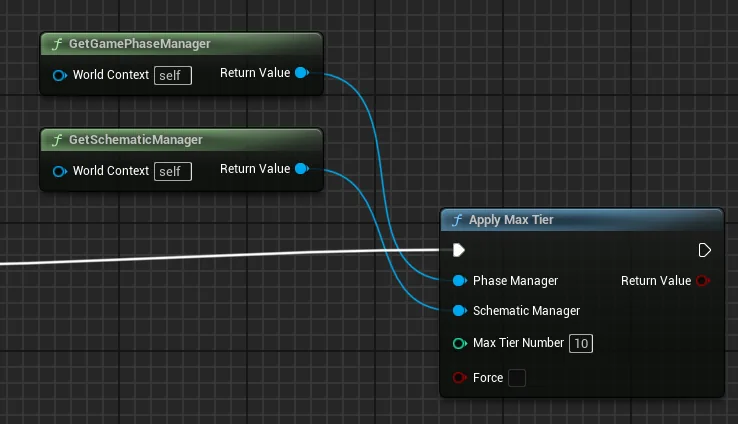
- Method Call: Use the `UTierOverflowLib_BPNodes::ApplyMaxTier` method in your mod's code, fill it with an instance of the session's Phase Manager and Schematic Manager, then with an int for the tier you wish to unlock.
API Reference
Methods
- `ApplyMaxTier(AFGGamePhaseManager phaseManager, AFGSchematicManager schematicManager, int32 maxTierNumber, bool force)`: Unlock the wished tier.
Blueprint Nodes
- `ApplyMaxTier`: Unlock the wished tier.
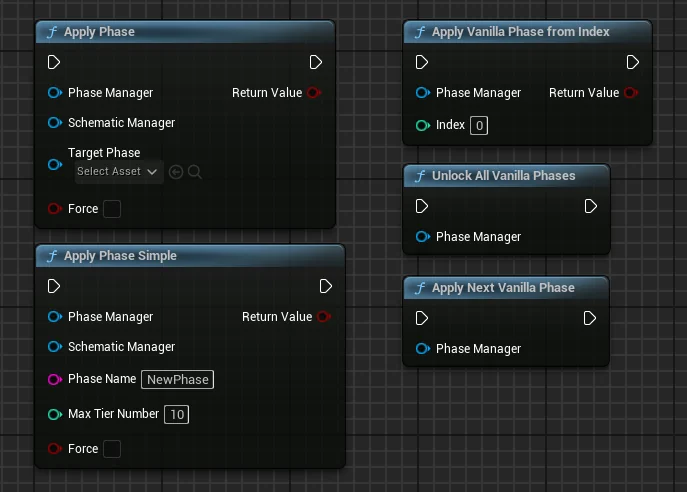
- `ApplyPhase`: Apply a custom phase from a phase asset (can break the game progression).
- `ApplyPhaseSimple`: Apply a custom phase from a phase name and tier number (can break the game progression).
- `ApplyVanillaPhaseFromIndex`: Unlocks a vanilla phase from it's number.
- `ApplyNextVanillaPhase`: Unlocks the next vanilla phase.
- `UnlockAllVanillaPhases`: Unlocks all the vanilla phases.
Future Features
- Server Compatibility Testing: Ensure the mod works seamlessly in multiplayer environments.
- Console & Chat Commands: Introduce commands to interact with the mod features.
- Milestone Integration:
- Allow to unlock a tier from a schematic.
- Display the unlocked tiers graphically in the milestone rewards.
---
Feedback
For bug reports and requests/suggestions you can find me (acxd25) on the [Ficsit Labs Discord](https://discord.gg/pz2U6FvMat).
Note: HolographicWings no longer maintains the library, please do not ping him.
Sponsorship
<img style="float: right;" src="https://i.imgur.com/gc9Thxj.png" />
Are you looking to host your own Satisfactory dedicated server, fully SMM-compatible? I highly recommend <b>Indifferent Broccoli</b>. They offer top-notch servers at affordable prices and an intuitive control panel. [Try their 2-day free trial](https://indifferentbroccoli.com/satisfactory-server-hosting?fpr=acxd), no strings attached.
<br />
---
Thanks
Coffee Stain Studios
[Mircea](https://ficsit.app/user/5NC9GpMKcYZbon), [Robb](https://ficsit.app/user/6axpMZJjUTUBWU) and co., which made this mod possible
* [HolographicWings](https://ficsit.app/user/5q7ihJ2KnwNdiL) for his original idea and initial code development
Versionen
Tier Overflow Lib auf dem Server installieren
Satisfactory Server bestellen
Bestelle einen Satisfactory Server mit mindestens 4 GB RAM (6 GB empfohlen). Bei Multiplayer: +1 GB pro 4 Spieler.
Mod installieren
Öffne den Mod-Manager im Dashboard und suche nach "Tier Overflow Lib". Installations-Dependencies werden automatisch mitinstalliert.
Server neu starten
Starte den Server neu, damit die Mod geladen wird. Spieler müssen die Mod ebenfalls lokal installiert haben.
Häufige Fragen
Tier Overflow Lib funktioniert nicht nach Update – was tun?
Nach einem Satisfactory-Update müssen Mods aktualisiert werden. Prüfe auf ficsit.app, ob Tier Overflow Lib bereits für die neue Game-Version aktualisiert wurde. Bei Mado Hosting: Öffne den Mod-Manager und klicke "Alle aktualisieren". Wenn die Mod noch nicht aktualisiert ist, entferne sie temporär, damit der Server startet.
Tier Overflow Lib verursacht Crashes im Multiplayer – Lösung
Häufigste Ursache: alle Spieler müssen exakt die gleiche Mod-Version installiert haben. Prüfe in den Server-Logs nach "ModMismatch" oder "Version Conflict". Stelle sicher, dass alle Spieler Tier Overflow Lib v1.0.2 und den gleichen SML verwenden. Bei Mado Hosting laufen Satisfactory Server mit 6 GB RAM für stabile Multiplayer-Performance.
Ist Tier Overflow Lib mit anderen Satisfactory Mods kompatibel?
Tier Overflow Lib nutzt den Satisfactory Mod Loader (SML). Generell sind SML-basierte Mods untereinander kompatibel, aber Mods die gleiche Game-Systeme ändern, können Konflikte verursachen. Teste neue Mod-Kombinationen am besten auf einem Backup-Save. Im Mado Dashboard werden bekannte Konflikte automatisch erkannt und du wirst gewarnt.
Tier Overflow Lib Server mieten
Spiele Tier Overflow Lib auf deinem eigenen Satisfactory Server mit Mod-Support.
Mod Informationen
- Ersteller
- Acxd, HolographicWings
- Neueste Version
- v1.0.2
- Erstellt am
- 19. Oktober 2024
- Zuletzt aktualisiert
- 8. Juli 2026
- Quellcode
- GitHub →