
Vanilla Upgrades
Upgrade your existing base-game machines via MAM Research trees!
Beschreibung
Upgrade your existing base-game machines via MAM Research trees!
Spend Power Shards and tier-appropriate resources to effectively increase the base clock speed of all machines of a type, including existing ones!
Essentially, by purchasing these upgrades, you don't need to install power shards in your machines to increase their speed -
although you can still do so for even more speed.
This means you can upgrade your existing base without having to replace any machines,
and if you ever uninstall the mod, you won't lose any of your machines or their contents,
although they will revert to their base game speeds.
Available Machine Upgrades
There are 3 upgrade tiers available for each of the machines below, spread across 4 MAM trees
Production machines generally get upgrades of +33%, +66%, then +100% base clock speed.
The exact upgrade amounts are described in the MAM nodes.
<!-- markdownlint-disable MD033 MD045 -->
<style type="text/css">
.tg {border-collapse:collapse;border-spacing:0;}
.tg td{border-color:black;border-style:solid;border-width:1px;font-family:Arial, sans-serif;font-size:14px;
overflow:hidden;padding:10px 5px;word-break:normal;}
.tg th{border-color:black;border-style:solid;border-width:1px;font-family:Arial, sans-serif;font-size:14px;
font-weight:normal;overflow:hidden;padding:10px 5px;word-break:normal;}
.tg .tg-0pky{border-color:inherit;text-align:left;vertical-align:top}
</style>
<table class="tg"><thead>
<tr>
<th class="tg-0pky">Machine</th>
<th class="tg-0pky">Upgrade Effects</th>
</tr></thead>
<tbody>
<tr>
<td class="tg-0pky">Crafting Bench<br>Equipment Workshop</td>
<td class="tg-0pky">Increased crafting speed (Fewer crafting hammers required for items that need more than 1)</td>
</tr>
<tr>
<td class="tg-0pky">Smelter<br>Constructor<br>Assembler<br>Foundry<br>Manufacturer<br>Packager<br>Refinery<br>Blender<br>Particle Accelerator<br>Quantum Encoder<br>Converter</td>
<td class="tg-0pky">Increased crafting speed (reduced cycle time)<br>Increased power consumption (following overclocking exponent)</td>
</tr>
<tr>
<td class="tg-0pky">Miner<br>Water Extractor<br>Oil Extractor<br>Resource Well Pressurizer/Extractor</td>
<td class="tg-0pky">Increased extraction speed<br>Increased power consumption (following overclocking exponent)</td>
</tr>
<tr>
<td class="tg-0pky">Biomass Burner<br>Coal-Powered Generator<br>Fuel-Powered Generator<br>Nuclear Power Plant</td>
<td class="tg-0pky">Increased power production (fuel and water consumption rates increased)</td>
</tr>
<tr>
<td class="tg-0pky">Geothermal Generator</td>
<td class="tg-0pky">Increased average power generation</td>
</tr>
<tr>
<td class="tg-0pky">Power Storage</td>
<td class="tg-0pky">Increased maximum power stored<br>Increased charge rate</td>
</tr>
</tbody></table>
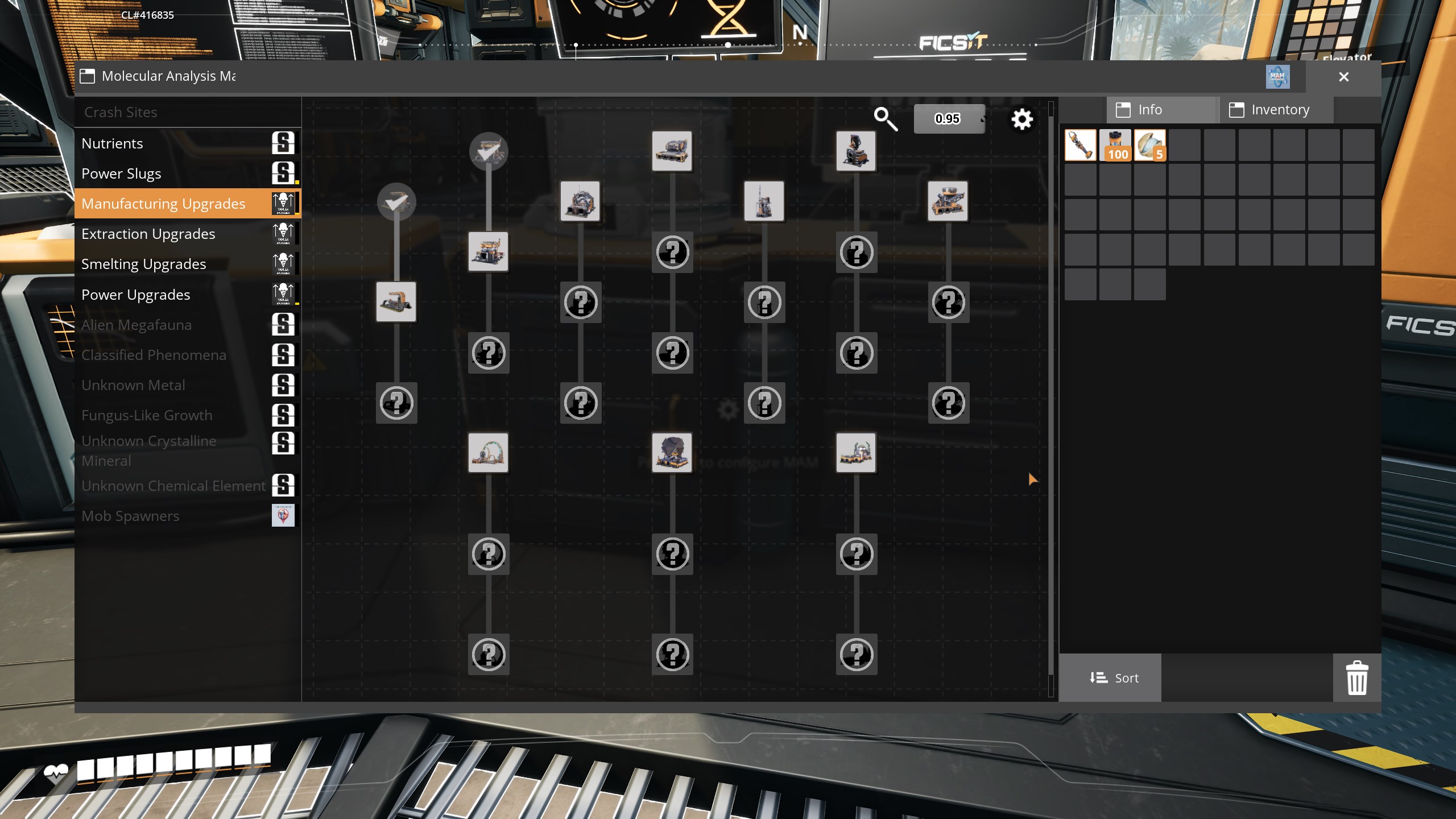
The first upgrade is available with resources from the same HUB Tier you unlock the machine,
with further upgrades requiring more complex resources and additional Power Shards.
_(This screenshot was taken with the [MAM Enhancer](https://ficsit.app/mod/MAMTips) mod installed)_
Upgrading a Machine
Upon purchasing an upgrade, all machines of that type will immediately be upgraded to the new speed, including existing machines.
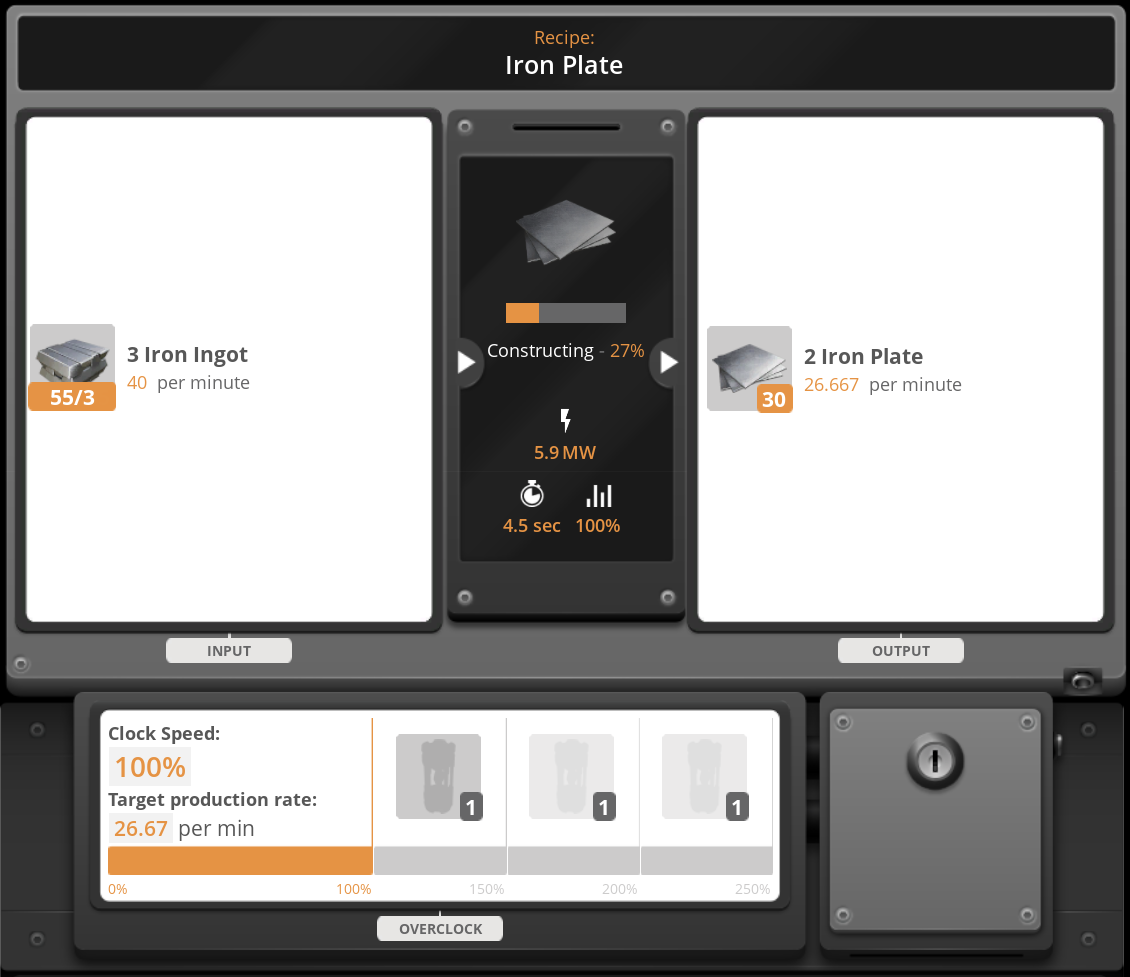
For example, if you had a Constructor making 20 Iron Plates per minute by consuming 30 ingots per minute and 4 MW (set to 100% clock speed),
then purchased the first Constructor upgrade,
it will now be making 26.667 plates per minute by consuming 40 ingots per minute and 5.9 MW (set to 100% clock speed).
This is a 33% bonus to the crafting speed, as if you had set the un-upgraded Constructor to 133% clock speed.
Here's a screenshot of this example's Constructor after the Level 1 upgrade has been unlocked:
Disclaimers
- Building descriptions/stats in the Build Gun menus and recipe estimates in the Codex are not altered to reflect current upgrade effects - they always show the base game values.
- It is possible to achieve resource demands or production rates that exceed the base game's belt and pipe speed limits,
esepcially if you still install Power Shards in your machines after upgrading them.
You will need to use other mods to deal with this problem.
Keep in mind that Satisfactory limitations prevent belt speeds >2000 items/minute and pipe speeds >600 m³/minute.
Credits
- Mod concept and implementation: SirDigby
- Balance suggestions: Acxd, AngryBeaver, AniMouse, DarthPorisius, derpierre65, Muppet Burrito, Robb
- Mod page: Robb
- MAM Node details: Robb
<br><br><h3>Please report any issues <a href="https://discord.gg/WM5KT7pVu8">on my Discord server</a></h3>
<a href="https://ko-fi.com/sirdigbymodding">SirDigby's completely optional tip jar</a>
<br><a href="https://indifferentbroccoli.com/satisfactory-server-hosting?fpr=sirdigby"><img src="https://indifferentbroccoli.com/img/broccoli_shadow_square.png" width=80/></a>
Indifferent Broccoli provides the server I use to test Dedicated Server mod support, and I highly recommend them. If you're looking to <a href="https://indifferentbroccoli.com/satisfactory-server-hosting?fpr=sirdigby">host your own Satisfactory server</a> , try indifferent broccoli's 2-day free trial.
Versionen
Vanilla Upgrades auf dem Server installieren
Satisfactory Server bestellen
Bestelle einen Satisfactory Server mit mindestens 4 GB RAM (6 GB empfohlen). Bei Multiplayer: +1 GB pro 3 Spieler.
Mod installieren
Öffne den Mod-Manager im Dashboard und suche nach "Vanilla Upgrades". Installations-Dependencies werden automatisch mitinstalliert.
Server neu starten
Starte den Server neu, damit die Mod geladen wird. Spieler müssen die Mod ebenfalls lokal installiert haben.
Häufige Fragen
Vanilla Upgrades funktioniert nicht nach Update – was tun?
Nach einem Satisfactory-Update müssen Mods aktualisiert werden. Prüfe auf ficsit.app, ob Vanilla Upgrades bereits für die neue Game-Version aktualisiert wurde. Bei Mado Hosting: Öffne den Mod-Manager und klicke "Alle aktualisieren". Wenn die Mod noch nicht aktualisiert ist, entferne sie temporär, damit der Server startet.
Vanilla Upgrades verursacht Crashes im Multiplayer – Lösung
Häufigste Ursache: alle Spieler müssen exakt die gleiche Mod-Version installiert haben. Prüfe in den Server-Logs nach "ModMismatch" oder "Version Conflict". Stelle sicher, dass alle Spieler Vanilla Upgrades v1.1.5 und den gleichen SML verwenden. Bei Mado Hosting laufen Satisfactory Server mit 6 GB RAM für stabile Multiplayer-Performance.
Ist Vanilla Upgrades mit anderen Satisfactory Mods kompatibel?
Vanilla Upgrades nutzt den Satisfactory Mod Loader (SML). Generell sind SML-basierte Mods untereinander kompatibel, aber Mods die gleiche Game-Systeme ändern, können Konflikte verursachen. Teste neue Mod-Kombinationen am besten auf einem Backup-Save. Im Mado Dashboard werden bekannte Konflikte automatisch erkannt und du wirst gewarnt.
Vanilla Upgrades Server mieten
Spiele Vanilla Upgrades auf deinem eigenen Satisfactory Server mit Mod-Support.
Mod Informationen
- Ersteller
- Robb, SirDigby
- Neueste Version
- v1.1.5
- Erstellt am
- 4. Juli 2025
- Zuletzt aktualisiert
- 8. Oktober 2026
- Quellcode
- GitHub →