X3-Signs V2
X3-Signs is a mod for using different signs, which can be fully customized.
Beschreibung
<img src="https://raw.githubusercontent.com/deantendo/community/master/com_mp_yes.png"></a>
<hr>
Updated for Satisfactory Version 1.0 by JustNotG00d 22 October 2024
<hr>
<hr>
Update 8 INFO
The new version is now working.
<hr>
<hr>
Update 5 INFO
I stopped modding (too many projects) and I am searching for modders who want to continue my work (details on my discord). My mods will NOT work in update 5, because there were many changes in Satisfactory, the mods have to be ported.
New Update: Now working in Update 5, updated by JustNotG00d / John Barradale
https://www.twitch.tv/justnotg00d
[Discord](https://discord.gg/rCeGex)
[John's Facebook](https://www.facebook.com/jbarradale)
<hr>
INFOS FOR SATISFACTORY UPDATE 4
The config system changed with Update 4, so I had to make a new solution for the template system. The original config file (`C:\Program Files\Epic Games\SatisfactoryEarlyAccess\configs\X3_Signs.cfg`) does no longer work! You have to recreate all your templates.<br />I exported all templates shown in the trailer from the old engine for you (see below and 10 / TEMPLATES). You could also open your old config file and copy/paste all the values, or use the copy/paste on the Signs Menu, if you have this sign in your world. I don't use the SML function for saving templates anymore, so it's very unlikely this will happen again...<br />
Also you can not edit the new config file anymore, but you could still share the file at `%LOCALAPPDATA%\FactoryGame\Saved\SaveGames\X3_Signs_Config.sav`.
INFOS FOR V2 UPDATE
- <a href="https://youtu.be/8AMu9xcJvQk" target="_blank">X3-Signs v2 Trailer (see all new features)</a><br>- <a href="https://github.com/Rick86/sf_mods/raw/master/X3_Signs_Config.sav" target="_blank">Config-File with some Templates (as shown in the Trailer)</a> (just copy it to `%LOCALAPPDATA%\FactoryGame\Saved\SaveGames\X3_Signs_Config.sav`)<br>
Have a Savegame with v1 signs?<br>
The old v1 signs are still available, so you can keep your existing ones (yeah, I take care of you :D).
All features are also available for the old signs, except for the new aiming system. So keep your old signs, but use the new one for new buildings.
<br>
<br>
CONTENTS
- 01 / DESCRIPTION- 02 / VIDEOS
- 03 / INSTALLATION / USAGE
- 04 / WORKS GREAT WITH
- 05 / UPDATES
- 06 / KNOWN ISSUES
- 07 / QUESTIONS? BUGS? CONTACT ME VIA
- 08 / WANT TO SUPPORT ME? (DONATIONS)
- 09 / YOUTUBER / STREAMER?
- 10 / TEMPLATES
- 11 / CREDITS
- 12 / SCREENSHOTS
Just search for the number with the slash to find your topic (Ctrl+F and "03 /" for example).
<br>
<hr>
01 / DESCRIPTION
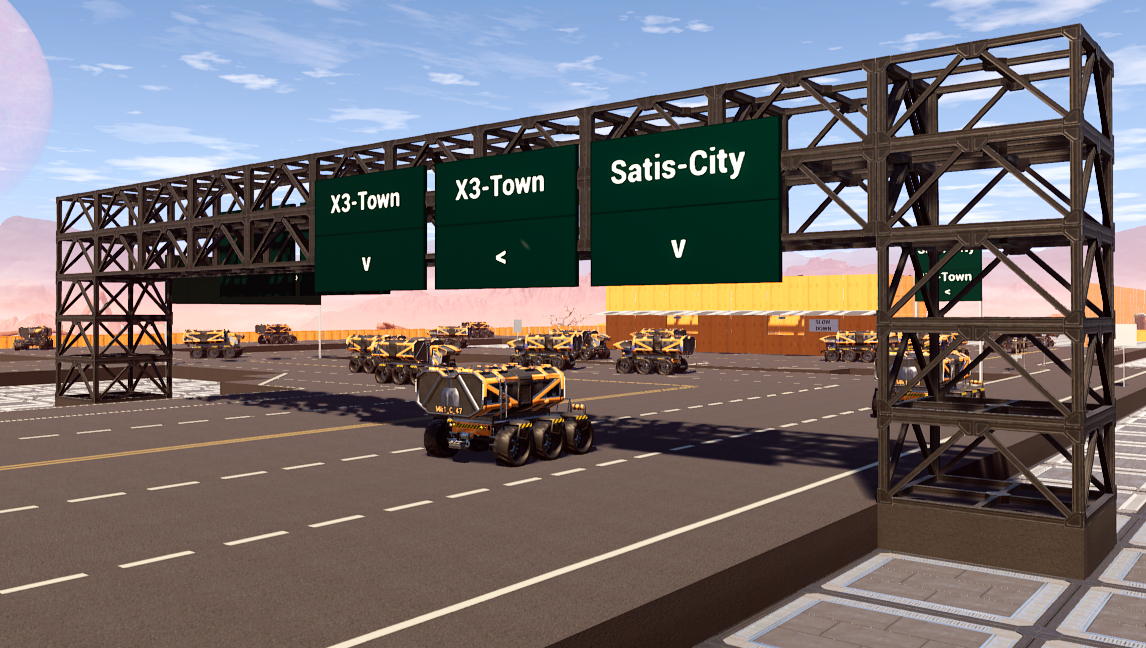
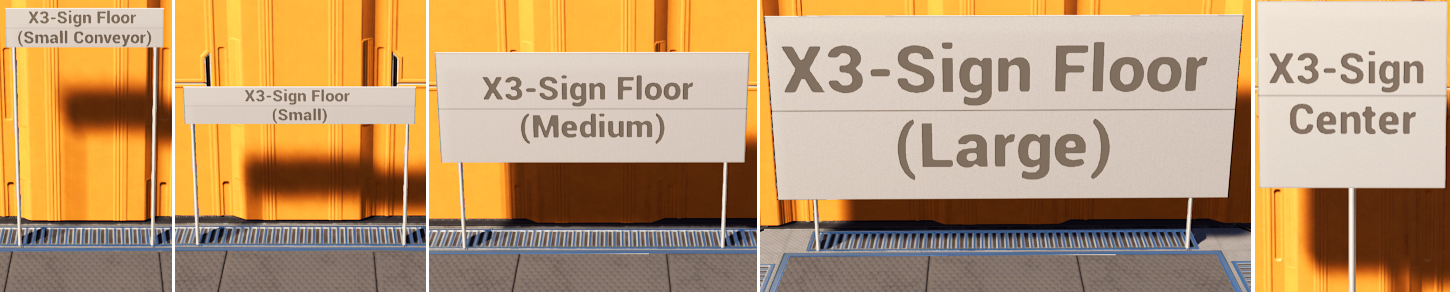
X3-Signs is a mod for using different signs, which can be fully customized.The mod comes with 21 different signs, like:
- White Conveyor Signs (special size to match conveyor belts and conveyor wall holes)
- White Floor Signs for Floor-Montage with poles (different sizes)
- White Wall Signs for Front-Montage (different sizes)
- White Wall Signs for Side-Montage (different sizes)
- White Ceilling Signs for Ceilling-Montage with poles (different sizes)
Highlights:
- Full Multiplayer-Support
- Text and Background Color can be changed by Color-Picker
- Text-Size and Location can be changed
- Text can have multiple lines
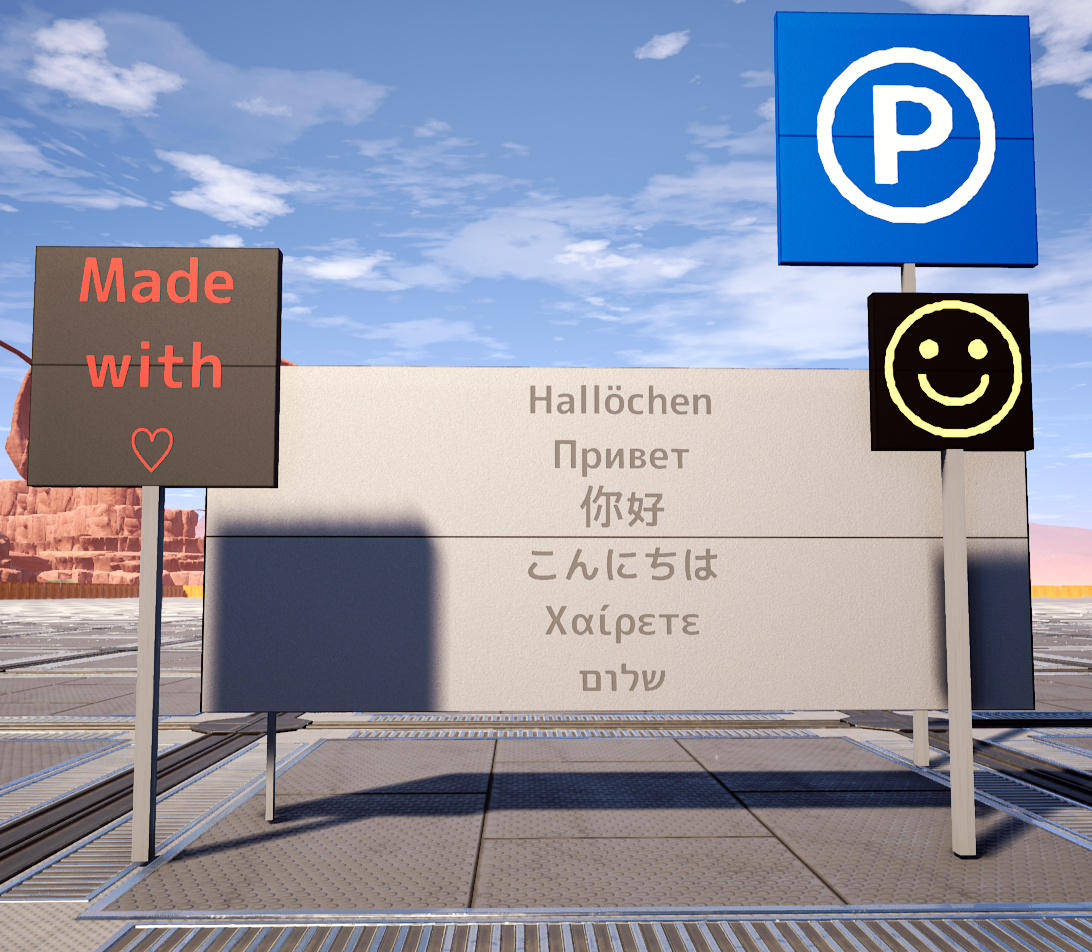
- Multi-Language Support (Cyrillic, Chinese, Japanese, and much more)
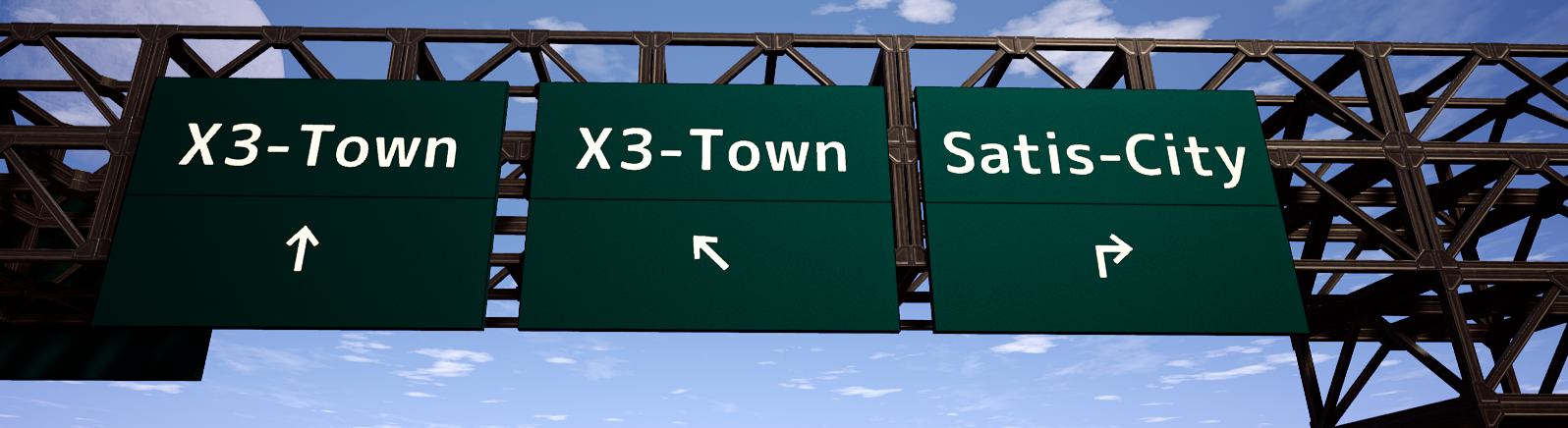
- You can use arrows and some other symbols (copy paste from [here](https://www.fontspace.com/m-2c-font-f13604#action=charmap&id=YlGy) and from below, see "templates")
- Text can be on Front- and/or on Backside
- Sign-Position can be changed
- Sign-Size can be changed
- The Floor Poles will grow with the position and size
- The Ceilling Poles will grow up to the next level (if the sign's top is at 10m, the poles will grow up to 12m)
- Show/Hide every single Pole (including wall-side support)
- Text-Alignment can be changed (Left / Center / Right)
- Copy and Paste all the settings to every sign of your choice
- Create unlimited own templates with the Global Template-System (the config file can be edited and shared)
With all these parts together, you can build many types of alerts / informations (see some of them in the video / screenshots)
No vanilla content was overwritten, so hopefully it will work with future updates.
<br>
<hr>
02 / VIDEOS
- <a href="https://youtu.be/8AMu9xcJvQk" target="_blank">X3-Signs v2 Trailer (see all new features)</a>- [Overview / Showcase](https://youtu.be/ympT4htBAcg)
- [Showcase only](https://youtu.be/ympT4htBAcg?t=24) (part of first video)
- [Spotlight with Commentary](https://youtu.be/LOXjTIJxErs) (thanks Random Gamer!)
Sorry for the lags in my videos -.-
<br>
<hr>
03 / INSTALLATION / USAGE
- Install [SML](https://ficsit.app/sml-versions) (this is a mod manager, used by nearly all modders)- Activate / Install this mod within the mod manager
- Unlock "X3-Signs" at Tier 1 in the HUB (you have to scroll to the right)
- It will have it's own category in the build menu
- ~~[Outdated / v1] You have to aim on the ground, even with wall and ceilling signs (if you want them higher, just edit the height, or build a higher foundation and aim at it, delete it when you're done)~~
- ~~[Outdated / v1] To change colors, use RGB-Values (Red, Green, Blue). For example: Pure red would be 255, 0, 0. The simplest way is to google for "color picker", choose your color, copy the RGB-Values from there and paste it in the Signs GUI.~~
<br>
<hr>
04 / WORKS GREAT WITH
- [X3-Roads](https://ficsit.app/mod/CTm5tJXpDfdATU) (as seen in the video)<br>
<hr>
05 / UPDATES
- New pole textures (v1.0.1)- Multiplayer-Support (v1.0.2)
- Migration for old settings (v1.0.2)
- Changeable Colors (v1.0.3)
- Multi-Language Support (v1.0.3)
- Auto "clean" line brakes, no more need of `<br>` (v1.0.4)
- Text Alignment Left / Center / Right (v1.0.4)
- Scrollbar for larger texts (v1.0.5 / v1.0.6)
- Fixed error where signs smaller than 100x100 could not be saved (v1.0.7)
- Auto-Clear " and ' on import, so you can import your templates from excel (v1.0.8)
- New UI with Color-Picker & Auto-Save (v2.0.0)
- New global Template-System (v2.0.0)
- New Aim-System for Wall and Ceiling (v2.0.0)
- New Shapes (v2.0.0)
- Added "TXT" Indicator, so you know how to rotate your sign (v2.0.3)
- Removed old recipes, your old signs will still be there, you can also still use them by saving them as templates (v2.0.3)
- Fixed "Width=Height" on non-square large sign (v2.0.4)
- Fixed Multiplayer, where players didn't see changes after certain distance (v2.0.5)
- Migration for Update 4 (v2.0.6)
- Fixed text "after" glowing when hovered on dismantle mode (v2.0.7)
<br>
<hr>
06 / KNOWN ISSUES
- None at the moment<br>
<hr>
07 / QUESTIONS? BUGS? CONTACT ME VIA
- [My Discord](https://discord.gg/DjjVgpP)- [Official ficsit.app Discord](https://discord.gg/xkVJ73E)
- [SF Forum](https://questions.satisfactorygame.com/user/x3008x)
- [Patreon](https://www.patreon.com/x3008x)
- [Reddit](https://www.reddit.com/r/SatisfactoryGame/comments/kz7g17/mod_x3signs_supportthread/)
<br>
<hr>
08 / WANT TO SUPPORT ME? (DONATIONS)
Please keep in mind, I (the original author) am not active anymore. You can still support my (old) work if you really want to:- [Patreon](https://www.patreon.com/x3008x)
- [PayPal](https://www.paypal.com/cgi-bin/webscr?cmd=_s-xclick&hosted_button_id=EG79RBD4QCGPE&source=url)
- BitCoin: 115Jh3qCAYqjin1Y4iN4fDCqvcvuYvz4rb
- Ask for more
<br>
<hr>
09 / YOUTUBER / STREAMER?
Feel free to use my mod, but please just link to this mod page in your description.If you earn money with your (modded) gameplay, please consider of supporting these modders (not just me), thanks!
<br>
<hr>
10 / TEMPLATES
Create your own Templates inGame with the Signs-Menu (button "More"). You can not edit the config file anymore, but you could still share the file at `%LOCALAPPDATA%\FactoryGame\Saved\SaveGames\X3_Signs_Config.sav`<br />
Anyway <a href="https://github.com/Rick86/sf_mods/raw/master/X3_Signs_Config.sav" target="_blank">here are the templates, as seen in the trailer</a> (just copy it to `%LOCALAPPDATA%\FactoryGame\Saved\SaveGames\X3_Signs_Config.sav`)<br>
Or copy the following content and use the Paste function within the signs menu:
- Conveyor Wall-Hole (opened):
```
___ 8 ___ 1 ___ 1 ___ 0 ___ 0 ___ 0 ___ 0 ___ 0 ___ 0 ___ 0 ___ -130 ___ 185 ___ 30 ___ 5 ___ 10 ___ 0, 0, 0 ___ 164, 164, 164 ___ 1 ___ 4, 4, 4 ___ 0 ___ 0 ___ 0 ___ 0 ___ 0 ___ 0 ___
```
- Conveyor Wall-Hole (closed):
```
___ 8 ___ 1 ___ 1 ___ 0 ___ 0 ___ 0 ___ 0 ___ 0 ___ 0 ___ 0 ___ -205 ___ 185 ___ 180 ___ 5 ___ 10 ___ 0, 0, 0 ___ 164, 164, 164 ___ 1 ___ 4, 4, 4 ___ 0 ___ 0 ___ 0 ___ 0 ___ 0 ___ 0 ___
```
- Warning Radioactive:
```
☢ ___ 110 ___ 1 ___ 1 ___ 1 ___ 0 ___ 0 ___ 0 ___ 0 ___ 0 ___ 0 ___ 600 ___ 300 ___ 300 ___ 10 ___ 150 ___ 0, 0, 0 ___ 224, 255, 0 ___ 1 ___ 24, 24, 24 ___ 1 ___ 1 ___ 1 ___ 0 ___ -2 ___ 2 ___
```
- Warning Biohazard:
```
☣ ___ 110 ___ 1 ___ 0 ___ 1 ___ 0 ___ 0 ___ 0 ___ 0 ___ 0 ___ 0 ___ 600 ___ 300 ___ 300 ___ 10 ___ 150 ___ 0, 0, 0 ___ 224, 255, 0 ___ 1 ___ 24, 24, 24 ___ 1 ___ 1 ___ 1 ___ 0 ___ -2 ___ 2 ___
```
- Warning Atom:
```
⚛ ___ 110 ___ 1 ___ 0 ___ 1 ___ 0 ___ 0 ___ 0 ___ 0 ___ 0 ___ 0 ___ 600 ___ 300 ___ 300 ___ 10 ___ 150 ___ 0, 0, 0 ___ 224, 255, 0 ___ 1 ___ 24, 24, 24 ___ 1 ___ 1 ___ 0 ___ 0 ___ -2 ___ 1 ___
```
- Street-Sign STOP:
```
STOP ___ 40 ___ 1 ___ 0 ___ 1 ___ 0 ___ 0 ___ 0 ___ 0 ___ 0 ___ 0 ___ 600 ___ 300 ___ 300 ___ 10 ___ 150 ___ 255, 255, 255 ___ 183, 0, 0 ___ 1 ___ 255, 255, 255 ___ 1 ___ 1 ___ 3 ___ 0 ___ 0 ___ 0 ___
```
- Street-Sign Danger (DE):
```
! ___ 100 ___ 1 ___ 0 ___ 1 ___ 0 ___ 0 ___ 0 ___ 0 ___ 0 ___ 0 ___ 600 ___ 300 ___ 300 ___ 10 ___ 150 ___ 0, 0, 0 ___ 255, 255, 255 ___ 1 ___ 135, 0, 0 ___ 1 ___ 1 ___ 2 ___ 0 ___ 0 ___ -35 ___
```
- Street-Sign Yield (DE):
```
✖ ___ 80 ___ 1 ___ 0 ___ 1 ___ 0 ___ 0 ___ 0 ___ 0 ___ 0 ___ 0 ___ 600 ___ 300 ___ 300 ___ 10 ___ 150 ___ 0, 0, 0 ___ 255, 255, 255 ___ 1 ___ 135, 0, 0 ___ 1 ___ 1 ___ 2 ___ 0 ___ 0 ___ -60 ___
```
- Street-Sign Uneven Road (DE/UK):
```
~ ___ 130 ___ 1 ___ 0 ___ 1 ___ 0 ___ 0 ___ 0 ___ 0 ___ 0 ___ 0 ___ 600 ___ 300 ___ 300 ___ 10 ___ 150 ___ 0, 0, 0 ___ 255, 255, 255 ___ 1 ___ 135, 0, 0 ___ 1 ___ 1 ___ 2 ___ 0 ___ 0 ___ -70 ___
```
- Street-Sign Do not enter (DE):
```
- ___ 180 ___ 1 ___ 0 ___ 1 ___ 0 ___ 0 ___ 0 ___ 0 ___ 0 ___ 0 ___ 600 ___ 300 ___ 300 ___ 10 ___ 150 ___ 255, 255, 255 ___ 135, 0, 0 ___ 1 ___ 135, 0, 0 ___ 0 ___ 1 ___ 1 ___ 0 ___ 0 ___ 0 ___
```
- Street-Sign Speed-Limit (DE/UK):
```
70 ___ 60 ___ 1 ___ 0 ___ 1 ___ 0 ___ 0 ___ 0 ___ 0 ___ 0 ___ 0 ___ 600 ___ 300 ___ 300 ___ 10 ___ 150 ___ 0, 0, 0 ___ 255, 255, 255 ___ 1 ___ 135, 0, 0 ___ 1 ___ 1 ___ 1 ___ 0 ___ 0 ___ 0 ___
```
- Street-Sign Speed-Limit (US):
```
120 ___ 55 ___ 1 ___ 0 ___ 1 ___ 0 ___ 0 ___ 0 ___ 0 ___ 0 ___ 0 ___ 600 ___ 300 ___ 300 ___ 10 ___ 150 ___ 0, 0, 0 ___ 164, 164, 164 ___ 1 ___ 0, 0, 0 ___ 1 ___ 1 ___ 0 ___ 0 ___ 0 ___ 0 ___
```
- Street-Sign Direction (DE):
```
→ ___ 140 ___ 1 ___ 0 ___ 1 ___ 0 ___ 0 ___ 0 ___ 0 ___ 0 ___ 0 ___ 600 ___ 300 ___ 300 ___ 10 ___ 150 ___ 255, 255, 255 ___ 20, 66, 188 ___ 1 ___ 135, 0, 0 ___ 0 ___ 1 ___ 1 ___ 0 ___ 0 ___ 0 ___
```
- Street-Sign Highway-Number (DE):
```
21 ___ 80 ___ 1 ___ 0 ___ 1 ___ 0 ___ 0 ___ 0 ___ 0 ___ 0 ___ 0 ___ 600 ___ 300 ___ 300 ___ 10 ___ 150 ___ 255, 255, 255 ___ 20, 66, 188 ___ 1 ___ 255, 255, 255 ___ 1 ___ 1 ___ 0 ___ 0 ___ 0 ___ 0 ___
```
- Street-Sign Highway-Number (US):
```
21 ___ 80 ___ 1 ___ 0 ___ 1 ___ 0 ___ 0 ___ 0 ___ 0 ___ 0 ___ 0 ___ 600 ___ 300 ___ 300 ___ 10 ___ 150 ___ 255, 255, 255 ___ 25, 178, 90 ___ 1 ___ 255, 255, 255 ___ 1 ___ 1 ___ 0 ___ 0 ___ 0 ___ 0 ___
```
- Street-Sign One way (US):
```
ONE
WAY
← ___ 30 ___ 1 ___ 0 ___ 1 ___ 0 ___ 0 ___ 0 ___ 0 ___ 0 ___ 0 ___ 600 ___ 300 ___ 300 ___ 10 ___ 150 ___ 0, 0, 0 ___ 164, 164, 164 ___ 1 ___ 0, 0, 0 ___ 1 ___ 1 ___ 0 ___ 0 ___ 0 ___ 0 ___
```
~~<a href="https://raw.githubusercontent.com/Rick86/sf_mods/master/X3_Signs.cfg" target="_blank">Old config file (OUTDATED)</a>~~
<br>
<br>
[Outdated]
You can use these templates (just copy the whole line and use the "Import" function)
- Big Parking Sign:
- `℗ ___ 100 ___ 1 ___ 1 ___ 1 ___ 0 ___ 0 ___ 0 ___ 0 ___ 0 ___ 0 ___ 600 ___ 250 ___ 250 ___ 10 ___ 125 ___ 255, 255, 255 ___ 34, 120, 224`
- Small Parking Sign:
- `℗ ___ 60 ___ 1 ___ 1 ___ 0 ___ 1 ___ 0 ___ 0 ___ 0 ___ 0 ___ 0 ___ 300 ___ 150 ___ 150 ___ 10 ___ 75 ___ 255, 255, 255 ___ 34, 120, 224`
- No Parking Sign:
- `No
Parking
⇦ ⇨ ___ 25 ___ 1 ___ 0 ___ 1 ___ 0 ___ 0 ___ 0 ___ 0 ___ 0 ___ 0 ___ 600 ___ 250 ___ 250 ___ 10 ___ 125 ___ 240, 240, 240 ___ 210, 10, 10`
- Some Symbols for copy/paste:
- ←↑→↓↖↗↘↙
↰↱↲↳↴↵
⇦⇧⇨⇩≪≫
℗Θ☒⚠☠☢✇☣⚛♻
-⊕⊖⊗⊘⊝✖✕〼
①②③④⑤⑥⑦⑧⑨⑩⑪⑫⑬⑭⑮⑯⑰⑱⑲⑳
❶❷❸❹❺❻❼❽❾❿
◇♡☺
<br>
<hr>
11 / CREDITS
- I used the font from [fontspace.com](https://www.fontspace.com/m-2c-font-f13604)- Ficsit Mod-Logo by Deantendo#4265
<br>
<hr>
12 / SCREENSHOTS
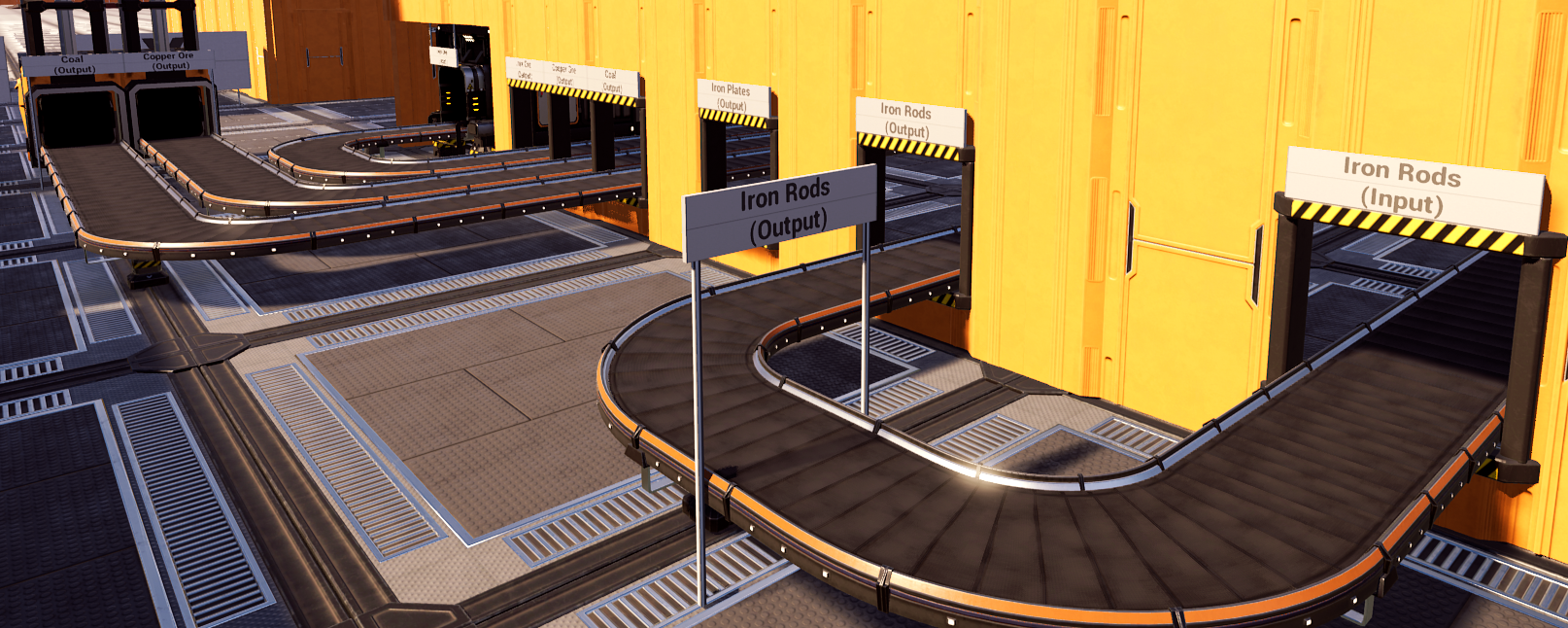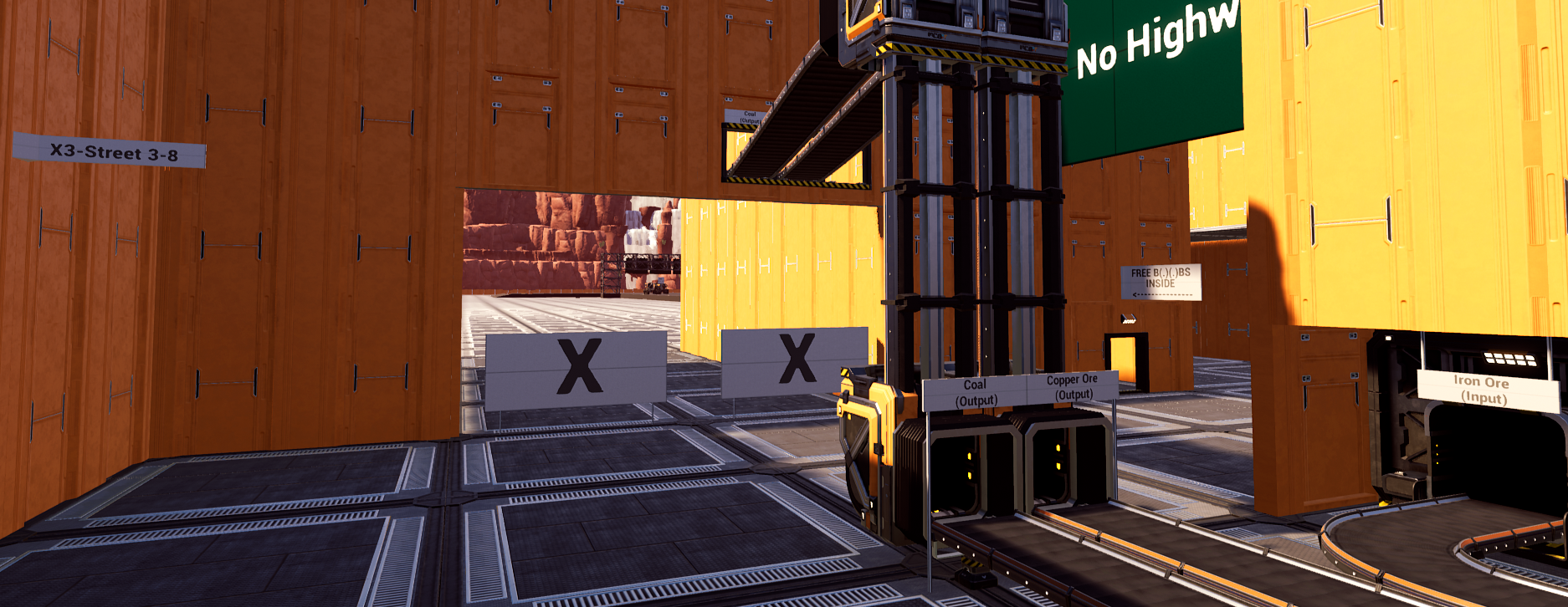
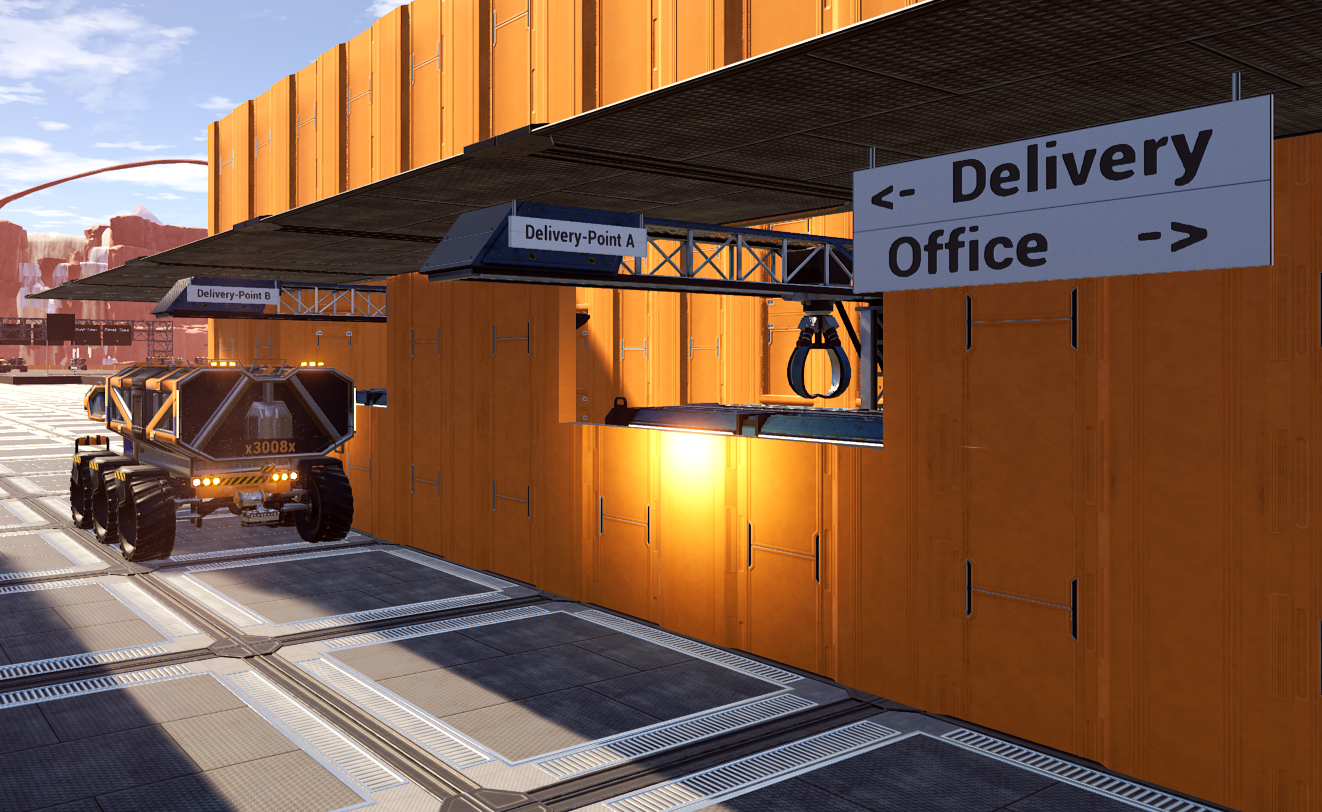
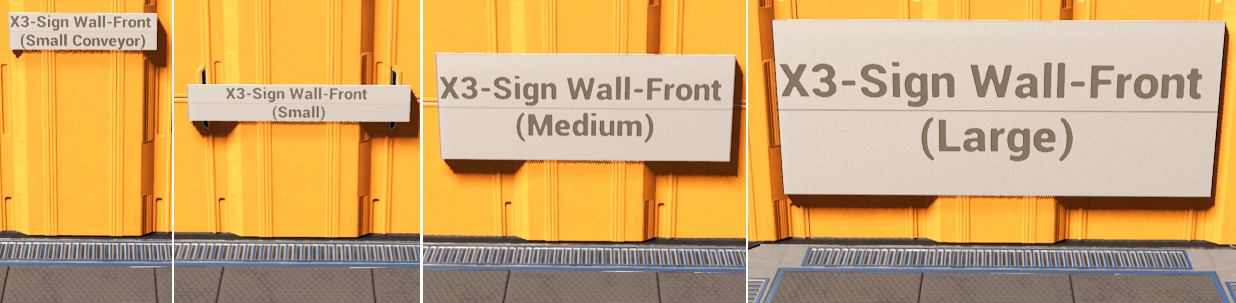
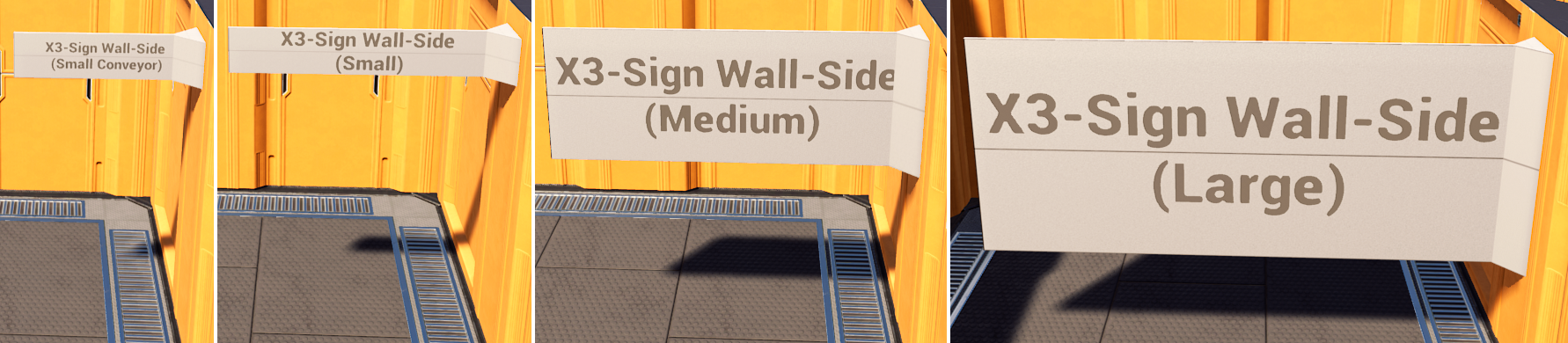
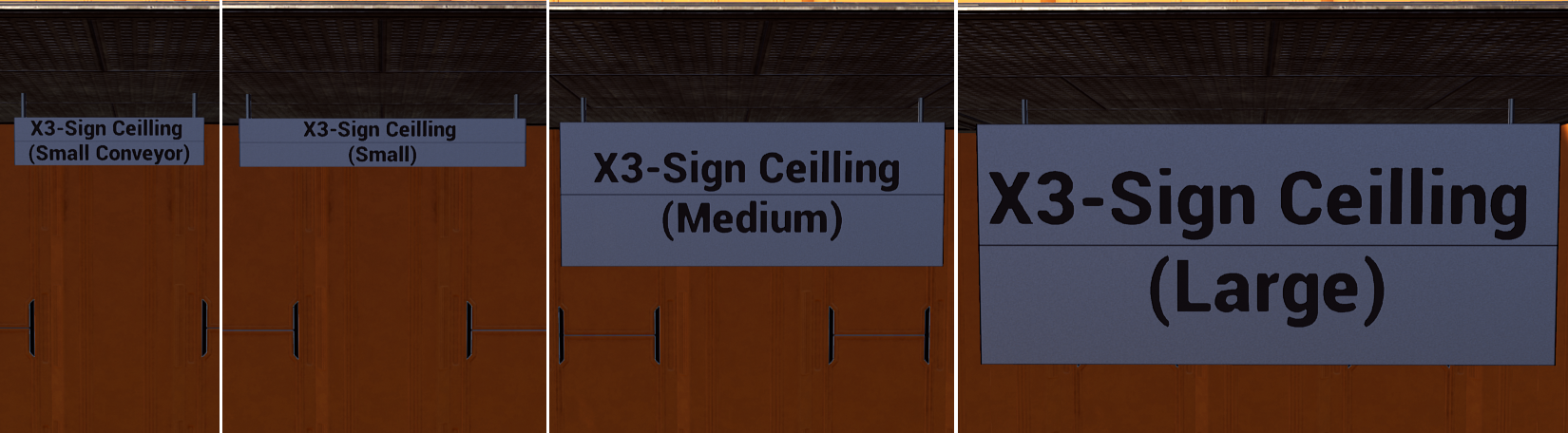

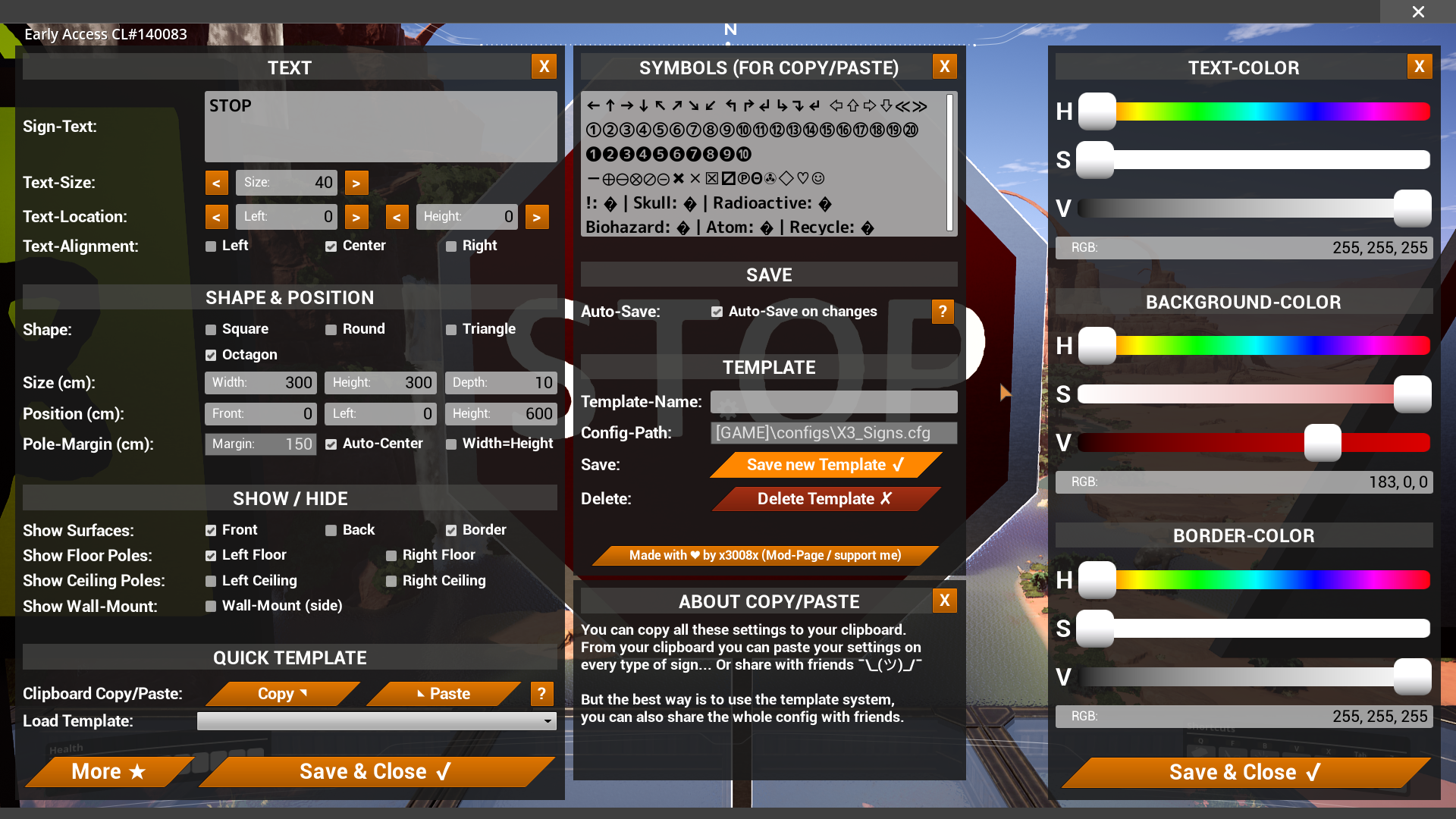
Versionen
X3-Signs V2 auf dem Server installieren
Satisfactory Server bestellen
Bestelle einen Satisfactory Server mit mindestens 4 GB RAM (6 GB empfohlen). Bei Multiplayer: +1 GB pro 4 Spieler.
Mod installieren
Öffne den Mod-Manager im Dashboard und suche nach "X3-Signs V2". Installations-Dependencies werden automatisch mitinstalliert.
Server neu starten
Starte den Server neu, damit die Mod geladen wird. Spieler müssen die Mod ebenfalls lokal installiert haben.
Häufige Fragen
X3-Signs V2 funktioniert nicht nach Update – was tun?
Nach einem Satisfactory-Update müssen Mods aktualisiert werden. Prüfe auf ficsit.app, ob X3-Signs V2 bereits für die neue Game-Version aktualisiert wurde. Bei Mado Hosting: Öffne den Mod-Manager und klicke "Alle aktualisieren". Wenn die Mod noch nicht aktualisiert ist, entferne sie temporär, damit der Server startet.
X3-Signs V2 verursacht Crashes im Multiplayer – Lösung
Häufigste Ursache: alle Spieler müssen exakt die gleiche Mod-Version installiert haben. Prüfe in den Server-Logs nach "ModMismatch" oder "Version Conflict". Stelle sicher, dass alle Spieler X3-Signs V2 v2.0.17 und den gleichen SML verwenden. Bei Mado Hosting laufen Satisfactory Server mit 6 GB RAM für stabile Multiplayer-Performance.
Ist X3-Signs V2 mit anderen Satisfactory Mods kompatibel?
X3-Signs V2 nutzt den Satisfactory Mod Loader (SML). Generell sind SML-basierte Mods untereinander kompatibel, aber Mods die gleiche Game-Systeme ändern, können Konflikte verursachen. Teste neue Mod-Kombinationen am besten auf einem Backup-Save. Im Mado Dashboard werden bekannte Konflikte automatisch erkannt und du wirst gewarnt.
X3-Signs V2 Server mieten
Spiele X3-Signs V2 auf deinem eigenen Satisfactory Server mit Mod-Support.
Mod Informationen
- Ersteller
- x3008x [Gameplay], John Barradale
- Neueste Version
- v2.0.17
- Erstellt am
- 15. Juli 2020
- Zuletzt aktualisiert
- 8. Oktober 2026
- Quellcode
- GitHub →