
ENSImon
Modpack cobblemon x create in 1.21.1
Screenshots
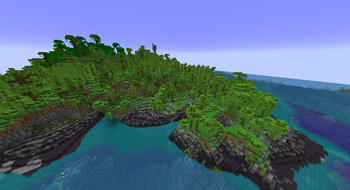
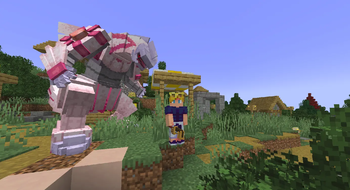
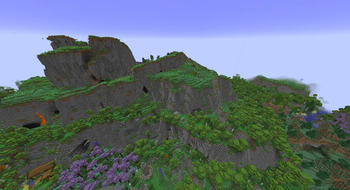
About this Modpack
Welcome to ENSImon
The fusion of engineering innovation and creature-collecting adventure!
This carefully curated modpack bridges the gap between complex automation and the world of Pokémon, offering a deeply immersive experience where your technical creativity is the only limit.
🛠️ Core Features
🔹 The Ultimate Cobblemon Experience
Catch, train, and battle your favorite Pokémon in a completely organic Minecraft setting. With stunning 3D models and fluid animations, Pokémon roam freely across the world, interacting seamlessly with the environment. Build your dream team and conquer the wilderness!
🔹 Next-Level Industrialization (Create + Addons)
Put your engineering skills to the test! Harness the power of rotation, gears, and kinetic energy with the Create mod and over 20 specialized addons.
Automate Everything: Set up massive, fully automated assembly lines to mass-produce Pokéballs, healing potions, and advanced gear.
Advanced Logistics: Build complex transport networks, diesel generators, and automated kitchens to keep your base running at peak efficiency.
🔹 A Breathtaking World to Explore
Adventure awaits in a completely overhauled universe designed to make exploration incredibly rewarding:
- Terralith Generation: Discover majestic, realistic biomes and breathtaking landscapes that serve as the perfect backdrop for rare Pokémon spawns.
- YUNG's Better Structures: Explore redesigned, dangerous, and loot-filled dungeons, desert temples, and ocean monuments.
🔹 Smooth Performance & Optimization
Engineered to run flawlessly. Packed with modern optimization mods like Sodium, Lithium, and advanced memory fixes, ENSImon ensures high frame rates and stutter-free gameplay, even when your massive automated factories are running at full speed in the background.
💡 Ready to build, automate, and catch 'em all? Step into the world of ENSImon and engineer your way to becoming the ultimate Pokémon Master!
Available Versions
How to Set Up a ENSImon Server
Order Server
Choose at least 6 GB RAM (8 GB recommended for ENSImon). Based on player count: per 5 players.
Install Modpack in Dashboard
Open the modpack browser in the dashboard, search for "ENSImon" and click "Install". The neoforge loader and Minecraft 1.21.1 are configured automatically.
Start Server & Play
Start the server – all mods are loaded automatically. Share the server IP with friends and play together!
Frequently Asked Questions
ENSImon server crashes or won't start – what to do?
Most common causes: insufficient RAM or wrong neoforge loader. Check latest.log for "OutOfMemoryError" → increase RAM to at least 8 GB. For "Mixin" or "ClassNotFoundException" errors: modpack version and loader don't match. With Mado Hosting, loader and Minecraft version are auto-configured on modpack install – preventing most startup issues.
How much RAM does a ENSImon server really need?
Minimum 6 GB, recommended 8 GB for stable performance. per 5 players. Important: Minecraft modpacks need more RAM than vanilla – plan extra per additional player. With Mado Hosting, you can scale RAM up live at any time without data loss (from €12/month).
Can I add custom mods to ENSImon without conflicts?
Yes, but check compatibility: only use mods for the same loader (neoforge) and same Minecraft version (1.21.1). Common issues: ID conflicts with recipe mods and incompatible coremod versions. The Mado dashboard mod browser only shows compatible mods and warns about known conflicts.
ENSImon server lagging – performance tips
1) Increase RAM to 8 GB+. 2) Reduce server view-distance to 8 (server.properties). 3) Pre-generate chunks with the "Chunky" plugin. 4) Use /spark profiler to check which mods consume the most tick time. With Mado Hosting, all servers run on NVMe SSDs with dedicated CPU cores – eliminating hardware as a bottleneck.
Similar Modpacks
![Cobblemon Official Modpack [Fabric]](https://cdn.modrinth.com/data/5FFgwNNP/e7f9ee2e9d361623847853fe2ddce42f519ee64f.png)
![COBBLEVERSE - Pokemon Adventure [Cobblemon]](https://cdn.modrinth.com/data/Jkb29YJU/581ecf54530972afb18a04660afd820f2f24f6c7.png)
![Better MC [FABRIC] - BMC2](https://cdn.modrinth.com/data/shFhR8Vx/a19c2bcb51d38f32f138d3607e91cb2b7b8e387f_96.webp)


![Better MC [FORGE] - BMC4](https://cdn.modrinth.com/data/4BV47HRn/7f5ef7cc61b2593609aabef3ed07a866a4f11b73_96.webp)
Rent ENSImon Server
Start your own server with automatic modpack installation.
Supported Versions
Start your ENSImon Server now
From €12.00/month with 8 GB RAM for the best performance.
Configure Server →