
NextCraft - Just Smoother
Smoother Minecraft Take ur Vanilla minecraft to the next level
Screenshots
About this Modpack
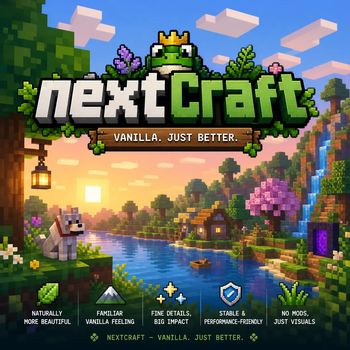
🌿 NextCraft
Vanilla. Just better.
NextCraft is a lightweight Fabric modpack that enhances Minecraft without changing its core feeling.
No crazy mechanics, no overwhelming content — just a smoother, prettier, and more polished vanilla experience.
✨ What is NextCraft?
NextCraft focuses on visual improvements, performance, and quality-of-life features while staying true to vanilla gameplay.
You still play Minecraft — just better.
🎯 Features
🌱 Vanilla+ Experience
Everything feels familiar — no major gameplay changes
🎨 Improved Visuals
Better lighting, animations, particles, and overall atmosphere
⚡ High Performance
Optimized with performance mods like Sodium/C2ME/Entity Culling
🧰 Quality of Life
Small but impactful improvements (BetterF3, Better Mount HUD, Chat Animation, etc.)
🌍 Exploration Enhancements
Mods like Dungeons & Taverns add more structures to discover
🎮 Smooth Gameplay
Better controls, camera, and overall feel
📦 Included Mod Types
Performance (C2ME, EntityCulling, Clumps)
Visual Enhancements (Continuity, Entity Texture Features, Particle Improvements)
UI & QoL (BetterF3, Controlling, ChatAnimation)
World Enhancements (Dungeons & Taverns, Cherished Worlds)
Utility (Chunky, Delete Worlds To Trash, Inventory tweaks)
💡 Who is this for?
Players who want vanilla Minecraft, but polished
People with low to mid-end PCs who want better performance
Anyone who prefers simple, clean modpacks
🚀 Why NextCraft?
Because sometimes you don’t need more content —
you just want Minecraft to feel right.
📌 Notes
Fabric-based modpack
Works best with shaders (optional)
Regular updates & improvements planned
Available Versions
How to Set Up a NextCraft - Just Smoother Server
Order Server
Choose at least 4 GB RAM (6 GB recommended for NextCraft - Just Smoother). Based on player count: per 8 players.
Install Modpack in Dashboard
Open the modpack browser in the dashboard, search for "NextCraft - Just Smoother" and click "Install". The fabric loader and Minecraft 1.21.8 are configured automatically.
Start Server & Play
Start the server – all mods are loaded automatically. Share the server IP with friends and play together!
Frequently Asked Questions
NextCraft - Just Smoother server crashes or won't start – what to do?
Most common causes: insufficient RAM or wrong fabric loader. Check latest.log for "OutOfMemoryError" → increase RAM to at least 6 GB. For "Mixin" or "ClassNotFoundException" errors: modpack version and loader don't match. With Mado Hosting, loader and Minecraft version are auto-configured on modpack install – preventing most startup issues.
How much RAM does a NextCraft - Just Smoother server really need?
Minimum 4 GB, recommended 6 GB for stable performance. per 8 players. Important: Minecraft modpacks need more RAM than vanilla – plan extra per additional player. With Mado Hosting, you can scale RAM up live at any time without data loss (from €8/month).
Can I add custom mods to NextCraft - Just Smoother without conflicts?
Yes, but check compatibility: only use mods for the same loader (fabric) and same Minecraft version (1.21.8). Common issues: ID conflicts with recipe mods and incompatible coremod versions. The Mado dashboard mod browser only shows compatible mods and warns about known conflicts.
NextCraft - Just Smoother server lagging – performance tips
1) Increase RAM to 6 GB+. 2) Reduce server view-distance to 8 (server.properties). 3) Pre-generate chunks with the "Chunky" plugin. 4) Use /spark profiler to check which mods consume the most tick time. With Mado Hosting, all servers run on NVMe SSDs with dedicated CPU cores – eliminating hardware as a bottleneck.
Rent NextCraft - Just Smoother Server
Start your own server with automatic modpack installation.
Supported Versions
Start your NextCraft - Just Smoother Server now
From €8.00/month with 6 GB RAM for the best performance.
Configure Server →