
TUN3T'S MODPACK
A lightweight Fabric modpack focused on performance, shaders, and quality-of-life improvements. It enhances Minecraft with better FPS, beautiful graphics, and useful features while keeping the vanilla gameplay feel.
Screenshots
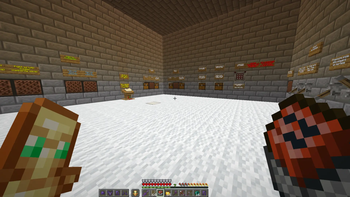
About this Modpack
📦 Modpack Description
This modpack for Minecraft (Fabric 1.21.11) is focused on high performance, enhanced visuals, and quality-of-life improvements, while staying close to the vanilla experience.
It combines powerful optimization mods, multiple shader options, and useful gameplay tweaks to deliver a smoother and more modern Minecraft experience.
⚙️ Optimization & Performance
Alternate Current – improves redstone performance and reduces lag in complex circuits.
FerriteCore – lowers RAM usage, helping the game run smoother.
Krypton – optimizes network performance, especially on servers.
Bobby – lets you see chunks beyond the server render distance.
Hero's Anchor Optimizer – improves performance of respawn anchors.
Marlow's Crystal Optimizer – optimizes end crystal behavior for better FPS.
🎨 Graphics & Shaders
Iris Shaders – modern shader loader for Fabric.
AstraLex Shaders – cinematic visuals with vibrant colors.
BSL Shaders – balanced visuals and performance.
Complementary Shaders (Unbound) – highly customizable and optimized.
MakeUp Ultra Fast Shaders – lightweight shaders for high FPS.
Photon Shaders – realistic lighting and atmosphere.
🧩 Libraries & Dependencies
Fabric API – essential core library for Fabric mods.
Cloth Config API – provides configuration menus for mods.
🛠️ Quality of Life
AppleSkin – shows detailed hunger and saturation info.
Gamma Utils (Fullbright) – increases brightness for better visibility.
Shulker Box Tooltip – preview shulker contents without opening them.
Mod Menu – easy access to installed mods and settings.
Modify Player Data – allows editing certain player-related values.
🎥 Multiplayer & Extras
ReplayMod – record and create cinematic replays.
Simple Voice Chat – in-game proximity voice chat.
Space Walker – adds unique movement or physics-related tweaks.
⭐ Summary
This modpack is perfect if you want better FPS, stunning visuals, and useful gameplay improvements while keeping the core Minecraft experience intact.
Also my settings
Available Versions
How to Set Up a TUN3T'S MODPACK Server
Order Server
Choose at least 4 GB RAM (6 GB recommended for TUN3T'S MODPACK). Based on player count: per 8 players.
Install Modpack in Dashboard
Open the modpack browser in the dashboard, search for "TUN3T'S MODPACK" and click "Install". The fabric loader and Minecraft 1.21.11 are configured automatically.
Start Server & Play
Start the server – all mods are loaded automatically. Share the server IP with friends and play together!
Frequently Asked Questions
TUN3T'S MODPACK server crashes or won't start – what to do?
Most common causes: insufficient RAM or wrong fabric loader. Check latest.log for "OutOfMemoryError" → increase RAM to at least 6 GB. For "Mixin" or "ClassNotFoundException" errors: modpack version and loader don't match. With Mado Hosting, loader and Minecraft version are auto-configured on modpack install – preventing most startup issues.
How much RAM does a TUN3T'S MODPACK server really need?
Minimum 4 GB, recommended 6 GB for stable performance. per 8 players. Important: Minecraft modpacks need more RAM than vanilla – plan extra per additional player. With Mado Hosting, you can scale RAM up live at any time without data loss (from €8/month).
Can I add custom mods to TUN3T'S MODPACK without conflicts?
Yes, but check compatibility: only use mods for the same loader (fabric) and same Minecraft version (1.21.11). Common issues: ID conflicts with recipe mods and incompatible coremod versions. The Mado dashboard mod browser only shows compatible mods and warns about known conflicts.
TUN3T'S MODPACK server lagging – performance tips
1) Increase RAM to 6 GB+. 2) Reduce server view-distance to 8 (server.properties). 3) Pre-generate chunks with the "Chunky" plugin. 4) Use /spark profiler to check which mods consume the most tick time. With Mado Hosting, all servers run on NVMe SSDs with dedicated CPU cores – eliminating hardware as a bottleneck.
Rent TUN3T'S MODPACK Server
Start your own server with automatic modpack installation.
Supported Versions
Start your TUN3T'S MODPACK Server now
From €8.00/month with 6 GB RAM for the best performance.
Configure Server →