
Velocifine
Optimization modpack based on OptiFine features
Screenshots
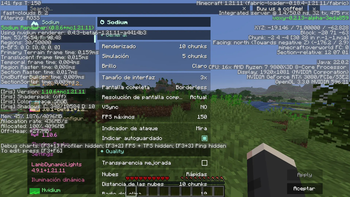
About this Modpack
DO NOT UPDATE THE MODS IN THE MODPACK, OR THE MODPACK WILL BREAK!!!
🌀 Velocifine is more than just a modpack; it is a complete reimagining of OptiFine for the modern age of Minecraft. Built on the Fabric loader, it replaces the aging code of the past with a high-performance suite of modern optimization mods, meticulously tuned to deliver the smoothest experience possible.
✨ Legacy Features, Modern Power
I've brought back everything you loved about OptiFine, but reworked from the ground up for superior performance:
🚀 Performance Without Compromise
While OptiFine was a "all-in-one" solution, Velocifine uses a modular approach. This allows us to optimize specific parts of the engine—like chunk rendering, light calculation, and thread management—independently and more aggressively.
Native Hardware Acceleration: Taking full advantage of modern CPU instructions like AVX-512 (perfect for AMD Zen 4/5 and Intel 10th+ Gen).
IMPORTANT READ!!! (For 1.21.11):
You may experience minor lag spikes immediately after world creation or joining. To significantly reduce initial loading screen times, the modpack prioritizes getting you into the game faster by offloading some chunk pre-generation to the first few seconds of gameplay. Performance will stabilize completely within moments as the background engine completes its initial tasks.
Just delete the mod: Ksyxis if you want to have a preload world instead of faster loading screens.
JMV ARGUMENTS (Recommended):
For Intel 12th Gen or newer & Ryzen X3D processors:
-Xms2G -Xmx4G -XX:+UseZGC -XX:+ZGenerational -XX:+AlwaysPreTouch -XX:MaxGCPauseMillis=5 -XX:ZAllocationSpikeTolerance=5 -XX:+ParallelRefProcEnabled -XX:+UnlockExperimentalVMOptions -XX:ErrorFile=./hs_err_pid%p.log
For standard processors:
-Xms2G -Xmx4G -XX:+UseZGC -XX:+ZGenerational -XX:+AlwaysPreTouch -XX:MaxGCPauseMillis=20 -XX:ZAllocationSpikeTolerance=2.0 -XX:+UnlockExperimentalVMOptions -XX:ErrorFile=./hs_err_pid%p.log
Some memory recommendations to avoid lag during gameplay (Optional):
Vanilla: -Xms2G -Xmx4G (Perfect for a lightweight, smooth experience).

Vanilla + Shaders: -Xms3G -Xmx6G (Provides the extra overhead needed for visual enhancements).

Technical Gameplay: -Xms4G -Xmx8G (Optimized for massive farms, redstone machines, and high entity counts).

Technical Gameplay + Shaders: -Xms5G -Xmx10G (The ultimate configuration for high-end performance with heavy visuals).
(In-game test to memory usage with 32 preloaded chunks with 10 chunks visible)
JRE Version (Fully recommended for 1.21.11):
Eclipse Adoptium JRE 22 x64 Bits
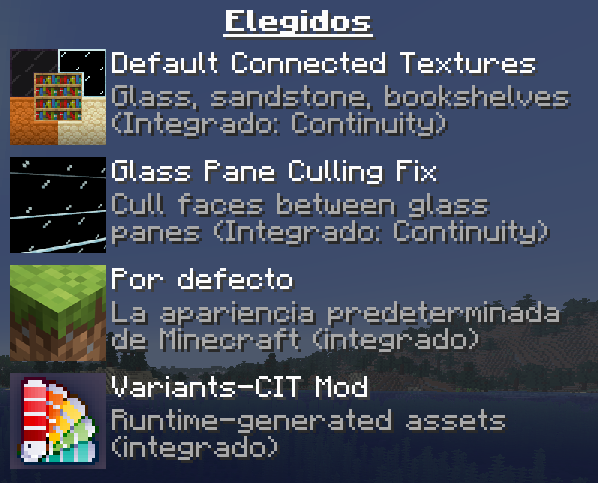
Texture Pack configuration for the connected textures like optifine:
Extra Performance Config (For 1.21.11):
Please adjust the threadtweak and c2me configuration files in your /config directory to better match your hardware specifications
Example for threadtweak:
Tailored for 8-Core/16-Thread CPUs (Ryzen 7 9800X3D & High-end Intel)
{
"threadCount": {
"bootstrap": 1,
"main": 14 # Max performance for 16-thread CPUs (2 threads left for OS/Background)
},
"threadPriority": {
"game": 8, # High priority for smooth visual rendering and input response   "bootstrap": 1,
"main": 6, # Efficient background data processing without interrupting render   "io": 4, # Balanced disk priority to prevent frame drops during autosaves      "integratedServer": 8 # Ensures mod logic stays synced with the game world
}
}
Example for c2me:
Global Parallelism: Optimized for 16-thread CPUs (e.g., Ryzen 9800X3D / Intel i7-i9).
# Uses 12 threads for chunk tasks, leaving 4 for render and background apps.
globalExecutorParallelism = 12

[vanillaWorldGenOptimizations.nativeAcceleration]
# Native Acceleration: Uses AVX-512 instructions.
# Essential for AMD Zen 4/5 and Intel 10th Gen+ (with AVX-512 support).
# Significantly accelerates terrain and biome generation.
   allowAVX512 = true
   enabled = true

[noTickViewDistance]
# Max Concurrent Loads: Eliminates "invisible walls" during fast travel.
# Optimized for high-speed L3 Cache (AMD 3D V-Cache / Intel Smart Cache).
   maxConcurrentChunkLoads = 48

[ioSystem]
# GC-Free Serializer: Reduces Java Garbage Collection overhead.
# Minimizes micro-stutters when saving world data to disk.
   gcFreeChunkSerializer = true
Available Versions
How to Set Up a Velocifine Server
Order Server
Choose at least 4 GB RAM (6 GB recommended for Velocifine). Based on player count: per 8 players.
Install Modpack in Dashboard
Open the modpack browser in the dashboard, search for "Velocifine" and click "Install". The fabric loader and Minecraft 1.21.11 are configured automatically.
Start Server & Play
Start the server – all mods are loaded automatically. Share the server IP with friends and play together!
Frequently Asked Questions
Velocifine server crashes or won't start – what to do?
Most common causes: insufficient RAM or wrong fabric loader. Check latest.log for "OutOfMemoryError" → increase RAM to at least 6 GB. For "Mixin" or "ClassNotFoundException" errors: modpack version and loader don't match. With Mado Hosting, loader and Minecraft version are auto-configured on modpack install – preventing most startup issues.
How much RAM does a Velocifine server really need?
Minimum 4 GB, recommended 6 GB for stable performance. per 8 players. Important: Minecraft modpacks need more RAM than vanilla – plan extra per additional player. With Mado Hosting, you can scale RAM up live at any time without data loss (from €8/month).
Can I add custom mods to Velocifine without conflicts?
Yes, but check compatibility: only use mods for the same loader (fabric) and same Minecraft version (1.21.11). Common issues: ID conflicts with recipe mods and incompatible coremod versions. The Mado dashboard mod browser only shows compatible mods and warns about known conflicts.
Velocifine server lagging – performance tips
1) Increase RAM to 6 GB+. 2) Reduce server view-distance to 8 (server.properties). 3) Pre-generate chunks with the "Chunky" plugin. 4) Use /spark profiler to check which mods consume the most tick time. With Mado Hosting, all servers run on NVMe SSDs with dedicated CPU cores – eliminating hardware as a bottleneck.
Similar Modpacks

![Cobblemon Official Modpack [Fabric]](https://cdn.modrinth.com/data/5FFgwNNP/e7f9ee2e9d361623847853fe2ddce42f519ee64f.png)
![COBBLEVERSE - Pokemon Adventure [Cobblemon]](https://cdn.modrinth.com/data/Jkb29YJU/581ecf54530972afb18a04660afd820f2f24f6c7.png)
![Better MC [FABRIC] - BMC2](https://cdn.modrinth.com/data/shFhR8Vx/a19c2bcb51d38f32f138d3607e91cb2b7b8e387f_96.webp)


Rent Velocifine Server
Start your own server with automatic modpack installation.
Supported Versions
Start your Velocifine Server now
From €8.00/month with 6 GB RAM for the best performance.
Configure Server →