
AccountSwitcher
Quick offline account switching directly from the game's main menu.
Screenshots
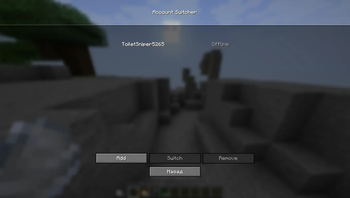
About this Mod
REQUIREMENTS
Fabric API
RU:
AccountSwitcher — это модификация, позволяющая переключаться между локальными (офлайн) учётными записями Minecraft непосредственно в главном меню игры, без необходимости перезапуска клиента или лаунчера.
Основные функции
- Быстрая смена профиля: Добавляет кнопку управления локальными аккаунтами в главное меню.
- Локальные профили: Поддерживает добавление и управление офлайн-аккаунтами (Offline/Crack) для удобного тестирования или игры.
- Безопасность данных: Мод работает полностью локально, не собирает данные и не взаимодействует со сторонними сервисами.
- Сохранение сессий: Мод запоминает созданные профили, исключая необходимость повторного ввода никнейма при каждом запуске.
Инструкция по использованию
- Нажмите на кнопку управления аккаунтами в главном меню игры.
- Выберите пункт «add» и введите нужный никнейм.
- Кликните по созданному профилю в списке для моментального переключения.
Техническая информация
- Платформа: Fabric
- Поддерживаемые версии: 1.21.x
EN:
AccountSwitcher is a modification that allows players to switch between local (offline) Minecraft accounts directly from the main menu without restarting the client or the launcher.
Features
- Quick Account Switching: Adds a local account management button to the game's main menu.
- Offline Profiles: Supports adding and managing offline accounts, making it convenient for testing or multi-profile usage.
- Data Security: Works completely locally, does not collect any data, and has no third-party connections.
- Session Persistence: Remembers created profiles, eliminating the need to re-enter nicknames upon every launch.
How to Use
- Click the account management button in the main menu.
- Click "add" and enter the desired nickname.
- Select the created profile from the list to switch instantly.
Technical Information
- Platform: Fabric
- Supported Versions: 1.21.x
Available Versions
How to Install AccountSwitcher on Your Server
Order Server
Order a Minecraft Java server with at least 3 GB RAM (4 GB recommended).
Set fabric Loader
In the panel under "Egg", select the fabric loader and matching Minecraft version (1.21.4).
Install Mod
Open the mod browser in the dashboard and search for "AccountSwitcher". Click "Install" – done! Alternatively, upload the .jar via SFTP to the /mods folder.
Compatibility
Mod Loaders
Minecraft Versions
1.21.4
Server-side
✗ UnsupportedRecommended RAM
4 GB(min. 3 GB)Frequently Asked Questions
AccountSwitcher server crashes on startup – what to do?
Most common cause: wrong fabric version or insufficient RAM. Check the server log (latest.log) for "OutOfMemoryError" or "Mixin" errors. With Mado Hosting: ensure at least 3 GB RAM is allocated and the loader matches the mod version (1.21.4). You can switch loaders with one click in the panel.
Is AccountSwitcher compatible with fabric?
AccountSwitcher officially supports fabric for Minecraft 1.21.4. The Mado dashboard automatically detects incompatible loader combinations.
Server lagging with AccountSwitcher – how to optimize performance?
Recommended RAM: 4 GB (per 8 players). Use /spark profiler to check if AccountSwitcher consumes the most tick time. Common fixes: reduce server view-distance to 8-10, install "performant" or "starlight" as supplementary mods on Forge. With Mado Hosting, your server runs on NVMe SSDs with dedicated CPU cores for minimal latency.
Similar Mods






Rent Modded Server
Install AccountSwitcher with just one click on your server.