
Advanced Shadows
This project add´s an overlay for shadows in the Overworld.
Screenshots
About this Mod
AdvancedShadows
See shadows. Find skybases.
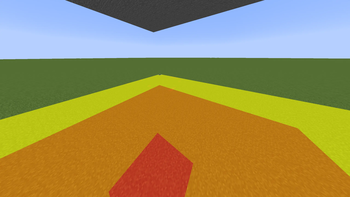
AdvancedShadows is a lightweight clientside mod that overlays colored carpets on the ground showing sky light levels — like a light level overlay, but for skylight. Perfect for hunting down skybase locations on survival or PvP servers.
How it works
Press F7 to toggle the overlay. Colored quads appear on all walkable surfaces around you:
- 🔴 Red — completely hidden from the sky (skylight 0)
- 🟠 Orange — heavily shadowed (skylight 1–7)
- 🟡 Yellow — partially shadowed (skylight 8–14)
- No overlay — full sky exposure
The overlay also renders on tree leaves, so you can walk through a forest canopy and immediately see which areas below are shadowed enough to hide a skybase.
Features
- Toggle with F7 (rebindable in Controls)
- Solid blocks + leaves support
- Overworld only (Nether/End auto-disabled)
- 16 block render radius
- Pure clientside — no mod needed on the server
Installation
Requires Fabric Loader + Fabric API for Minecraft 1.21.11.
- Download the
.jar - Place it in
.minecraft/mods/ - Launch → press F7
Compatibility
Works alongside Sodium, Iris, and other rendering mods. Multiplayer-safe (clientside only).
Available Versions
How to Install Advanced Shadows on Your Server
Order Server
Order a Minecraft Java server with at least 3 GB RAM (4 GB recommended).
Set fabric Loader
In the panel under "Egg", select the fabric loader and matching Minecraft version (1.21.11).
Install Mod
Open the mod browser in the dashboard and search for "Advanced Shadows". Click "Install" – done! Alternatively, upload the .jar via SFTP to the /mods folder.
Compatibility
Mod Loaders
Minecraft Versions
1.21.11
Server-side
✗ UnsupportedRecommended RAM
4 GB(min. 3 GB)Frequently Asked Questions
Advanced Shadows server crashes on startup – what to do?
Most common cause: wrong fabric version or insufficient RAM. Check the server log (latest.log) for "OutOfMemoryError" or "Mixin" errors. With Mado Hosting: ensure at least 3 GB RAM is allocated and the loader matches the mod version (1.21.11). You can switch loaders with one click in the panel.
Is Advanced Shadows compatible with fabric?
Advanced Shadows officially supports fabric for Minecraft 1.21.11. The Mado dashboard automatically detects incompatible loader combinations.
Server lagging with Advanced Shadows – how to optimize performance?
Recommended RAM: 4 GB (per 8 players). Use /spark profiler to check if Advanced Shadows consumes the most tick time. Common fixes: reduce server view-distance to 8-10, install "performant" or "starlight" as supplementary mods on Forge. With Mado Hosting, your server runs on NVMe SSDs with dedicated CPU cores for minimal latency.
Rent Modded Server
Install Advanced Shadows with just one click on your server.