
AntiJunk (Item Filter)
Stop picking up unwanted items like dirt or cobblestone! A highly customizable and user-friendly in-game GUI item filter. / Oyun içi arayüz sayesinde istemediğiniz eşyaları toplamayı engelleyen gelişmiş filtre modu!
Screenshots
About this Mod
AntiJunk (Item Filter)
Tired of your inventory filling up with dirt, cobblestone, or other junk items while mining? AntiJunk is a highly customizable, user-friendly item filter mod that prevents you from picking up items you don't want!
🌟 Features (Özellikler)
- In-Game GUI: Press
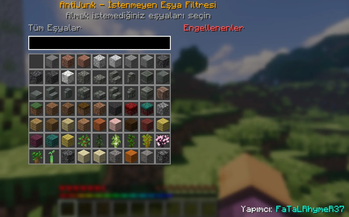
J(by default) to open the interactive filter menu! - Easy Filtering: Simply search for the item you don't want and click it to add it to your blocked list.
- Side Panel: Easily view and manage all your currently blocked items in the dedicated side panel.
- Multi-Language: Automatically supports English and Turkish based on your game language.
- Server & Client: Works flawlessly in both singleplayer and multiplayer servers (Mod must be installed on the server as well).
🇹🇷 Türkçe Açıklama
Maden yaparken envanterinizin toprak, kırıktaş veya gereksiz eşyalarla dolmasından sıkıldınız mı? AntiJunk, istemediğiniz eşyaları yerden almanızı tamamen engelleyen, kullanımı son derece kolay bir filtre modudur!
🌟 Nasıl Kullanılır?
- Oyundayken
Jtuşuna basarak filtreleme menüsünü açabilirsiniz. - Açılan ekrandaki arama çubuğundan istemediğiniz eşyayı bulun ve üzerine tıklayın. Eşya anında engellenenler listesine eklenecektir.
- Menünün sağ tarafındaki özel panelden o an engelli olan tüm eşyalarınızı görebilir ve üzerine tıklayarak engeli kolayca kaldırabilirsiniz.
- Hem tek oyunculuda hem de sunucularda (sunucuya da kurulması şartıyla) sorunsuz çalışır.
Developer: FaTaLRhymeR37
Available Versions
How to Install AntiJunk (Item Filter) on Your Server
Order Server
Order a Minecraft Java server with at least 3 GB RAM (4 GB recommended).
Set fabric Loader
In the panel under "Egg", select the fabric loader and matching Minecraft version (1.21.11).
Install Mod
Open the mod browser in the dashboard and search for "AntiJunk (Item Filter)". Click "Install" – done! Alternatively, upload the .jar via SFTP to the /mods folder.
Compatibility
Mod Loaders
Minecraft Versions
1.21.11, 1.21.10, 1.21.9 (+8 more)
Server-side
✓ RequiredRecommended RAM
4 GB(min. 3 GB)Frequently Asked Questions
AntiJunk (Item Filter) server crashes on startup – what to do?
Most common cause: wrong fabric version or insufficient RAM. Check the server log (latest.log) for "OutOfMemoryError" or "Mixin" errors. With Mado Hosting: ensure at least 3 GB RAM is allocated and the loader matches the mod version (1.21.11). You can switch loaders with one click in the panel.
Is AntiJunk (Item Filter) compatible with fabric?
AntiJunk (Item Filter) officially supports fabric for Minecraft 1.21.11, 1.21.10, 1.21.9. The Mado dashboard automatically detects incompatible loader combinations.
Server lagging with AntiJunk (Item Filter) – how to optimize performance?
Recommended RAM: 4 GB (per 8 players). Use /spark profiler to check if AntiJunk (Item Filter) consumes the most tick time. Common fixes: reduce server view-distance to 8-10, install "performant" or "starlight" as supplementary mods on Forge. With Mado Hosting, your server runs on NVMe SSDs with dedicated CPU cores for minimal latency.
Similar Mods



![[TaCZ] Timeless and Classics Zero](https://cdn.modrinth.com/data/SzzJttH8/fd27766d2bb8390d284696b1dbd358f87e081439_96.webp)


Rent Modded Server
Install AntiJunk (Item Filter) with just one click on your server.