
Boss area woof
BossArea is a Fabric 1.20.1 mod designed for custom adventure modpacks to make fight areas in a RPG style
Screenshots
About this Mod
BossArea — Command Reference
Fabric 1.20.1 · Requires operator permission level 2
All data is saved in the world's data/bossarea.dat file and survives server restarts.
Table of Contents
- Selection wand
- Creating and managing areas
- Mob waves
- Boss sequence
- Datapack functions
- Custom NBT
- Doors
- Timing
- Victory teleport
- Messages
- Player progression
- Reset and debug
- Full example
Selection wand
/give @s bossarea:selection_wand
- Left-click a block → sets corner A
- Right-click a block → sets corner B
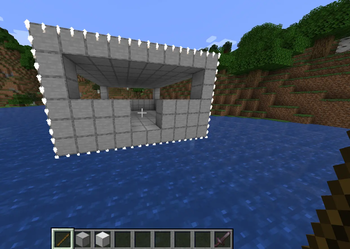
The selection outline displays as particles visible only to you, refreshed continuously while you hold the wand.
Creating and managing areas
/bossarea set <name>
Creates a new boss area from your current wand selection.
/bossarea remove <name>
/bossarea list
/bossarea info <name>
/bossarea status <name>
/bossarea enable <name> <true|false>
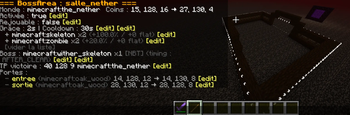
info shows the full configuration with clickable [edit] buttons that pre-fill commands in your chat bar. list shows all areas — click a name to open its info page. All commands that accept an area name support tab-autocomplete.
/bossarea edit <name> setcorners
Redefines the zone bounds from your current wand selection, preserving all existing configuration.
Mob waves
Mobs spawn in the central quarter of the zone (37.5%–62.5% on each axis) on a valid solid floor.
Simple method — addmob
/bossarea edit <name> addmob minecraft:zombie 10
→ 10 zombies per fight.
With optional player scaling:
/bossarea edit <name> addmob minecraft:zombie 10 25
→ 10 base zombies, +25% per player beyond the first.
/bossarea edit <name> addmob minecraft:zombie 10 25 1
→ same, plus +1 flat zombie per extra player.
Scaling formula for N players:
total = base + (flat × (N-1)) + round(base × percent% × (N-1))
/bossarea edit <name> clearmobs
Advanced method — setmobs
Replaces the entire mob list in one command:
/bossarea edit <name> setmobs minecraft:zombie 10 percent:25 flat:1, minecraft:skeleton 5
Note: setmobs uses percent: and flat: prefixes (no space before the value). Use addmob multiple times if you find this syntax confusing — it is strictly equivalent.
Boss sequence
Bosses spawn one at a time, in order. Each boss spawns only after the previous one is dead. The order is controlled by the order value set with reorderboss.
/bossarea edit <name> addboss minecraft:wither 1
Adds a boss at the end of the sequence.
/bossarea edit <name> addboss minecraft:wither 1 50 0
With scaling: +50% extra per player beyond the first, +0 flat.
With custom NBT (see Custom NBT):
/bossarea edit <name> addboss minecraft:wither_skeleton 1 0 0 {CustomName:'"The Ancient"',Health:200f}
/bossarea edit <name> setboss <entity> <amount> [percent] [flat] [nbt]
Replaces the entire boss list with a single entry (backward-compatible shorthand).
/bossarea edit <name> clearboss
Boss timing
/bossarea edit <name> bosstiming with_mobs
/bossarea edit <name> bosstiming after_clear
| Value | Behaviour |
|---|---|
with_mobs (default) |
Boss #1 spawns alongside the mobs. Each subsequent boss spawns after the previous boss and all mobs are dead. |
after_clear |
All mobs must be cleared first, then bosses spawn one after another. |
Reordering bosses
/bossarea edit <name> reorderboss "minecraft:wither" 0
/bossarea edit <name> reorderboss "mobs_woof:spawn_spectre" 1
The order value (0 = first) controls the spawn sequence. Use the entity ID for MobSpawnEntry bosses, or the function name in quotes for function-based bosses.
Datapack functions
Functions allow spawning any entity — custom mobs, modded entities, multi-entity setups — via a datapack .mcfunction file. BossArea tracks the spawned entities via a scoreboard tag that you add in the mcfunction.
Tag naming
| Role | Tag format | Example for zone dungeon |
|---|---|---|
mob |
bossarea_<zone> |
bossarea_dungeon |
boss |
bossarea_boss_<zone> |
bossarea_boss_dungeon |
The exact tags for your zone are shown in /bossarea info <name> under "Functions".
Adding the tag in your mcfunction
Put the tag directly in the Tags:[...] NBT of the summon command:
summon minecraft:cave_spider ~ ~ ~ {PersistenceRequired:1b,...,Tags:["bossarea_boss_dungeon"]}
If your entity uses Passengers, add the tag to both the mount and the passenger so BossArea waits for both to die.
Registering a function
Simple (role mob, 1 call, no scaling):
/bossarea edit <name> addfunc mobs_woof:spawn_elite_zombie
With scaling and role:
/bossarea edit <name> addfuncscaled "mobs_woof:spawn_boss" 1 100 0 boss
Arguments: "function" count percent flat mob|boss
count= base number of calls (each call runs the mcfunction once)percent= +X% more calls per extra playerflat= +X more calls per extra playermob= entities count as normal mobs (must die before bosses spawn onafter_clear)boss= entities are part of the boss sequence
/bossarea edit <name> removefunc "mobs_woof:spawn_boss"
/bossarea edit <name> listfuncs
Note: function names containing
:must be wrapped in double quotes inaddfuncscaled,removefunc, andreorderboss.
After modifying a datapack mcfunction file, run /reload in-game to apply the changes without restarting the server.
Custom NBT
Pass custom NBT to any mob or boss added with addmob, addboss, or setboss. The NBT goes as the last argument, after amount percent flat (all three must be supplied, even if percent and flat are 0):
/bossarea edit <name> addboss minecraft:wither_skeleton 1 0 0 {CustomName:'"The Guardian"',Health:200f,Attributes:[{Id:"minecraft:generic.max_health",Base:200}]}
/bossarea edit <name> addmob minecraft:zombie 5 0 0 {HandItems:[{id:"minecraft:diamond_sword",Count:1b},{}],CustomName:'"Elite Zombie"'}
The NBT is validated immediately on entry. Build and test your NBT with /summon first (using in-game autocomplete), then copy the {...} block.
Doors
Select the door volume with the wand, then:
/bossarea edit <name> door set <doorName> <blocktype>
Invisible door (barrier without a visible block):
/bossarea edit <name> door invisible <doorName>
Define a door by coordinates (no wand needed):
/bossarea edit <name> door setcoords <doorName> <x1> <y1> <z1> <x2> <y2> <z2> <blocktype>
/bossarea edit <name> door list
/bossarea edit <name> door remove <doorName>
door list shows clickable [A: x y z] / [B: x y z] buttons that teleport you to each corner from chat.
Note: the original blocks inside the door volume are not preserved — design a dedicated empty frame for doors.
Timing
/bossarea edit <name> setgrace <seconds>
Grace period before doors close (default: 3 s). Players who leave during this window are removed from the fight. If all players leave, the fight is cancelled entirely.
/bossarea edit <name> setcooldown <seconds>
Cooldown after a fight ends (default: 300 s) before the room can trigger again.
Victory teleport
/bossarea edit <name> setvictorytp <x> <y> <z>
Teleports surviving engaged players on victory (same dimension as the zone).
/bossarea edit <name> setvictorytp <x> <y> <z> <dimension>
Teleports to a specific dimension. The dimension ID is validated immediately.
| Dimension ID | Dimension |
|---|---|
minecraft:overworld |
Overworld |
minecraft:the_nether |
Nether |
minecraft:the_end |
The End |
For modded dimensions, use the mod's identifier (e.g. aether:the_aether). Players who died are not teleported. Teleported players keep their yaw and pitch.
/bossarea edit <name> clearvictorytp
Messages
Four events can each have a custom message or be disabled:
| Event | Default trigger |
|---|---|
grace |
A player enters the zone |
combat |
Doors close, fight begins |
victory |
All enemies defeated |
defeat |
All engaged players are dead |
/bossarea edit <name> setmessage <event> <text>
/bossarea edit <name> setmessage <event> default
/bossarea edit <name> setmessage <event> off
/bossarea edit <name> disablemessage <event>
/bossarea edit <name> enablemessage <event>
Messages display on the actionbar only, visible to players physically inside the zone.
Player progression
Once a group clears a room, every engaged player (including those who died before the final blow) is permanently marked as having completed it. Completed players can walk through freely — unless they enter alongside at least one player who has not yet completed it, in which case the fight triggers for everyone.
/bossarea completed <name> <player>
Shows whether that player has completed this room.
/bossarea completed <name> <player> <true|false>
Forces the completion status. false resets progress (they must fight again). true grants free passage.
Repeatable mode
/bossarea edit <name> setrepeatable true
/bossarea edit <name> setrepeatable false
When true, the fight triggers every time regardless of completion status.
Reset and debug
/bossarea forcereset <name>
Immediate full reset: removes all remaining entities, reopens doors, returns to idle.
/bossarea resettimer <name>
Cancels the cooldown or restarts the grace countdown without interrupting an active fight. Refuses to act if a fight is currently active — use forcereset in that case.
Full example
# 1. Get the wand and select the room
/give @s bossarea:selection_wand
# Left-click one corner, right-click the opposite corner
/bossarea set dragon_lair

# 2. Define the entrance door (select volume with wand first)
/bossarea edit dragon_lair door set entrance minecraft:stone

# 3. Regular mobs
/bossarea edit dragon_lair addmob minecraft:zombie 8 20 1
/bossarea edit dragon_lair addmob minecraft:skeleton 4 20

# 4. Two bosses in sequence via datapack functions
/bossarea edit dragon_lair addfuncscaled "mobs:spawn_spider_mount" 1 0 0 boss
/bossarea edit dragon_lair addfuncscaled "mobs:spawn_ancient_spectre" 1 0 0 boss
/bossarea edit dragon_lair reorderboss "mobs:spawn_spider_mount" 0
/bossarea edit dragon_lair reorderboss "mobs:spawn_ancient_spectre" 1
/bossarea edit dragon_lair bosstiming after_clear

# 5. Timing
/bossarea edit dragon_lair setgrace 3
/bossarea edit dragon_lair setcooldown 300

# 6. Teleport survivors to the nether on victory
/bossarea edit dragon_lair setvictorytp 100 64 200 minecraft:the_nether

# 7. Review the config
/bossarea info dragon_lair

# During testing: skip the cooldown instantly
/bossarea resettimer dragon_lair
Available Versions
How to Install Boss area woof on Your Server
Order Server
Order a Minecraft Java server with at least 3 GB RAM (4 GB recommended).
Set fabric Loader
In the panel under "Egg", select the fabric loader and matching Minecraft version (1.20.1).
Install Mod
Open the mod browser in the dashboard and search for "Boss area woof". Click "Install" – done! Alternatively, upload the .jar via SFTP to the /mods folder.
Compatibility
Mod Loaders
Minecraft Versions
1.20.1
Server-side
✓ RequiredRecommended RAM
4 GB(min. 3 GB)Frequently Asked Questions
Boss area woof server crashes on startup – what to do?
Most common cause: wrong fabric version or insufficient RAM. Check the server log (latest.log) for "OutOfMemoryError" or "Mixin" errors. With Mado Hosting: ensure at least 3 GB RAM is allocated and the loader matches the mod version (1.20.1). You can switch loaders with one click in the panel.
Is Boss area woof compatible with fabric?
Boss area woof officially supports fabric for Minecraft 1.20.1. The Mado dashboard automatically detects incompatible loader combinations.
Server lagging with Boss area woof – how to optimize performance?
Recommended RAM: 4 GB (per 8 players). Use /spark profiler to check if Boss area woof consumes the most tick time. Common fixes: reduce server view-distance to 8-10, install "performant" or "starlight" as supplementary mods on Forge. With Mado Hosting, your server runs on NVMe SSDs with dedicated CPU cores for minimal latency.
Similar Mods




Rent Modded Server
Install Boss area woof with just one click on your server.