Cobblemon No IVs
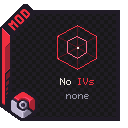
Every Pokémon rolls with the same IVs — no breeding for a perfect spread, no resetting spawns. What you catch is already competitive. And every IV screen just reads `none`.
Screenshots
About this Mod
Cobblemon No IVs
Every Pokémon rolls with the same IVs — no breeding for a perfect spread, no resetting spawns. What you catch is already competitive. And every IV screen just reads none.
Not client-only — it changes real stats. The server (or your single-player world) applies the equal IVs and battle math; the client renders the none display. Install it on both sides for the full effect.
Features
- Equal IVs, everywhere — every stat of every Pokémon is locked to one value (default 31). Wild spawns, starters, captures, eggs, trades,
/pokegive, and even old saves get normalized on load. - IVs stop deciding battles — the battle formula (and the Showdown export) uses the fixed value, so same species + level + nature + EVs = identical stats. Strategy wins, not the roll.
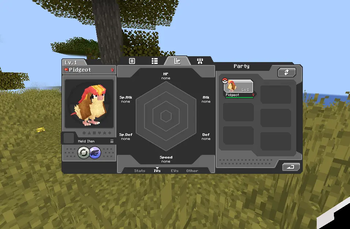
noneon every IV surface — Summary (M key) IV tab values and hover labels, PC (Stat/IV view), and Trade (both sides). The IV-mode radar hexagon is hidden.- Pokédex untouched (it only shows species base stats — no individual IVs live there).
Config (config/cobblemon-no-ivs.json)
ivValue— the IV applied to every stat (0–31, default 31). Out-of-range values are clamped; edit and restart to change it.
Requirements
Minecraft 1.21.1 — Fabric & NeoForge · Cobblemon 1.7+ · needed on server & client
| Fabric | NeoForge | |
|---|---|---|
| Required | Fabric Language Kotlin | NeoForge 21.1+, Kotlin for Forge 5+ |
Fabric API comes bundled with Cobblemon's own dependencies.
All Rights Reserved · Dev: igorbescobar
Available Versions
How to Install Cobblemon No IVs on Your Server
Order Server
Order a Minecraft Java server with at least 3 GB RAM (4 GB recommended).
Set fabric Loader
In the panel under "Egg", select the fabric loader and matching Minecraft version (1.21.1).
Install Mod
Open the mod browser in the dashboard and search for "Cobblemon No IVs". Click "Install" – done! Alternatively, upload the .jar via SFTP to the /mods folder.
Compatibility
Mod Loaders
Minecraft Versions
1.21.1
Server-side
✓ RequiredRecommended RAM
4 GB(min. 3 GB)Frequently Asked Questions
Cobblemon No IVs server crashes on startup – what to do?
Most common cause: wrong fabric version or insufficient RAM. Check the server log (latest.log) for "OutOfMemoryError" or "Mixin" errors. With Mado Hosting: ensure at least 3 GB RAM is allocated and the loader matches the mod version (1.21.1). You can switch loaders with one click in the panel.
Is Cobblemon No IVs compatible with fabric and neoforge?
Cobblemon No IVs officially supports fabric, neoforge for Minecraft 1.21.1. The Mado dashboard automatically detects incompatible loader combinations.
Server lagging with Cobblemon No IVs – how to optimize performance?
Recommended RAM: 4 GB (per 8 players). Use /spark profiler to check if Cobblemon No IVs consumes the most tick time. Common fixes: reduce server view-distance to 8-10, install "performant" or "starlight" as supplementary mods on Forge. With Mado Hosting, your server runs on NVMe SSDs with dedicated CPU cores for minimal latency.
Similar Mods




Rent Modded Server
Install Cobblemon No IVs with just one click on your server.