
Command Presets
This Mod is perfect for people who need help with Commands. It adds a GUI that allows people to Use presets that run commands.
Screenshots
About this Mod
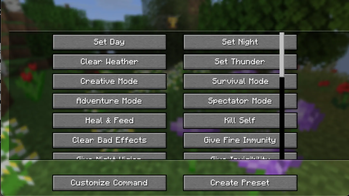
CommandHelper gives you an in-game menu to run common commands instantly instead of typing them out in chat every time. Just press Y to pull up a scrollable menu of shortcuts. You can change this keybind in your normal Minecraft controls settings.
Features:
32 Built-in Commands: Split into a clean, scrolling layout. Includes quick buttons for time, weather, gamemodes, item spawning, and potion effects.
100% Client-Side: You only need to install this on your own game. It works fine on servers without needing the mod installed on the server side.
Mob Purge Selector: Click "Customize Command" to open a sub-menu listing vanilla mobs. Select one to automatically run a /kill @e[type=...] command for that specific mob.
Custom Presets: Click "Create Preset" to type in your own custom command and give it a name. It saves directly to your computer so it stays there even after you close the game.
The current Preset Commands are:
- Time and Weather
- Set Day -> time set day
- Set Night -> time set night
- Clear Weather -> weather clear
- Set Thunder -> weather thunder
- Game Modes
- Creative Mode -> gamemode creative
- Survival Mode -> gamemode survival
- Adventure Mode -> gamemode adventure
- Spectator Mode -> gamemode spectator
- Player Health and Effects
- Heal and Feed -> effect give @s instant_health 1 255 and effect give @s saturation 1 255
- Kill Self -> kill
- Clear Bad Effects -> effect clear @s
- Give Fire Immunity -> effect give @s fire_resistance 9999 1
- Give Night Vision -> effect give @s night_vision 9999 1
- Give Invisibility -> effect give @s invisibility 9999 1
- Super Speed -> effect give @s speed 9999 5
- Super Jump Boost -> effect give @s jump_boost 9999 5
- Game Rules
- Keep Inventory ON -> gamerule keepInventory true
- Keep Inventory OFF -> gamerule keepInventory false
- Disable Mob Grief -> gamerule mobGriefing falseEnable
- Mob Grief -> gamerule mobGriefing trueStop
- Stop Weather Loop -> gamerule doWeatherCycle falseStart
- Items and Experience Drops
- Give 1 Diamond -> give @s diamond 1
- Give 64 Diamonds -> give @s diamond 64
- Give Netherite -> give @s netherite_ingot 1
- Give God Apple -> give @s enchanted_golden_apple 1
- Give 10 XP Levels -> xp add @s 10 levels
- Give 100 XP Levels -> xp add @s 100 levels
- Mechanics and Utilities
- Freeze Game Tick -> tick freeze
- Unfreeze Game Tick -> tick unfreezeSummon Lightning -> summon lightning_bolt
- Locate Village -> locate structure village
- Clear Inventory -> clear
Available Versions
How to Install Command Presets on Your Server
Order Server
Order a Minecraft Java server with at least 3 GB RAM (4 GB recommended).
Set fabric Loader
In the panel under "Egg", select the fabric loader and matching Minecraft version (1.21.11).
Install Mod
Open the mod browser in the dashboard and search for "Command Presets". Click "Install" – done! Alternatively, upload the .jar via SFTP to the /mods folder.
Compatibility
Mod Loaders
Minecraft Versions
1.21.11
Server-side
✗ UnsupportedRecommended RAM
4 GB(min. 3 GB)Frequently Asked Questions
Command Presets server crashes on startup – what to do?
Most common cause: wrong fabric version or insufficient RAM. Check the server log (latest.log) for "OutOfMemoryError" or "Mixin" errors. With Mado Hosting: ensure at least 3 GB RAM is allocated and the loader matches the mod version (1.21.11). You can switch loaders with one click in the panel.
Is Command Presets compatible with fabric?
Command Presets officially supports fabric for Minecraft 1.21.11. The Mado dashboard automatically detects incompatible loader combinations.
Server lagging with Command Presets – how to optimize performance?
Recommended RAM: 4 GB (per 8 players). Use /spark profiler to check if Command Presets consumes the most tick time. Common fixes: reduce server view-distance to 8-10, install "performant" or "starlight" as supplementary mods on Forge. With Mado Hosting, your server runs on NVMe SSDs with dedicated CPU cores for minimal latency.
Similar Mods






Rent Modded Server
Install Command Presets with just one click on your server.