
Death-note
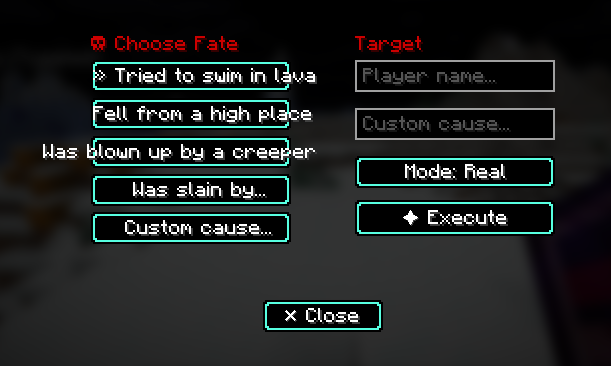
This project adds a death note with a custom texture and when opened it lets you chose a cause of death(which prints in the chat)
Screenshots


About this Mod
Death Note Book — Power Over Life and Death
Ever wanted to roleplay as a supernatural force on your server? The Death Note Book mod brings the concept of a cursed, all-powerful tome to Minecraft. Operators can use this mysterious book to influence the fate of players in creative and dramatic ways.
Features:
🔮 Cursed Book Interface — Right-click to open a sleek two-page UI that feels like forbidden knowledge
⚰️ Multiple Death Causes — Choose how fate strikes: lava, fall damage, explosion, slain by magic, or fully custom messages
🎭 Fake Mode — Send dramatic messages without actually dealing damage (perfect for roleplay servers)
📊 Fully Logged — Every use is recorded to logs/deathnote.log for server audits and intrigue
⏱️ Balanced Cooldown — 30-second cooldown prevents spam while keeping action flowing
🛠️ Easy Crafting — Assemble with books, feathers, and ink sacs
Installation:
Both server and client mods are required. Drop the mod into your mods folder on Fabric 26.2. For full details on configuration and usage, check out the GitHub repository https://github.com/Aldur13/Death-note.
Available Versions
How to Install Death-note on Your Server
Order Server
Order a Minecraft Java server with at least 3 GB RAM (4 GB recommended).
Set fabric Loader
In the panel under "Egg", select the fabric loader and matching Minecraft version (26.2).
Install Mod
Open the mod browser in the dashboard and search for "Death-note". Click "Install" – done! Alternatively, upload the .jar via SFTP to the /mods folder.
Compatibility
Mod Loaders
Minecraft Versions
26.2, 26.1.2, 26.1.1 (+1 more)
Server-side
✓ RequiredRecommended RAM
4 GB(min. 3 GB)Frequently Asked Questions
Death-note server crashes on startup – what to do?
Most common cause: wrong fabric version or insufficient RAM. Check the server log (latest.log) for "OutOfMemoryError" or "Mixin" errors. With Mado Hosting: ensure at least 3 GB RAM is allocated and the loader matches the mod version (26.2). You can switch loaders with one click in the panel.
Is Death-note compatible with fabric?
Death-note officially supports fabric for Minecraft 26.2, 26.1.2, 26.1.1. The Mado dashboard automatically detects incompatible loader combinations.
Server lagging with Death-note – how to optimize performance?
Recommended RAM: 4 GB (per 8 players). Use /spark profiler to check if Death-note consumes the most tick time. Common fixes: reduce server view-distance to 8-10, install "performant" or "starlight" as supplementary mods on Forge. With Mado Hosting, your server runs on NVMe SSDs with dedicated CPU cores for minimal latency.
Similar Mods





Rent Modded Server
Install Death-note with just one click on your server.