
Mob Drop Randomizer
Replace vanilla mob drops with fully configurable randomized loot featuring categories, rarities, weighted drop chances, presets, and live in-game configuration.
Screenshots
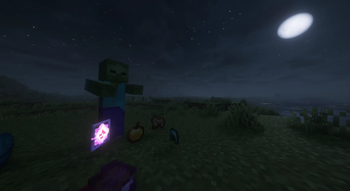
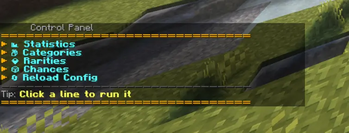
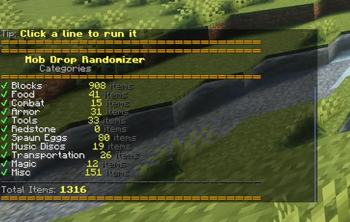
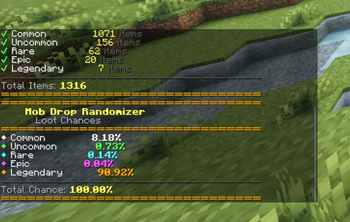
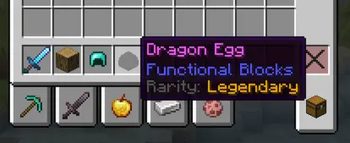
About this Mod
🎲 Mob Drop Randomizer
Transform Minecraft's predictable mob drops into a fully configurable randomized loot system.
Every mob can drop random items from a global loot pool, complete with configurable rarity weighting, categories, presets, and live in-game configuration.
✨ Features
- 🎲 Fully randomized mob drops
- 💎 Five rarity tiers
- ⚖️ Weighted rarity selection
- 📦 Category filtering
- 🔄 Runtime configuration reloads
- 🎛️ Interactive in-game dashboard
- ✨ Automatic rarity tooltips
- 📈 Configurable mob-specific drop counts
- 🚀 Optimized item registry caching
- 🛠️ Built-in gameplay presets
📋 Commands
/mobdrop

/mobdrop stats
/mobdrop categories
/mobdrop rarities
/mobdrop chances

/mobdrop preset <preset>

/mobdrop reload
⚙️ Configuration
Everything can be configured without restarting Minecraft.
- Enable or disable item categories
- Enable or disable rarity tiers
- Adjust weighted rarity chances
- Configure mob drop amounts
- Apply built-in presets instantly
🚧 Planned Features
- Interactive graphical configuration menu
- Additional gameplay modifiers
- More preset options
- Expanded loot customization
📦 Requirements
- Minecraft 1.21.1
- Fabric Loader
- Fabric API
- Java 21
Available Versions
How to Install Mob Drop Randomizer on Your Server
Order Server
Order a Minecraft Java server with at least 3 GB RAM (4 GB recommended).
Set fabric Loader
In the panel under "Egg", select the fabric loader and matching Minecraft version (1.21.1).
Install Mod
Open the mod browser in the dashboard and search for "Mob Drop Randomizer". Click "Install" – done! Alternatively, upload the .jar via SFTP to the /mods folder.
Compatibility
Mod Loaders
Minecraft Versions
1.21.1
Server-side
✓ RequiredRecommended RAM
4 GB(min. 3 GB)Frequently Asked Questions
Mob Drop Randomizer server crashes on startup – what to do?
Most common cause: wrong fabric version or insufficient RAM. Check the server log (latest.log) for "OutOfMemoryError" or "Mixin" errors. With Mado Hosting: ensure at least 3 GB RAM is allocated and the loader matches the mod version (1.21.1). You can switch loaders with one click in the panel.
Is Mob Drop Randomizer compatible with fabric?
Mob Drop Randomizer officially supports fabric for Minecraft 1.21.1. The Mado dashboard automatically detects incompatible loader combinations.
Server lagging with Mob Drop Randomizer – how to optimize performance?
Recommended RAM: 4 GB (per 8 players). Use /spark profiler to check if Mob Drop Randomizer consumes the most tick time. Common fixes: reduce server view-distance to 8-10, install "performant" or "starlight" as supplementary mods on Forge. With Mado Hosting, your server runs on NVMe SSDs with dedicated CPU cores for minimal latency.
Similar Mods




Rent Modded Server
Install Mob Drop Randomizer with just one click on your server.