
MrCody's Border's
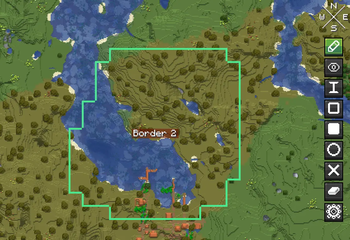
MrCody's Borders is a client-side mod that lets you draw, name, and color territory borders directly on Xaero's World Map.
Screenshots
About this Mod
Paint chunks with three drawing modes Chunk, Brush (3x3), and Lasso or erase mistakes with the eraser tool.
Customize each border with 9 preset colors or the full HSV color picker. Give your territories meaningful names up to 64 characters long.
As you explore, the mod alerts you when you enter or leave a territory via action bar or chat messages.
All borders persist per-world and per-dimension in a simple JSON file.
No server-side installation needed just drop it in your mods folder alongside Xaero's Minimap and Xaero's World Map.
Inspired by the mod Border Limit Xaero's made by Author: nertin0.
I do NOT want too copy nertin0's work so plz visit nertin0's Mod too!
It is still in development
- MrCody
Available Versions
How to Install MrCody's Border's on Your Server
Order Server
Order a Minecraft Java server with at least 3 GB RAM (4 GB recommended).
Set fabric Loader
In the panel under "Egg", select the fabric loader and matching Minecraft version (1.21.11).
Install Mod
Open the mod browser in the dashboard and search for "MrCody's Border's". Click "Install" – done! Alternatively, upload the .jar via SFTP to the /mods folder.
Compatibility
Mod Loaders
Minecraft Versions
1.21.11, 1.21.10, 1.21.9 (+11 more)
Server-side
✗ UnsupportedRecommended RAM
4 GB(min. 3 GB)Frequently Asked Questions
MrCody's Border's server crashes on startup – what to do?
Most common cause: wrong fabric version or insufficient RAM. Check the server log (latest.log) for "OutOfMemoryError" or "Mixin" errors. With Mado Hosting: ensure at least 3 GB RAM is allocated and the loader matches the mod version (1.21.11). You can switch loaders with one click in the panel.
Is MrCody's Border's compatible with fabric?
MrCody's Border's officially supports fabric for Minecraft 1.21.11, 1.21.10, 1.21.9. The Mado dashboard automatically detects incompatible loader combinations.
Server lagging with MrCody's Border's – how to optimize performance?
Recommended RAM: 4 GB (per 8 players). Use /spark profiler to check if MrCody's Border's consumes the most tick time. Common fixes: reduce server view-distance to 8-10, install "performant" or "starlight" as supplementary mods on Forge. With Mado Hosting, your server runs on NVMe SSDs with dedicated CPU cores for minimal latency.
Similar Mods




Rent Modded Server
Install MrCody's Border's with just one click on your server.